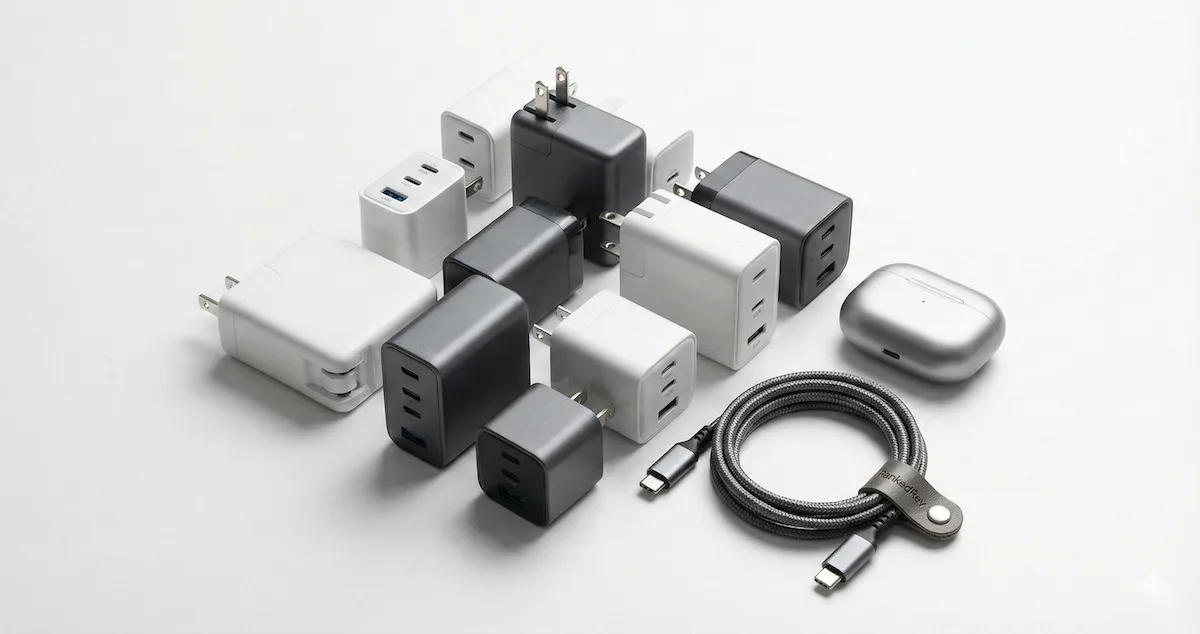
Best USB-C Wall Chargers in 2026
GaN, multi-port, and ultra-compact — we tested the top USB-C wall chargers for charging speed, efficiency, and heat management.

GaN Changed Everything: But the Specs Still Lie
The USB-C wall charger market in 2026 is dominated by gallium nitride (GaN) technology, and for good reason. GaN transistors switch faster and generate less heat than traditional silicon, which means chargers can deliver more power in smaller packages. A 100W GaN charger today is roughly the size of a 30W silicon charger from three years ago. That is a genuine engineering breakthrough, not a marketing gimmick.
But the marketing around these chargers has gotten out of hand. A "100W charger" does not necessarily deliver 100W to your device. It delivers 100W across all ports combined, and the wattage splits, how power gets distributed when you plug in multiple devices, vary dramatically between models. Some chargers drop from 100W to 45W on the primary port the moment you plug in a second device. Others maintain 65W on port one and allocate 30W to port two. These splits determine whether your laptop charges at full speed or crawls while your phone is plugged in alongside it.
I have been testing USB-C wall chargers across real-world multi-device scenarios: charging a MacBook Pro alongside a phone, powering a tablet and earbuds simultaneously, running sustained loads to measure thermal throttling, and checking whether the advertised wattage holds up after 30 minutes of continuous use. The differences between chargers are significant and directly impact how fast your devices actually charge. For the complete ranked list with detailed scoring, visit our best USB-C wall chargers category page.
What to Look For in a USB-C Wall Charger
These are the specs and features that actually matter, and they align with our scoring methodology.
GaN vs silicon. GaN chargers are smaller, more efficient, and run cooler than silicon-based chargers at the same wattage. In 2026, there is no reason to buy a silicon charger above 30W. Every charger on this list uses GaN technology. The generation of GaN matters too, newer GaN3 and GaN5 implementations are meaningfully more efficient than first-generation GaN.
Total wattage and PD standards. USB Power Delivery (PD) is the universal fast-charging protocol. PD 3.0 supports up to 100W, while PD 3.1 extends that to 240W. For most people, 65-100W covers all use cases: fast-charging a phone (20-30W), charging a laptop (45-100W), and powering accessories. Above 100W matters primarily for 16-inch laptops and workstation-class devices.
Port count and wattage splitting. This is where the real differences emerge. A 100W charger with three ports might split power as 65W + 20W + 15W when all ports are in use, or it might drop to 45W + 30W + 25W. The split determines whether your laptop gets enough power to charge while in use or merely enough to slow its battery drain. Always check the wattage allocation table in the charger's specs, if the manufacturer does not publish one, that is a red flag.
Size and travel-friendliness. A wall charger you leave at home because it is too bulky is a wall charger that is not doing its job. The best GaN chargers are compact enough to replace both your laptop charger and your phone charger in a single unit. Foldable prongs are essential for travel, they protect the prongs from damage and prevent them from snagging on bag linings.
Thermal management and safety. GaN chargers run cooler than silicon, but they still generate heat under sustained load. Quality chargers use internal temperature sensors to manage thermals and will throttle output before reaching unsafe temperatures rather than pushing through and degrading components. Look for UL or ETL safety certifications and overvoltage, overcurrent, and short-circuit protection.
Display and monitoring. A growing number of premium chargers include small displays that show real-time wattage delivery per port. This is not a gimmick, it eliminates the guesswork about whether your device is actually fast-charging or has negotiated down to a slower profile. If you have ever wondered why your laptop is charging slowly, a wattage display gives you the answer immediately.
Our Top Picks
Anker 100W 3-Port Smart Display: Best Overall

The Anker 100W 3-Port Smart Display is the charger I recommend to most people because it solves the core problem with multi-port chargers: not knowing what is actually happening. The built-in LED display shows real-time wattage for each port, so you can confirm at a glance that your laptop is pulling 65W and your phone is getting 20W. That transparency alone sets it apart from chargers that leave you guessing.
The 100W total output distributes power intelligently across three USB-C ports. With a single device connected, you get the full 100W, enough to fast-charge a MacBook Pro 14-inch or any USB-C laptop up to 100W. Plug in a second device and the charger dynamically reallocates: the primary port drops to 65W while the secondary gets 30W. Add a third device and the split adjusts again. The dynamic power allocation is smooth and happens without interrupting active charging sessions.
Build quality is typical Anker, solid, compact, and well-finished. The GaN internals keep the size remarkably small for a 100W charger. It runs warm under full load but never hot, and the thermal management maintains consistent output without throttling during my sustained load tests. Foldable prongs make it genuinely travel-friendly.
The limitation is that 100W is shared across all ports. If you need to charge a power-hungry 16-inch laptop at full speed while simultaneously fast-charging a phone, you will want the 140W model below. But for the vast majority of users, charging a laptop and a phone, or a tablet and accessories, the 100W model delivers everything you need with the added benefit of knowing exactly what each device is getting. See our full review for the detailed wattage split tables.
Anker 140W 4-Port PD 3.1: Best High-Wattage
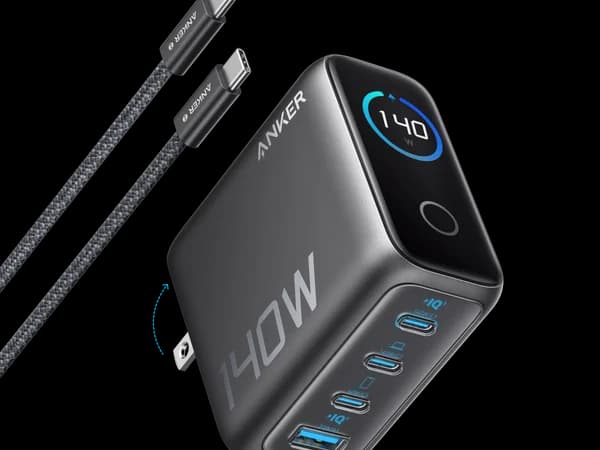
If 100W is not enough, and for power users with large laptops, it genuinely might not be, the Anker 140W 4-Port PD 3.1 is the step up. The headline feature is PD 3.1 support on the primary USB-C port, which delivers up to 140W to a single device. That is enough to fast-charge a MacBook Pro 16-inch at its maximum charging speed, something most chargers cannot do.
The four-port configuration (three USB-C, one USB-A) handles the full desk scenario: laptop, phone, tablet, and earbuds or a smartwatch, all from a single wall outlet. The wattage splits are generous, with two devices connected, you can get 100W + 30W, which means your laptop still charges at full speed while your phone fast-charges alongside it.
The LCD display mirrors the 100W model's real-time wattage monitoring, showing individual port output so you always know the charging status. The form factor is slightly larger than the 100W model, as you would expect from the additional 40W of capacity, but it is still remarkably compact for what it delivers. GaN5 technology keeps efficiency high and thermals manageable.
The trade-off is price and size. This is a premium charger that costs more than the 100W model and takes up slightly more space in your bag. For users with 14-inch or smaller laptops, the 100W model covers your needs and saves money. The 140W model is specifically for power users who need to charge large laptops at full speed while running multiple devices. If that describes you, this is the charger that eliminates the need for a separate laptop brick entirely. Read our full review for the PD 3.1 negotiation testing.
Ugreen Nexode 100W Retractable: Best for Travel
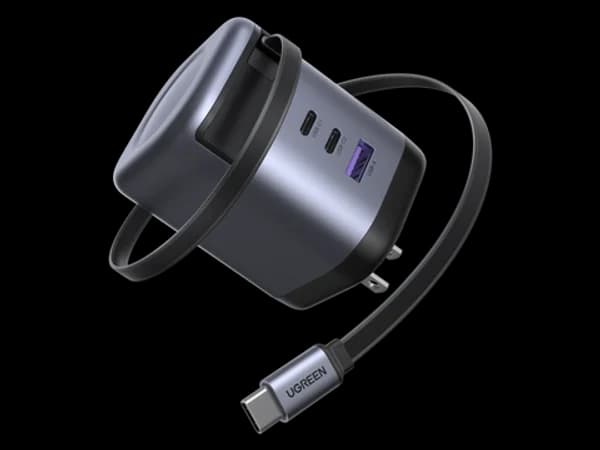
The Ugreen Nexode 100W Retractable takes a different design approach: instead of bringing a charger and a cable, you just bring the charger. A retractable USB-C cable is built directly into the unit, eliminating the most common charging frustration, forgetting the cable, losing the cable, or bringing the wrong cable.
The built-in cable supports full 100W PD charging, which means it can charge a laptop at full speed without a separate cable. Pull out the length you need, and the retraction mechanism neatly stores the excess. In my testing, the retraction mechanism feels solid and maintains tension without fraying or loosening over months of daily use.
Beyond the built-in cable, the Nexode offers additional USB-C and USB-A ports for charging additional devices. The total 100W output splits across ports when multiple devices are connected, similar to the Anker 100W. GaN technology keeps the form factor compact, though the retractable cable mechanism does add some thickness compared to cable-free chargers.
The trade-off is obvious: you are committed to USB-C. If your primary device uses a different connector or if the built-in cable length does not reach your typical charging setup, the advantage disappears. The cable is also not user-replaceable, if it fails, the entire unit needs replacing. But for USB-C laptop and phone users who travel frequently and hate cable management, the Nexode Retractable is the most practical solution I have tested. See our full review for the cable durability assessment.
Baseus EnerFill FE11 100W: Best Budget
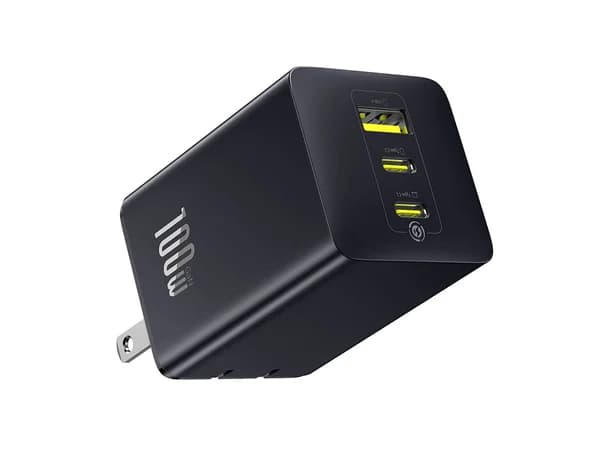
Baseus has been aggressively competing in the GaN charger space, and the EnerFill FE11 100W represents their strongest value proposition. It delivers 100W of total power across three USB-C ports with GaN efficiency, foldable prongs, and a compact form factor, all at a price that undercuts the Anker models significantly.
The charging performance is solid. The primary port delivers up to 100W with a single device, and the wattage splits when multiple devices are connected are reasonable: roughly 65W + 30W with two devices, or 45W + 30W + 20W with all three ports in use. PD 3.0 support ensures compatibility with the vast majority of USB-C devices, and the charger negotiates power profiles smoothly in my testing.
Build quality is good for the price. The matte finish is fingerprint-resistant, the ports feel sturdy, and the foldable prongs fold flat cleanly. Thermal management keeps the charger warm but well within safe operating temperatures under sustained load. Baseus includes overcurrent, overvoltage, and short-circuit protection.
Where the EnerFill falls short compared to the Anker models is polish and features. There is no wattage display, so you cannot verify charging speeds at a glance. The wattage splitting is less dynamic, the charger uses fixed allocation tiers rather than the smooth dynamic reallocation that Anker employs. And the PD negotiation is slightly less sophisticated, occasionally defaulting to a slower profile with certain devices before renegotiating.
For budget-conscious buyers who want 100W GaN charging without the premium price, the EnerFill FE11 delivers the core functionality. It charges a laptop and phone simultaneously, it is small enough for travel, and it costs less than the competition. If real-time wattage monitoring is not important to you, this is the smart buy. Read our full review for the charging protocol compatibility results.
Head-to-Head: Anker 100W Smart Display vs Anker 140W PD 3.1
These are both Anker chargers, but they serve different users.
Power output: The 140W model wins by definition. PD 3.1 at 140W charges large laptops at full speed, the 100W model cannot match that for 16-inch MacBook Pros or other high-draw devices. For 14-inch laptops and smaller, 100W is sufficient and both chargers perform identically on the primary port.
Port count: The 140W offers four ports (three USB-C, one USB-A) versus the 100W model's three USB-C ports. The extra port matters if you carry USB-A accessories. If everything you own is USB-C, the extra USB-A port is less relevant.
Portability: The 100W model is noticeably smaller and lighter. For travel, every cubic centimeter matters, and the 100W model packs more easily into a bag or pouch.
Wattage splits: The 140W model maintains higher primary-port wattage when multiple devices are connected. At two devices, you get 100W + 30W on the 140W model versus 65W + 30W on the 100W model. That 35W difference means your laptop charges meaningfully faster.
Price: The 100W model costs less. If your laptop charges at 65W or below, you are paying extra for wattage you will never use.
For most people with a standard USB-C laptop and phone, the 100W Smart Display is the right choice, it is smaller, cheaper, and the wattage display adds genuine utility. The 140W is the pick specifically for power users with large laptops who need maximum charging speed across multiple devices.
Budget vs Premium: When to Spend More
The gap between a $30 charger and a $60 charger is real but narrow. Here is where the money goes.
Wattage display. Premium chargers with built-in displays let you verify charging speeds instantly. Budget chargers leave you guessing. For most people, this is a convenience, not a necessity. But if you troubleshoot charging issues regularly, device not fast-charging, laptop charging slowly, the display pays for itself in frustration saved.
Dynamic power allocation. Premium chargers redistribute power smoothly when you plug in or unplug devices. Budget chargers use fixed tiers that can cause brief charging interruptions during reallocation. In practice, the difference is a few seconds of charging pause, noticeable but not impactful.
Build quality and longevity. Premium chargers tend to use higher-quality capacitors and better thermal management, which translates to longer lifespan and more consistent performance over years of daily use. A budget GaN charger will work well for a year or two, but a premium one is more likely to maintain peak performance for three to five years.
Safety certifications. Both budget and premium chargers on this list meet safety standards. The difference is that premium models often carry additional certifications and use more robust protection circuits. For charging expensive devices, the added safety margin has value.
If you are replacing a single phone charger and do not charge laptops, a budget option is perfectly fine. If you are replacing your laptop brick and want a charger that handles your entire kit reliably for years, the premium models are worth the investment. For portable power on the go, pair any of these chargers with one of the best power banks for all-day coverage.
The Bottom Line
The best USB-C wall chargers in 2026 deliver laptop-level power in phone-charger-sized packages, thanks to GaN technology that has genuinely matured. The Anker 100W 3-Port Smart Display is the best overall choice, the real-time wattage display, dynamic power allocation, and compact form factor make it the one-charger solution for most people. The Anker 140W 4-Port PD 3.1 is the power user's pick for charging large laptops at full speed. The Ugreen Nexode 100W Retractable eliminates cable management for travelers. And the Baseus EnerFill FE11 100W delivers core GaN charging performance at a budget-friendly price.
The best USB-C charger is the one that replaces the most cables and bricks in your bag. For most people, a single 100W GaN charger handles everything, phone, laptop, tablet, and accessories, from one wall outlet.
Frequently Asked Questions
Can a 100W USB-C charger replace my laptop's charger?
Yes, for most laptops. MacBook Air, MacBook Pro 14-inch, Dell XPS 13/15, and most ultrabooks charge at 65-100W via USB-C PD. A 100W charger handles these at full speed. The exception is large 16-inch laptops and workstation-class machines that draw 140W or more, for those, you need the 140W PD 3.1 charger.
Will a high-wattage charger damage my phone?
No. USB-C Power Delivery is a negotiation protocol. Your phone tells the charger exactly how much power it can accept, and the charger delivers only that amount. A 100W charger connected to a phone that accepts 25W will deliver exactly 25W. There is no risk of overcharging or damage from using a higher-wattage charger.
What is the difference between PD 3.0 and PD 3.1?
PD 3.0 supports up to 100W of power delivery, which covers most devices. PD 3.1 extends the maximum to 240W by introducing Extended Power Range (EPR) voltage levels (28V, 36V, and 48V). In practice, PD 3.1 matters primarily for large laptops that charge above 100W. If your most demanding device charges at 100W or below, PD 3.0 is sufficient.
Do I need a special cable for fast charging?
Yes. The USB-C cable must support the wattage your charger and device negotiate. Most standard USB-C cables support up to 60W. For 100W charging, you need a cable rated for 100W (often labeled "5A" or "100W"). For PD 3.1 at 140W or above, you need an EPR-rated cable. Using an underpowered cable will not damage your device, it will simply charge at a lower speed.
Is GaN safe?
GaN technology is thoroughly proven and carries the same safety certifications as silicon-based chargers. GaN chargers from reputable brands include overvoltage, overcurrent, over-temperature, and short-circuit protection. The technology itself is not inherently riskier than silicon, it is simply a different semiconductor material that happens to be more efficient.


