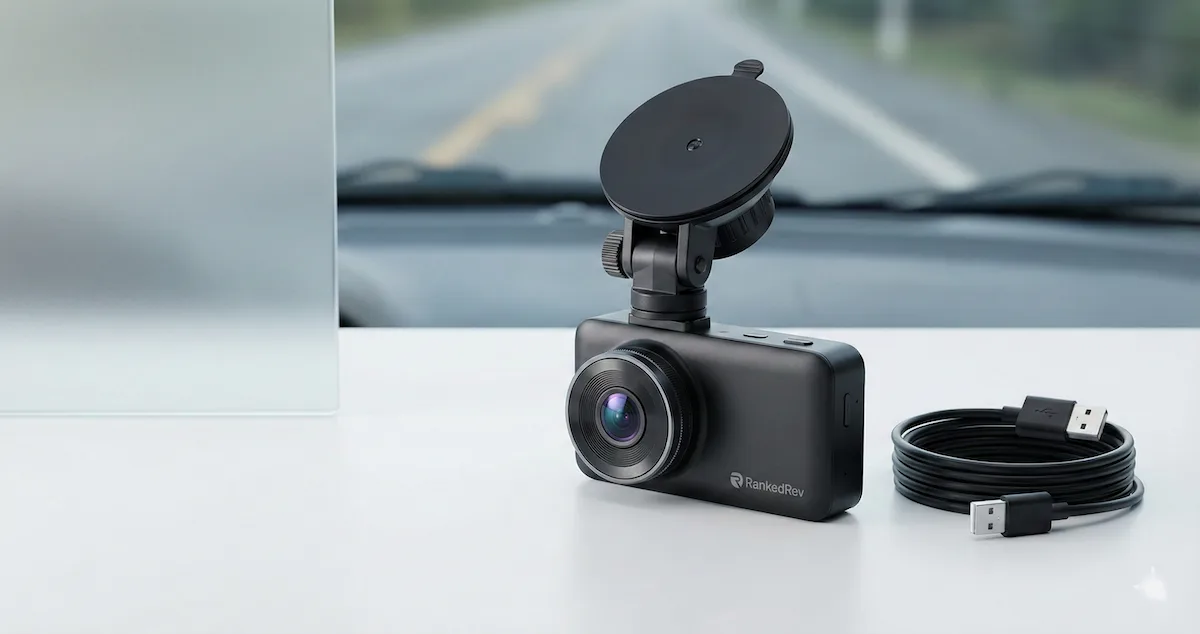
Best Dash Cams in 2026
Front, rear, and dual-channel — we tested the top dash cams for video quality, night vision, parking mode, and ease of use.

Dash Cams Are No Longer Optional
Five years ago, a dash cam was a nice-to-have gadget. In 2026, it is the most practical piece of tech you can add to your car. Insurance companies increasingly accept dash cam footage as evidence, some even offer premium discounts for drivers who use them. Hit-and-run incidents, road rage disputes, and parking lot damage that used to be your-word-against-theirs situations now have a digital witness that records every second.
The technology has also matured dramatically. The best dash cams now record in 4K, see clearly at night using STARVIS 2 sensors, detect collisions with built-in accelerometers, and upload footage to the cloud in real time. Some models use AI to identify dangerous driving behaviors, tailgating, lane departure, distracted driving, and alert you before an incident happens.
I have been testing dash cams for the past several months, running them through daily commutes, highway road trips, dark parking garages, and the kind of low-light conditions that separate good cameras from great ones. Video quality is the baseline, but reliability, a dash cam that actually records when something happens, is what makes the difference when you need the footage. For the complete ranked list with detailed scoring, visit our best dash cams category page.
What to Look For in a Dash Cam
Here are the criteria that matter most, aligned with our scoring methodology.
Video resolution and sensor quality. 4K (2160p) front cameras are now standard at the premium tier, and they capture license plates and details that 1080p cameras miss, especially at distance. But resolution alone does not tell the full story, sensor quality matters more. Sony STARVIS 2 sensors are the gold standard for dash cams because they handle low-light conditions dramatically better than older sensors. A 4K dash cam with a poor sensor will produce worse nighttime footage than a 1080p cam with a STARVIS 2 sensor.
Night recording performance. This is where most dash cams fail, and it is arguably when you need footage most. Look for cameras with large aperture lenses (f/1.6 or wider), HDR or WDR (Wide Dynamic Range) processing, and STARVIS 2 sensors. In my testing, the difference between good and bad night performance is the difference between readable license plates and blurry blobs.
Dual-channel recording. A front-only dash cam captures what happens ahead of you but misses rear-end collisions, tailgaters, and incidents behind your vehicle. Dual-channel systems (front plus rear camera) cover both directions and are worth the modest price premium for complete coverage. Some premium models add an interior-facing camera for rideshare drivers or fleet vehicles.
Parking mode. When your car is parked, a good dash cam continues recording in a low-power state, triggering full recording when it detects motion or impact. This is critical for hit-and-run protection in parking lots. The quality of parking mode varies significantly, some cameras drain your car battery, others use an external battery pack, and the best ones use a hardwire kit that monitors your battery voltage and shuts off before draining it.
Storage and cloud connectivity. Dash cams record continuously by overwriting the oldest footage, so microSD card capacity determines how many hours of footage you retain. A 256GB card at 4K recording holds roughly 12-16 hours of footage. Cloud-connected cameras upload clips automatically, which means footage survives even if the camera is stolen or destroyed in a serious accident.
Heat tolerance. This is the hidden reliability killer. A dash cam mounted on your windshield bakes in direct sunlight. Interior temperatures can exceed 160 degrees Fahrenheit in summer, and cheap cameras with poor thermal design will fail, screens crack, adhesive melts, batteries swell. Supercapacitor-based cameras handle heat far better than lithium-ion battery cameras, and the best models are rated for extended high-temperature operation.
Our Top Picks
VIOFO A229 Ultra 2CH: Best Overall
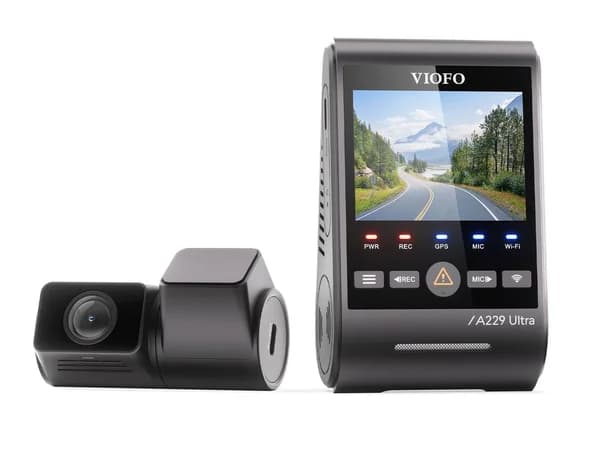
The VIOFO A229 Ultra delivers the best video quality I have tested in the dual-channel category. Both the front and rear cameras record in 4K using Sony STARVIS 2 IMX678 sensors, which means you get the same excellent low-light performance from both angles. In my night driving tests, the A229 Ultra captured readable license plates on vehicles three to four car lengths ahead, a distance where most competitors produce blurry smudges.
The image processing is mature and well-tuned. HDR handles the high-contrast situations that challenge dash cams, driving into a low sun, entering a dark tunnel from bright daylight, and headlight glare from oncoming traffic at night. The footage looks natural without the overprocessed, over-sharpened look that some cameras produce when they push HDR too aggressively.
VIOFO uses a supercapacitor instead of a lithium-ion battery, which means better heat tolerance and longer lifespan in hot climates. The parking mode (supported with an optional hardwire kit) monitors battery voltage and shuts off before draining your car battery. GPS is built in for speed and location logging, which adds an extra layer of evidence for insurance claims.
The user interface is functional rather than elegant, VIOFO's app and menu system work but feel a generation behind Garmin's polished experience. Installation with two cameras and a rear cable requires some patience and cable routing through your headliner. But for pure video quality and reliability, the A229 Ultra is the best value in the dual-channel 4K category. See our full review for nighttime footage comparisons.
Garmin Dash Cam X310: Best Smart Features
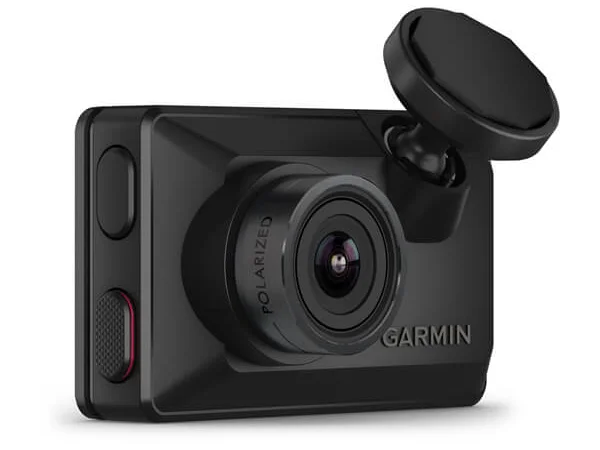
Garmin brings its navigation and mapping expertise to the dash cam space, and the X310 is the most feature-rich camera on this list. The headline features are what Garmin calls "Safety Alerts", forward collision warnings, lane departure alerts, and speed camera notifications, all processed on-device using the front camera's feed. These are the same driver-assistance features found in modern cars, available as an add-on for any vehicle.
Video quality is excellent, with a 4K front sensor and Garmin's Clarity HDR processing. Night performance is very good, not quite matching the VIOFO's STARVIS 2 sensors in absolute low-light capability, but close enough that the difference is only visible in side-by-side comparisons of the darkest conditions.
Where Garmin excels is user experience. The Garmin Drive app is polished, intuitive, and makes reviewing and sharing footage straightforward. Voice control lets you save clips hands-free, and the Travelapse feature creates a time-lapse of your entire drive that is surprisingly fun for road trips. Cloud storage via Garmin's Vault service automatically backs up incident clips.
The Garmin ecosystem integration is a genuine advantage if you already use Garmin devices. Footage and safety data sync across your Garmin account, and the dash cam can pair with compatible Garmin navigators for an integrated dashboard experience.
The downsides: it is a front-only camera at this price tier (adding Garmin's rear camera is an additional purchase), and the 1440p effective capture resolution, while marketed as 4K upscaled, is a step below the VIOFO's native 4K in detail. For drivers who want the smartest, most polished dash cam experience and are willing to invest in the Garmin ecosystem, the X310 delivers. Read our full review for the full feature breakdown.
Thinkware U3000 Pro: Best AI Safety

Thinkware has pushed further into AI-powered safety features than any other dash cam manufacturer, and the U3000 Pro is their most advanced model. The ADAS 2.0 system (Advanced Driver Assistance System) uses on-device AI to identify vehicles, pedestrians, motorcycles, and lane markings in real time, then provides audio and visual alerts for potential collision risks.
The front camera uses a Sony STARVIS 2 sensor with 2K QHD resolution (2560x1440) and captures footage that is crisp and detailed in both daylight and nighttime conditions. The Night Vision 4.0 processing is among the best I have tested, it brightens dark scenes intelligently without introducing the noise and grain that plague basic night modes. The rear camera matches with its own STARVIS 2 sensor.
Parking mode is a particular strength. Thinkware's Energy Saving parking surveillance uses radar-based motion detection, which is more reliable than the purely video-based motion detection used by most competitors. It triggers less frequently on non-events (shadows, rain) and catches actual incidents more consistently. The camera supports both impact detection and time-lapse recording in parking mode.
Build quality is robust, and Thinkware uses a supercapacitor that handles extreme heat without the degradation risk of lithium batteries. The design is compact and discreet, mounted behind your rearview mirror, the U3000 Pro is nearly invisible to both the driver and anyone outside the vehicle.
The limitation is the app and interface, which are functional but lack the polish of Garmin's software. Cloud connectivity requires a separate Wi-Fi hotspot or Thinkware's optional LTE module, adding complexity and cost. But for drivers who prioritize AI-powered safety alerts and the most reliable parking mode, the U3000 Pro is the strongest option. See our full review for the ADAS testing results.
BlackVue DR970X-2CH Plus II: Best Cloud Connected
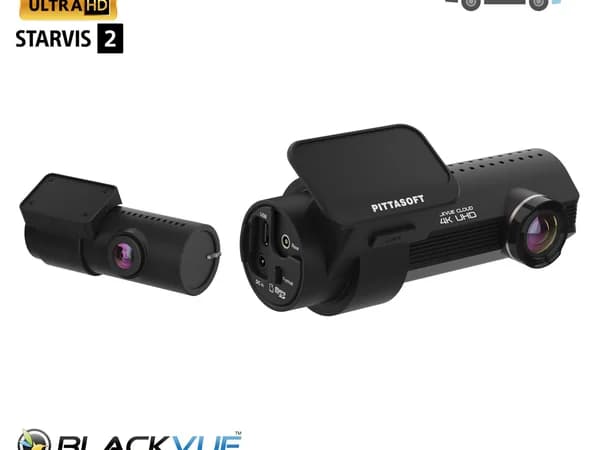
BlackVue pioneered the cloud-connected dash cam category, and the DR970X-2CH Plus II represents the most mature implementation of always-connected recording. With a compatible Wi-Fi hotspot or built-in connectivity, the camera streams footage directly to BlackVue's cloud servers, which means you can check on your car from anywhere, receive real-time alerts when an impact is detected, and access footage even if the camera is physically stolen or destroyed.
The front camera records in 4K with a Sony STARVIS 2 sensor and Dual-Save technology that simultaneously writes to the microSD card and the cloud. The rear camera records in Full HD 1080p. Video quality is strong across all lighting conditions, with BlackVue's well-tuned image processing handling transitions between bright and dark environments smoothly.
The cloud platform is the real differentiator. BlackVue Over the Cloud lets you live-view both cameras remotely, download clips to your phone, create geo-fenced alerts, and track your vehicle's location via GPS. For fleet managers, parents monitoring teen drivers, or anyone who parks in areas with frequent vandalism, this connectivity is invaluable.
Parking mode supports multiple recording methods, impact detection, motion detection, and time-lapse, and the cloud push notification for parking incidents means you know about damage as soon as it happens, not when you return to your car hours later.
The trade-offs: the cloud service requires a monthly subscription after the initial trial period, and the camera needs consistent internet connectivity to deliver on its core promise. Without a dedicated hotspot or cellular plan, you lose the cloud features and are left with a good (but not best-in-class) local recording dash cam. The cylindrical design is compact but less discreet than Thinkware's form factor. For drivers who want cloud-first recording and remote monitoring, the BlackVue is unmatched. Read our full review for the cloud platform walkthrough.
Head-to-Head: VIOFO A229 Ultra vs Garmin X310
These two represent different philosophies: the VIOFO prioritizes video quality and value, while the Garmin prioritizes smart features and user experience.
Video quality: The VIOFO wins, particularly at night. Native 4K on both front and rear cameras with STARVIS 2 sensors produces the most detailed footage available. The Garmin's effective 1440p resolution with HDR processing is very good but cannot match the VIOFO's raw detail in low-light conditions.
Smart features: The Garmin wins decisively. Forward collision warnings, lane departure alerts, speed camera notifications, and voice control add genuine safety value that the VIOFO does not offer. If your car lacks built-in ADAS features, the Garmin effectively adds them.
User experience: The Garmin's app, interface, and setup process are more polished and intuitive. VIOFO's tools work but feel utilitarian. If you want a set-it-and-forget-it experience, Garmin delivers.
Value: The VIOFO delivers better raw camera performance for less money, and it includes dual-channel recording at the base price. Adding a rear camera to the Garmin costs extra.
For maximum video evidence quality, get the VIOFO. For the smartest driving companion, get the Garmin. Both are excellent cameras that I would trust to record when it matters.
Installation Tips
A dash cam is only as useful as its installation. A poorly routed cable and a loose mount can create a hazard and produce unusable footage.
Mount position. Center the camera behind your rearview mirror, as high as possible without blocking your view. This position captures the widest field of view with the least dashboard intrusion.
Cable routing. Route the power cable along the headliner, down the A-pillar, and along the dashboard to your power source. Tuck the cable under trim pieces using a plastic pry tool, it should be invisible when properly installed. Avoid dangling cables that can distract you or interfere with controls.
Hardwire kits. For parking mode to work without draining your battery, invest in a hardwire kit with voltage monitoring. These connect directly to your fuse box and cut power before your battery drops below a safe level. Most kits cost $20-30 and take 30-60 minutes to install.
MicroSD cards. Use a high-endurance microSD card designed for continuous recording (like Samsung PRO Endurance or SanDisk High Endurance). Standard SD cards are not designed for the constant read/write cycles of dash cam recording and will fail prematurely.
The Bottom Line
The best dash cams in 2026 are sophisticated tools that provide genuine peace of mind and practical protection. The VIOFO A229 Ultra 2CH leads with the best dual-channel video quality at a competitive price. The Garmin Dash Cam X310 adds smart safety features that turn a passive recorder into an active driving assistant. The Thinkware U3000 Pro pushes AI-powered alerts further than any competitor. And the BlackVue DR970X-2CH Plus II delivers the best cloud-connected experience for remote monitoring and fleet management.
A dash cam costs a fraction of what a single at-fault insurance claim or unresolved hit-and-run would cost you. If you drive, you should have one.
Frequently Asked Questions
Do dash cams drain your car battery?
Only if parking mode is active and improperly configured. A good hardwire kit with voltage monitoring prevents battery drain by cutting power when your battery drops below a safe threshold (typically 12.0-12.2V). Without a hardwire kit, most dash cams shut off when you turn off your car and do not use parking mode.
Is 4K resolution necessary for a dash cam?
It is not strictly necessary, but it makes a meaningful difference for capturing license plates and small details at distance. A 1440p camera will handle most situations well. But in the scenarios where dash cam footage matters most, accidents, hit-and-runs, road rage, the extra detail from 4K resolution can be the difference between identifiable and unreadable footage.
Are dash cams legal?
In the United States, dash cams are legal in all 50 states, though some states restrict where you can mount them on the windshield. Most states prohibit mounting anything that obstructs the driver's view. Mounting the camera behind the rearview mirror typically satisfies these requirements. Check your state's specific regulations for exact placement rules.
How much storage do I need?
A 256GB high-endurance microSD card is the sweet spot for most dual-channel dash cams. At 4K front and 1080p rear recording, this provides roughly 12-16 hours of continuous footage before the oldest files are overwritten. For most daily commuters, this covers several days of driving. If you take long road trips frequently, consider a 512GB card.
You Might Also Like
Best Gaming Chairs in 2026
 Emily Thornton
Best Electric Toothbrushes in 2026
 David Nakamura
Best Solar Panels for Portable Power Stations in 2026
 James Mitchell