
Baseus EnerFill FE11 100W Review
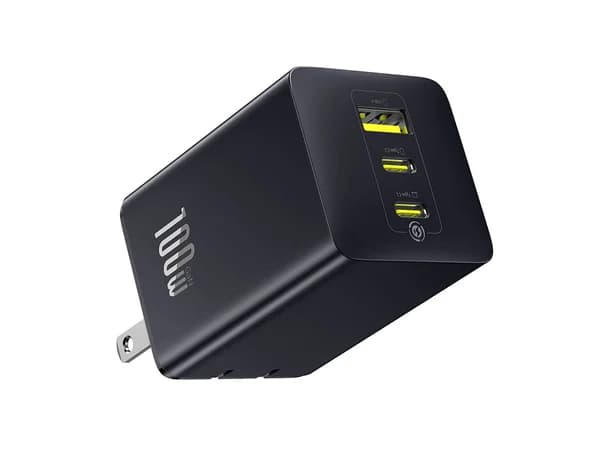
The Baseus EnerFill FE11 delivers 100W of charging power for just $49.99, making it the best value high-power charger. Broad protocol support and 3 ports make it a versatile desktop or travel companion.

Baseus EnerFill FE11 100W Review
The Baseus EnerFill FE11 delivers 100W of charging power for just $49.99, making it the best value high-power charger. Broad protocol support and 3 ports make it a versatile desktop or travel companion.
Baseus EnerFill FE11 100W Review
The Baseus EnerFill FE11 delivers 100W of charging power for just $49.99, making it the best value high-power charger. Broad protocol support and 3 ports make it a versatile desktop or travel companion.

Baseus EnerFill FE11 100W Pros & Cons
Pros
- 100W output for $49.99 — best watt-per-dollar in its class
- 3 ports (2 USB-C + 1 USB-A) with smart power distribution
- PD 3.0, PPS, QC, and UFCS protocol support
- LED indicator shows charging status
Cons
- Larger form factor than lower-wattage chargers
- No smart display like Anker competitors
- Plastic construction feels less premium
Overview
The Baseus EnerFill FE11 100W breaks the unwritten rule that 100W chargers must cost $65 or more. At $49.99, it delivers the same total wattage as chargers that cost 40% more, with three ports, broad protocol support including the emerging UFCS standard, and an LED indicator that at least acknowledges you might want to know what is happening with your power delivery. It is the charger equivalent of finding a business-class feature set at an economy price.
The story behind this value is straightforward: Baseus competes on price with a manufacturing scale advantage, using capable GaN technology while skipping the premium build materials and brand marketing budgets of Anker, Belkin, and Mophie. The result is a charger that matches or exceeds those competitors on every measurable specification while trailing on build quality, aesthetics, and brand confidence. The plastic body is functional but unremarkable. There is no companion app, no per-port display, and no soft-touch finish. What there is, unambiguously, is 100W across three ports for fifty dollars.
For power users who charge a MacBook Pro, a phone, and a tablet or accessory -- and who measure charger quality by whether their devices charge quickly rather than by how the charger feels in their hand -- the EnerFill FE11 makes spending more on a competitor genuinely difficult to justify. The question is not whether it charges well; it is whether the areas where Baseus cuts costs to hit this price point matter to your specific situation.
Features Deep-Dive
100W Power Delivery and Port Architecture
The EnerFill FE11 arranges its power across two USB-C ports and one USB-A port. The primary USB-C port delivers up to 100W when used alone, which is enough to charge a 14-inch MacBook Pro at its full USB-C charging speed and even push a 16-inch MacBook Pro at a respectable rate. This is the critical specification that separates the FE11 from the 67W and 70W mid-range chargers -- it crosses the threshold where laptop charging stops being a compromise.
The secondary USB-C port provides up to 30W, which handles any phone at full PD fast-charging speed and most tablets at near-maximum. The USB-A port offers up to 22.5W via Quick Charge protocols. Under multi-port load, the total wattage redistributes: a typical three-port scenario might deliver 65W to the primary USB-C, 20W to the secondary USB-C, and 15W to USB-A. The exact splits depend on what each device negotiates, but the 100W total ceiling means that even under redistribution, the primary port retains enough wattage to charge a laptop at a meaningful rate.
Smart power distribution manages the rebalancing dynamically. Removing a device from one port reallocates that wattage to remaining ports without interrupting active charging sessions. The LED indicator changes color based on charging state -- a simple but useful feature for confirming that power is actually flowing, particularly when a cable might be loose or a device is not properly negotiating.
Protocol Support: PD 3.0, PPS, QC, and UFCS
The EnerFill FE11 offers the broadest protocol support in its price class. PD 3.0 covers the vast majority of modern laptops, tablets, and phones. PPS enables optimized fast charging on Samsung Galaxy devices, adjusting voltage in fine increments for better thermal performance during charging. QC (Quick Charge) handles legacy Android devices and accessories. And UFCS (Universal Fast Charging Standard) -- the newest protocol in the charger, developed by Chinese industry consortia and gaining adoption in Xiaomi, Oppo, and other Chinese-market devices -- future-proofs the charger for a broader device ecosystem.
UFCS support matters most if you use or plan to use devices from Chinese manufacturers. For users in the North American and European markets primarily using Apple, Samsung, and Google devices, PD 3.0 and PPS cover all fast-charging needs. But the inclusion of UFCS at this price point demonstrates Baseus's position as a manufacturer that can afford to include emerging protocols without a price increase -- a flexibility that brands with higher cost structures cannot easily match.
The absence of PD 3.1 is worth noting. PD 3.1 enables the 48V Extended Power Range that supports charging above 100W. At exactly 100W total output, the EnerFill FE11 operates at the ceiling of PD 3.0's capability. This is technically sufficient for the charger's rated output, but PD 3.1 would provide a cleaner power negotiation path and future-proofing for higher-wattage devices. Chargers like the Baseus PicoGo AH11 140W and Anker's premium models include PD 3.1, but they also cost 60% to 80% more.
Build and Form Factor Trade-offs
The EnerFill FE11 is physically larger than every charger in the 67W to 70W mid-range tier, and noticeably so. This is the unavoidable physics of 100W GaN: more power requires more thermal headroom, which means a bigger enclosure. The charger is roughly the size of a deck of cards -- manageable for a desk but bulky for a travel bag compared to the Baseus PicoGo AE11 or Mophie Speedport.
The plastic construction is the same lightweight, matte-finish polycarbonate that Baseus uses across their charger lineup. It is not unpleasant, but it lacks the density and texture of the Mophie Speedport's soft-touch shell or the Belkin BoostCharge Pro's thick polycarbonate. Thermal performance under sustained load is adequate -- the charger gets warm during three-port operation but stays within comfortable touch temperatures. Baseus includes the standard suite of safety protections (over-voltage, over-current, over-temperature, short-circuit), though without Belkin's level of third-party certification granularity.
The foldable prongs partially redeem the larger body for travel use, but realistically, this is a charger that performs best as a semi-permanent desk fixture where its 100W output and three-port capacity can replace two or three separate chargers. For dedicated travel use at this wattage class, you might accept the size penalty or step down to a 67W model that fits more easily in a bag.
Pricing Analysis
The math on the EnerFill FE11 is almost absurdly good. At $49.99 for 100W, the cost-per-watt is $0.50 -- the best ratio of any charger in this roundup. The Anker 100W 3-Port Smart Display costs $69.99 for the same total wattage, a 40% premium. The Baseus PicoGo AE11 costs $39.99 for 67W ($0.60 per watt), which is cheaper in absolute terms but delivers 33W less total power. The Belkin BoostCharge Pro costs $51.99 for 70W ($0.74 per watt), making it both more expensive and less powerful.
The competitive pressure this creates is significant. For $49.99, you get 100W with three ports, four charging protocols, and smart power distribution. The only reasons to spend more are the Anker Smart Display (if you need per-port wattage monitoring), premium build quality (Belkin or Mophie), or a higher wattage ceiling (the 140W class). For raw charging capability per dollar, nothing in the market today matches the EnerFill FE11. Baseus is essentially using this charger as a loss-leader for brand awareness, and consumers are the beneficiaries.
The real question is not whether the EnerFill FE11 is good value -- it indisputably is -- but whether the $20 savings over Anker's 100W Smart Display is worth giving up the display feature, or whether the areas where Baseus cuts costs (build materials, certification depth, support infrastructure) create risks that outweigh the savings. For most users, the answer is that $49.99 for 100W is too compelling to overanalyze.
Who Is This For?
- Power users who charge a laptop, phone, and one more device daily and want a single charger that handles the entire spread without any device waiting for a port or charging at a trickle -- 100W across three ports eliminates the need for multiple chargers
- MacBook Pro owners who need more than 67W to charge their laptop at a reasonable speed while simultaneously keeping a phone topped off, and who do not want to pay the $70-plus price of Anker's 100W option for the same wattage
- Value-maximizing buyers who evaluate chargers on specifications-per-dollar and want the objectively best ratio in the market, accepting that build quality and brand premium are separate considerations from charging performance
- Users with mixed-brand device ecosystems who benefit from the broadest protocol support (PD 3.0, PPS, QC, UFCS) to ensure every device -- Apple, Samsung, Google, Xiaomi -- charges at its optimal speed
Who Should NOT Use This
- Travelers who prioritize compact form factor: The EnerFill FE11 is measurably larger than 67W and 70W alternatives. If charger size in your bag is a constraint, the Baseus PicoGo AE11 at 67W is smaller, lighter, and $10 cheaper -- and 67W may be all you actually need for travel.
- Users who want real-time charging data: The LED indicator confirms power flow but does not tell you how many watts each port is delivering. If per-port wattage monitoring matters to your workflow -- troubleshooting charging issues, optimizing power allocation, or simply satisfying curiosity -- the Anker 100W Smart Display is the only option that provides it, and the $20 premium is the cost of that visibility.
- Buyers who prioritize brand assurance and premium build: The plastic construction and Baseus's smaller support infrastructure compared to Belkin or Anker may not satisfy users who want the comfort of a well-known brand with an extensive warranty track record. If brand confidence matters, the Belkin BoostCharge Pro or Anker Smart Display provide it at a higher price.
Bottom Line
The Baseus EnerFill FE11 100W is the charger that makes you question what you were paying for before. One hundred watts across three ports with four charging protocols for $49.99 is a value proposition that no competitor in this roundup can match on specifications alone. The trade-offs -- plastic build, no display, less brand cachet -- are genuine but proportional to the savings. For users who evaluate chargers by what they do rather than how they feel, the EnerFill FE11 is the most rational choice in the entire category and the one that makes every competing charger work harder to justify its price.
FAQ
Can the EnerFill FE11 fully replace a MacBook Pro's included charger?
For the 14-inch MacBook Pro (which ships with a 70W USB-C adapter), yes -- the FE11's 100W primary port exceeds the included charger's output when used solo. For the 16-inch MacBook Pro (which ships with a 140W MagSafe adapter), the FE11 charges more slowly via USB-C, but 100W is still fast enough for overnight charging and will maintain battery during moderate workloads. Only sustained heavy tasks like video rendering will drain the battery faster than 100W can replenish it.
How does the LED indicator actually work?
The LED changes color based on charging status: typically green when actively delivering power and off or dim when no devices are connected. It does not display wattage numbers or per-port status. Think of it as a confirmation that the charger is working rather than a diagnostic tool. It is genuinely useful for verifying that a cable is properly seated and power is flowing, but it will not tell you whether you are getting 65W or 45W on your laptop port.
Is UFCS support actually useful right now?
For most North American and European users, not yet. UFCS is primarily relevant for devices from Chinese manufacturers like Xiaomi, Oppo, and OnePlus that use UFCS as their primary fast-charging protocol. If your device ecosystem is Apple, Samsung, and Google, PD 3.0 and PPS cover all your fast-charging needs. UFCS inclusion is best understood as future-proofing -- as the protocol gains broader adoption, the FE11 will support it without needing replacement. It costs nothing extra at this price point, so there is no downside to having it.
How does this compare to the Anker 100W 3-Port Smart Display?
Both deliver 100W across three ports (2 USB-C + 1 USB-A). The Anker costs $20 more ($69.99) and adds a per-port wattage display, PD 3.1 support, and ActiveShield 2.0 safety monitoring. The Baseus counters with UFCS protocol support and a $20 lower price. If the display feature and Anker's brand assurance matter to you, the $20 premium is reasonable. If you just need 100W across three ports and want to spend as little as possible, the Baseus delivers identical charging performance for significantly less.
Who Is Baseus EnerFill FE11 100W Best For?
Power users wanting maximum wattage at the lowest price for laptop and multi-device charging
The Bottom Line
The Baseus EnerFill FE11 delivers 100W of charging power for just $49.99, making it the best value high-power charger. Broad protocol support and 3 ports make it a versatile desktop or travel companion.
Buy on AmazonKey Specs
Scoring Breakdown
Maximum wattage output, power per port, and multi-device power distribution efficiency.
Physical size, weight, foldable prongs, and overall travel-friendliness.
Number of ports, port types (USB-C/USB-A), and multi-device charging flexibility.
Fast charging protocol support including PD 3.0/3.1, PPS, QC, UFCS, and SCP.
Materials, safety certifications (TUV, UL), thermal management, and overall construction.
Price-to-performance ratio, wattage-per-dollar, and included accessories like cables.
Display/monitoring, touch controls, smart power allocation, and device identification.