
Garmin Dash Cam X310 Review
The Garmin Dash Cam X310 combines 4K video with Garmin's best-in-class software ecosystem. Incident detection, cloud backup, and the polished Garmin Drive app make it the smartest single-channel dash cam available — but at $400 for front-only, you're paying a premium for the Garmin experience.

Garmin Dash Cam X310 Review
The Garmin Dash Cam X310 combines 4K video with Garmin's best-in-class software ecosystem. Incident detection, cloud backup, and the polished Garmin Drive app make it the smartest single-channel dash cam available — but at $400 for front-only, you're paying a premium for the Garmin experience.
Garmin Dash Cam X310 Review
The Garmin Dash Cam X310 combines 4K video with Garmin's best-in-class software ecosystem. Incident detection, cloud backup, and the polished Garmin Drive app make it the smartest single-channel dash cam available — but at $400 for front-only, you're paying a premium for the Garmin experience.

Garmin Dash Cam X310 Pros & Cons
Pros
- Best-in-class Garmin Drive app with incident detection and cloud backup
- Compact, discreet design that hides behind the rearview mirror
- Excellent build quality backed by Garmin's reliability reputation
- Voice control and GPS with speed/location overlay on footage
Cons
- Single-channel only at $400 — no rear camera included
- Higher price for a front-only camera compared to dual-channel competitors
- Cloud backup requires Garmin Connect subscription
Overview
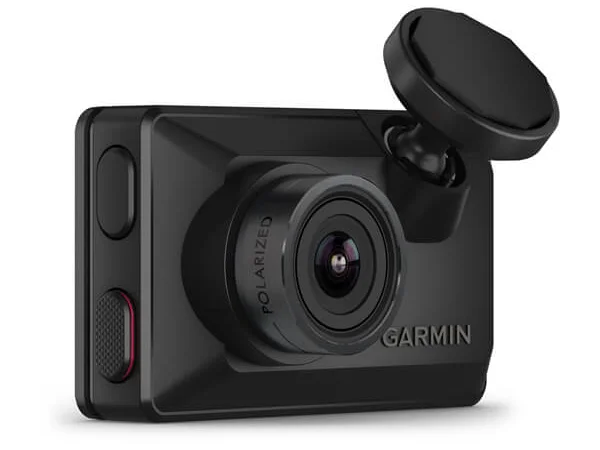
The Garmin Dash Cam X310 is the camera you buy when you want the entire experience to feel finished. At $400, it records 4K video at 30fps through a 140-degree lens with a built-in Clarity polarizer, HDR processing, and H.265 encoding — all packed into a 78-gram body that practically disappears behind your rearview mirror. GPS logs your speed and coordinates on every frame. Voice control in six languages lets you save clips or start a Travelapse without lifting a finger. The 2.41-inch touchscreen is sharp enough to review footage without pulling out your phone. And Garmin's Drive app ties it all together with incident detection alerts, cloud backup via the Vault subscription, live view monitoring, and ADAS-style warnings for forward collision, lane departure, and go alerts.
The catch is obvious: $400 buys you a single front-facing channel. The VIOFO A229 Ultra 2CH delivers dual 4K with Sony STARVIS 2 sensors for $70 less. The BlackVue DR970X-2CH Plus II adds a rear camera and LTE connectivity for $64 more. What Garmin offers instead is the most polished, intuitive software ecosystem in the dash cam market — and for drivers who value that refinement, it genuinely matters.
Features Deep-Dive
4K Clarity HDR with Built-In Polarizer
The X310 captures 3840x2160 video at 30fps using Garmin's Clarity HDR system, which combines multiple exposure levels per frame to handle the contrast extremes that dash cams face constantly — bright sky above, dark road ahead, headlights piercing through rain. The built-in Clarity polarizer is the real differentiator here. While competitors sell CPL filters as optional $15-30 accessories that you have to manually align, Garmin integrates one directly into the lens assembly. It eliminates dashboard reflections from the windshield automatically, which means your footage shows the road, not a ghostly overlay of your steering wheel and phone mount. The H.265 (HEVC) codec keeps file sizes roughly 50% smaller than H.264 at equivalent quality, so your microSD card (up to 512 GB supported) lasts significantly longer before looping overwrites older files. There is also a 1080p mode at 120fps for capturing fast-moving details, though most users will stick with 4K for everyday recording.
Garmin Drive App and Vault Cloud Ecosystem
This is where Garmin pulls ahead of nearly every competitor. The Garmin Drive app on iOS and Android is genuinely well-designed — responsive, logically organized, and free of the clunky interface quirks that plague apps from VIOFO, Thinkware, and even BlackVue. Through the app you get incident detection alerts pushed to your phone, the ability to review and download footage over Wi-Fi, and access to ADAS-style driver assistance warnings including forward collision, lane departure, and traffic-moving-ahead alerts. These ADAS features make the X310 a practical way to retrofit older vehicles with safety warnings that newer cars include from the factory.
The Vault cloud subscription ($9.99/month or $99.99/year for the Advanced plan) enables secure cloud backup of saved clips, live view monitoring of your parked vehicle, theft alerts, and emergency contact notifications. A free 30-day trial is included, so you can evaluate it before committing. The cloud dependency is a legitimate cost consideration — over three years, the Advanced plan adds $300 to your total investment — but for drivers who want remote peace of mind, no other Wi-Fi dash cam matches this level of integration. BlackVue's cloud is comparable in features but requires their own subscription and hardware ecosystem. Garmin's advantage is that it all just works, reliably, through a single well-maintained app.
Compact Design, Magnetic Mount, and Multi-Camera Support
At 7.0 x 4.2 x 1.95 cm and 78 grams, the X310 is remarkably small for a 4K dash cam with a touchscreen. It mounts via a low-profile magnetic adhesive bracket that lets you pop the camera on and off with one hand — useful if you park in areas where visible electronics invite break-ins. The magnetic connection is firm enough for daily driving but won't survive a severe impact, which is a reasonable trade-off for convenience.
The X310 supports syncing up to four Garmin cameras simultaneously through the Drive app, so you can build a multi-angle system using additional units or pair it with a Garmin Dash Cam Mini 3 for rear coverage. This modular approach gives you flexibility, but it also means buying a second $130+ camera to get what competitors like VIOFO and BlackVue include in the box as a dual-channel package.
Voice Control and GPS Integration
Voice commands are activated by saying "OK, Garmin" followed by simple phrases: "Save Video," "Record Audio," "Stop Audio," "Start Travelapse," or "Stop Travelapse." The command set is limited — you cannot ask the camera to take a photo or toggle settings — but the recognition works well in English, German, French, Spanish, Italian, and Swedish. For the hands-free save-a-clip use case that matters most during a sudden incident, it is reliable and genuinely safer than fumbling with a touchscreen while driving.
GPS locks on quickly and embeds speed, coordinates, and heading into every frame of recorded footage. This metadata is critical for insurance claims and legal disputes — it proves exactly where you were, how fast you were going, and in which direction. The speed overlay is accurate and unobtrusive, positioned in the corner of the frame without obscuring important visual detail.
Pricing Analysis
At $399.99, the X310 sits in an awkward spot on a pure specs-per-dollar basis. The VIOFO A229 Ultra 2CH gives you dual 4K channels with Sony STARVIS 2 sensors for $330 — $70 less and with rear coverage included. The VIOFO A119M Pro delivers single-channel 4K with STARVIS 2 for just $140. If you add the Vault Advanced subscription at $99.99/year, the X310's three-year total cost of ownership reaches $700 — more than the Thinkware U3000 Pro at $580 with its radar-based parking mode.
What justifies the Garmin premium is the total user experience: the polished Drive app, the integrated polarizer, the reliable voice control, and the seamless Vault cloud ecosystem. These are not spec-sheet features. They are daily-use refinements that make the camera easier to live with over years of ownership. If you value software quality and brand reliability — and Garmin's track record across GPS, aviation, and wearables lends serious credibility — the X310 earns its price. If you are primarily optimizing for video coverage per dollar, look at VIOFO.
Who Is This For?
- Tech-forward drivers who value a polished app experience — if you have tried VIOFO's or Thinkware's mobile apps and found them frustrating, the Garmin Drive app will feel like a generation ahead in usability and reliability
- Owners of older vehicles wanting ADAS retrofit — the forward collision, lane departure, and go alerts provide genuine safety value for cars that lack factory driver assistance systems
- Security-conscious commuters who want cloud peace of mind — Vault's live view, theft alerts, and parking guard notifications let you monitor your vehicle remotely without requiring built-in LTE hardware
- Frequent travelers or fleet-adjacent users — the Travelapse feature, GPS metadata logging, and multi-camera sync make the X310 practical for documenting trips or managing small vehicle fleets
Who Should NOT Use This
- Budget-conscious buyers who need front and rear coverage — spending $400 on a single channel is hard to justify when the VIOFO A229 Ultra 2CH delivers dual 4K for $330, or the Rove R2 4K Dual covers both angles for under $200
- Drivers who want always-on cloud without a subscription — the Vault subscription adds $100-120/year to your costs, and without it you lose live view, remote parking alerts, and cloud backup entirely; if you want built-in LTE connectivity without Wi-Fi dependence, the BlackVue DR970X-2CH Plus II with an LTE module is a better fit
- Night driving specialists — while the X310's night footage is good, it lacks a Sony STARVIS 2 sensor, which means cameras like the VIOFO A119M Pro at one-third the price will capture better low-light detail and license plate readability
Bottom Line
The Garmin Dash Cam X310 is the best-executed single-channel dash cam on the market. Its 4K video with integrated polarizer, Clarity HDR processing, and H.265 encoding produces clean, glare-free footage. The Garmin Drive app and Vault cloud ecosystem set the standard for dash cam software. Voice control, GPS overlay, and ADAS alerts round out a feature set that no single competitor matches in one package. The trade-off is paying a premium for a front-only camera in a market where $330 buys dual 4K — but if software polish and brand trust matter to you as much as sensor specs, the X310 is worth every dollar.
FAQ
Is the Garmin Vault subscription worth it, or can I use the X310 without it?
The X310 works perfectly as a standalone dash cam without Vault. It records to microSD, saves incident clips automatically via the G-sensor, and lets you review footage on the touchscreen or through the free Garmin Drive app over Wi-Fi. What you lose without Vault is cloud backup of saved clips, live view monitoring while parked, theft alerts, and emergency contact notifications. If you primarily want a set-it-and-forget-it dash cam that records locally, skip the subscription. If remote monitoring and cloud backup are important — especially for parking security — the $9.99/month Advanced plan is competitive with BlackVue's cloud pricing and more reliable in practice.
How does the X310's video quality compare to cameras with Sony STARVIS 2 sensors?
In daylight and well-lit conditions, the X310's 4K footage is excellent — the integrated polarizer and Clarity HDR give it an edge in reducing glare and handling high-contrast scenes that STARVIS 2 cameras handle through raw sensor sensitivity. In low light and at night, STARVIS 2 cameras like the VIOFO A229 Ultra or A119M Pro pull ahead with better shadow detail and license plate legibility. The X310 produces usable nighttime footage, but it is not the top choice if nighttime performance is your primary concern.
Can I add a rear camera to the X310?
Not directly as a wired dual-channel system — the X310 is designed as a single-channel unit. However, you can pair it with up to three additional Garmin cameras (such as the Dash Cam Mini 3 at around $130) through the Garmin Drive app for synchronized multi-angle recording. This modular approach gives you flexibility to place cameras where you want them, but the total cost of an X310 plus a Mini 3 ($530+) exceeds what you would pay for a dedicated dual-channel system like the VIOFO A229 Ultra 2CH ($330) or BlackVue DR970X-2CH Plus II ($464) that include both cameras in the box.
Does the X310 have parking mode, and how does it work?
Yes, but parking mode requires a constant power cable (hardwire kit or OBD-II adapter, sold separately for around $30-40). Once hardwired, the X310's Parking Guard activates automatically when the vehicle is turned off. The G-sensor detects impacts and triggers recording, while the camera can also monitor for motion. With an active Vault subscription, you receive smartphone push notifications when incidents are detected, and you can access live view from the camera remotely — provided the camera has Wi-Fi access. Without the subscription, parking mode still records locally but you will not get remote alerts.
Who Is Garmin Dash Cam X310 Best For?
Drivers who prioritize smart features, app quality, and brand reliability over raw value
The Bottom Line
The Garmin Dash Cam X310 combines 4K video with Garmin's best-in-class software ecosystem. Incident detection, cloud backup, and the polished Garmin Drive app make it the smartest single-channel dash cam available — but at $400 for front-only, you're paying a premium for the Garmin experience.
Buy on AmazonKey Specs
Scoring Breakdown
Resolution, HDR capability, frame rate, sensor quality (STARVIS 2), and overall daytime/rainy footage clarity
Low-light performance, infrared capability, STARVIS 2 sensor optimization, and license plate readability at night
ADAS (collision/lane departure alerts), AI parking mode, cloud storage, LTE connectivity, and app intelligence
Supercapacitor vs battery, operating temperature range, weather resistance, longevity, and warranty
Installation difficulty, app quality, display usability, WiFi transfer speed, voice control, and setup simplicity
Front and rear camera coverage angles, minimizing blind spots
Price-to-performance ratio considering included accessories (SD cards, CPL filters, hardwire kits)