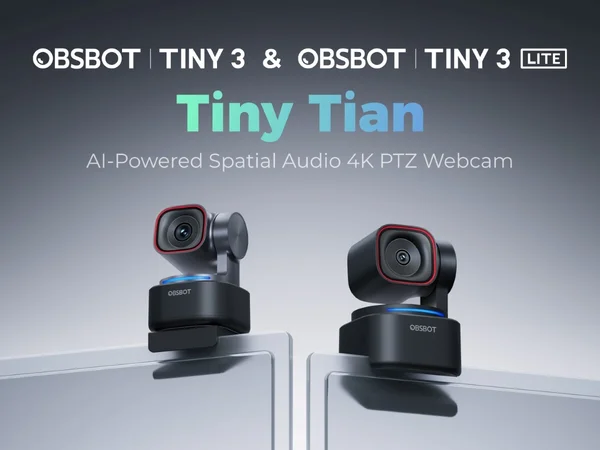
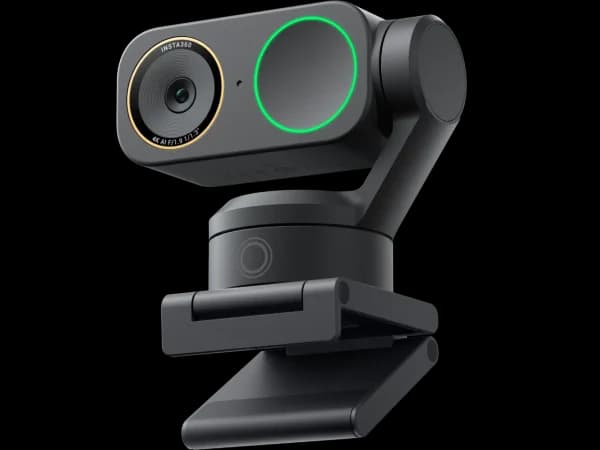
The OBSBOT Tiny 3 wins for content creators who want the best video, fastest tracking, and built-in spatial audio in a single device. The Insta360 Link 2 Pro wins for presenters and educators who need whiteboard mode, desk view, and the smoothest 3-axis gimbal tracking at a lower price.
OBSBOT Tiny 3
Content creators and streamers who demand the best video, tracking, and audio in a single device

Insta360 Link 2 Pro
Professionals who want the absolute best webcam for presentations, streaming, and video calls

Score Comparison
Quick Verdict
The OBSBOT Tiny 3 ($349) and Insta360 Link 2 Pro ($250) are the two best premium webcams you can buy, but they serve different workflows. The Tiny 3 produces the best video, tracks the fastest, and includes spatial audio microphones — it's the ultimate one-device solution for creators. The Link 2 Pro offers a 3-axis gimbal (smoother than OBSBOT's 2-axis), whiteboard mode, desk view, and saves you $99. Educators and presenters should buy the Link 2 Pro. Solo creators who want the simplest, highest-quality setup should buy the Tiny 3.
Head-to-Head Comparison
Video Quality
Winner: OBSBOT Tiny 3
The Tiny 3's sensor produces the highest-scoring video in our entire webcam roundup. Dynamic range is exceptional, color accuracy approaches studio-grade, and noise is minimal even in challenging lighting. The gap between the Tiny 3 and the Link 2 Pro isn't massive — both use large sensors with excellent 4K output — but the Tiny 3 consistently produces slightly sharper images with better detail retention in highlights and shadows.
The Link 2 Pro's 1/1.3-inch sensor is no slouch. In well-lit rooms, the difference between the two cameras is subtle enough that most viewers wouldn't notice on a video call. The gap widens in dim lighting, where the Tiny 3's sensor processing handles noise more gracefully. For streaming or recording where viewers may watch on large screens, the Tiny 3's image quality advantage is more apparent.
Tracking and Gimbal
Winner: Depends on use case
This is where the two cameras diverge most meaningfully. The OBSBOT Tiny 3 has a 2-axis pan-tilt gimbal with the fastest AI tracking in any webcam — it responds to movement almost instantaneously and maintains a tight frame on your face. The Insta360 Link 2 Pro has a 3-axis pan-tilt-roll gimbal that covers a wider range of motion and produces the smoothest physical tracking available.
The Tiny 3's tracking is faster but covers less physical range. The Link 2 Pro's tracking is smoother but has slightly more latency. For presenters who walk across a room to a whiteboard and back, the Link 2 Pro's 3-axis range handles the full movement more gracefully. For streamers and talking-head creators who make rapid movements — leaning in, standing up, turning to show something — the Tiny 3's speed keeps the frame locked on you without any perceptible delay.
Audio
Winner: OBSBOT Tiny 3
The Tiny 3's spatial audio microphones are a category-first and genuinely impressive. They capture directional sound, isolating your voice from background noise with better clarity than any other webcam microphone. The audio quality approaches that of a decent desk microphone — good enough that many users won't need a separate mic for video calls or casual streaming.
The Link 2 Pro's built-in microphone is functional but unremarkable. It captures voice adequately for calls, but most serious creators will want an external microphone. This is the standard expectation for webcams, so it's not a weakness so much as the Tiny 3's audio being an unexpected strength.
Software and Features
Winner: Insta360 Link 2 Pro
The Insta360 Link Controller app offers features the OBSBOT Center doesn't match. Whiteboard mode automatically detects your whiteboard, enhances marker contrast, corrects perspective, and overlays your video in a corner. Desk view tilts the camera to capture documents and objects below. These modes transform the Link 2 Pro from a webcam into a complete presentation toolkit.
OBSBOT Center is excellent for image tuning — exposure, white balance, color settings, and tracking configuration are all granular and responsive. But it doesn't offer whiteboard mode or desk view, which are genuine differentiators for anyone who teaches, presents, or demonstrates on camera.
Both cameras support gesture controls for hands-free zoom and framing adjustments.
Value
Winner: Insta360 Link 2 Pro
At $250 vs $349, the Link 2 Pro saves you $99 while delivering 3-axis tracking, a large sensor, and more software features. The Tiny 3 justifies its premium through superior video, faster tracking, and spatial audio — but those advantages are incremental rather than transformative for most users.
The Link 2 Pro offers the better cost-to-capability ratio. The Tiny 3 offers the better absolute performance. The question is whether the $99 difference buys enough improvement to matter for your specific use case.
When to Choose Insta360 Link 2 Pro
The Insta360 Link 2 Pro is the right choice when:
- You teach or present remotely: Whiteboard mode, desk view, and the 3-axis gimbal's wide tracking range are purpose-built for education and presentations
- Budget matters: $99 savings over the Tiny 3 with a marginal decrease in video quality that most viewers won't notice on a compressed video call
- You need versatile shooting modes: Switching between face-to-face, whiteboard, and desk view with gesture controls adds utility that no other webcam matches
- 3-axis tracking matters: The smoother, wider range of motion handles walking across rooms better than 2-axis tracking
When to Choose OBSBOT Tiny 3
The OBSBOT Tiny 3 is the right choice when:
- You want one device to do everything: Best video, fastest tracking, and spatial audio microphones eliminate the need for a separate mic — one USB cable for a complete setup
- Raw video quality is paramount: For streaming, recording, or high-stakes video calls where image quality matters, the Tiny 3 produces the best footage
- You need the fastest tracking: The Tiny 3's near-instant gimbal response keeps your frame locked during rapid movements
- Audio convenience matters: The spatial audio mics are good enough to skip a separate microphone for calls and casual content
Final Recommendation
Choose the Insta360 Link 2 Pro if you're an educator, presenter, or remote worker who needs versatile shooting modes and the smoothest gimbal tracking at a reasonable price. The whiteboard mode alone justifies the Link 2 Pro over the Tiny 3 for teaching workflows.
Choose the OBSBOT Tiny 3 if you're a content creator who wants the absolute best video and the simplest possible setup. The spatial audio microphones mean you can unbox the Tiny 3, plug in one USB cable, and have a professional-grade streaming setup with zero additional hardware.
Both are exceptional webcams. The Link 2 Pro is the smarter buy for most people. The Tiny 3 is the better device for those who can afford it and need what it uniquely offers.
Pricing & Features
Making Your Decision

When to Choose OBSBOT Tiny 3
Content creators and streamers who demand the best video, tracking, and audio in a single device
The OBSBOT Tiny 3 is the most premium webcam money can buy. The combination of flagship image quality, lightning-fast gimbal tracking, and spatial audio microphones makes it the ultimate all-in-one. At $349, it's steep, but for creators who want one device to do everything, nothing else comes close.
Strengths
- Flagship 4K image quality with a large sensor and superior dynamic range
- 2-axis gimbal with the fastest, most accurate AI tracking in any webcam
- Spatial audio microphones capture directional sound for immersive calls
Limitations
- At $349, it's the most expensive consumer webcam in this roundup
- Larger and heavier than non-gimbal alternatives
- Overkill for basic video calls — the features justify the price mainly for creators

When to Choose Insta360 Link 2 Pro
Professionals who want the absolute best webcam for presentations, streaming, and video calls
The Insta360 Link 2 Pro is the most capable webcam we've tested. The combination of a 3-axis gimbal and a 1/1.3-inch sensor means you get both the smoothest tracking and the best low-light performance in one package. If budget permits, this is the webcam to buy.
Strengths
- Best-in-class 3-axis gimbal tracking combined with a large 1/1.3-inch sensor
- Exceptional low-light performance rivals dedicated conference cameras
- Full feature set — whiteboard mode, desk view, gesture controls, AI background effects
Limitations
- Gimbal makes it the bulkiest webcam in this roundup
- At $250, it's the second most expensive webcam here
- Very new product (Jan 2026) — limited real-world testing available