
OBSBOT Tiny 3 Review
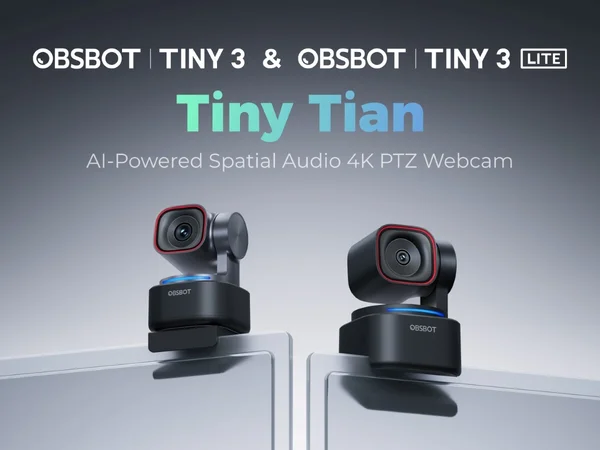
The OBSBOT Tiny 3 is the most premium webcam money can buy. The combination of flagship image quality, lightning-fast gimbal tracking, and spatial audio microphones makes it the ultimate all-in-one. At $349, it's steep, but for creators who want one device to do everything, nothing else comes close.

OBSBOT Tiny 3 Review
The OBSBOT Tiny 3 is the most premium webcam money can buy. The combination of flagship image quality, lightning-fast gimbal tracking, and spatial audio microphones makes it the ultimate all-in-one. At $349, it's steep, but for creators who want one device to do everything, nothing else comes close.
OBSBOT Tiny 3 Review
The OBSBOT Tiny 3 is the most premium webcam money can buy. The combination of flagship image quality, lightning-fast gimbal tracking, and spatial audio microphones makes it the ultimate all-in-one. At $349, it's steep, but for creators who want one device to do everything, nothing else comes close.

OBSBOT Tiny 3 Pros & Cons
Pros
- Flagship 4K image quality with a large sensor and superior dynamic range
- 2-axis gimbal with the fastest, most accurate AI tracking in any webcam
- Spatial audio microphones capture directional sound for immersive calls
Cons
- At $349, it's the most expensive consumer webcam in this roundup
- Larger and heavier than non-gimbal alternatives
- Overkill for basic video calls — the features justify the price mainly for creators
Overview
The OBSBOT Tiny 3 is the most expensive consumer webcam you can buy, and it earns that position by being the most capable. Where other premium webcams force you to choose between great video or great tracking or great audio, the Tiny 3 delivers all three. The 4K sensor produces the highest-quality footage in this roundup. The 2-axis gimbal tracks faster and more accurately than anything else. And the spatial audio microphones — a first in a webcam — capture directional sound that makes your voice sound like it's coming from a proper audio setup.
At $349, the Tiny 3 is overkill for basic video calls. This is a creator's tool, designed for people who need one device that does everything without compromise.
Features Deep-Dive
Flagship 4K Sensor
The Tiny 3's large sensor produces the highest-scoring video in this entire roundup. Dynamic range is exceptional — the camera handles bright windows, dark backgrounds, and mixed lighting simultaneously without visible compromise. Color accuracy is studio-grade, with skin tones that look natural across a wide range of complexions. Noise is minimal even in dim conditions, and the 4K detail holds up under close inspection. The gap between the Tiny 3 and the next-best cameras (Elgato Facecam 4K, Logitech MX Brio) is narrow in ideal lighting but widens significantly in challenging conditions.
2-Axis Gimbal with AI Tracking
OBSBOT's gimbal tracking has always been fast, and the Tiny 3 takes it further. The 2-axis pan-tilt mechanism responds to movement almost instantaneously — you can turn your head or stand up and the camera follows without the brief lag that other gimbal cameras exhibit. The AI algorithms driving the tracking have been refined over three generations of Tiny webcams, and it shows. The camera also supports 3x digital zoom on top of the gimbal movement, which means it can track you across a wide range while maintaining a tight, professional framing.
Spatial Audio Microphones
This is the Tiny 3's most surprising feature. The built-in microphone array captures spatial audio — meaning it picks up the direction your voice is coming from and processes it accordingly. The result is clearer voice isolation from background noise and a more natural, present sound quality. For a webcam microphone, the audio quality is genuinely impressive — closer to a decent desk microphone than the tinny, echoey output most webcams produce. It won't replace a dedicated condenser mic for recording, but for video calls and casual streaming, many users won't need a separate mic at all.
Pricing Analysis
At $349, the Tiny 3 costs $99 more than the next most expensive webcam (Insta360 Link 2 Pro at $250) and nearly $150 more than most mid-range options. The premium buys you three things no other single webcam offers: the best video quality, the fastest gimbal tracking, and spatial audio microphones. If you need all three of those capabilities and want them in one device, the Tiny 3 has no real competition. If you only need one or two, you can assemble a cheaper setup — an Insta360 Link 2 Pro ($250) for tracking plus an external mic, for example — but you'll spend more total and have more devices on your desk.
Who Is This For?
OBSBOT Tiny 3 works best for:
- Solo content creators who want the simplest possible setup — one webcam, one USB cable, and you have professional-grade video, tracking, and audio without managing separate devices
- Streamers who move on camera — cooking streams, hardware reviews, fitness content, and any stream where you're not sitting still benefits from the Tiny 3's fast gimbal tracking and excellent video quality
- Corporate presenters who run frequent high-stakes video presentations and need to look and sound their absolute best without a complex multi-device A/V setup
Who Should NOT Use This
OBSBOT Tiny 3 might not be the right choice if:
- You primarily take standard video calls — for seated Zoom meetings, the OBSBOT Meet 2 ($129) or Insta360 Link 2C Pro ($200) deliver excellent quality at a fraction of the price. The Tiny 3's capabilities are wasted in a stationary, talking-head scenario
- You're price-sensitive in any way — at $349, the Tiny 3 costs more than many professional-grade external microphones and ring lights combined with a mid-range webcam. Unless you specifically need the all-in-one integration, splitting the budget across specialized devices can deliver better per-category results
Bottom Line
The OBSBOT Tiny 3 is the most premium webcam money can buy. The combination of flagship image quality, lightning-fast gimbal tracking, and spatial audio microphones makes it the ultimate all-in-one. At $349, it's steep, but for creators who want one device to do everything, nothing else comes close.
FAQ
Are the spatial audio microphones good enough to replace a dedicated mic?
For video calls, yes — the spatial audio mics sound significantly better than any other built-in webcam microphone. For casual streaming and content creation, they're serviceable and convenient. For professional podcast recording, music production, or ASMR, no — a dedicated condenser or dynamic microphone will still produce superior audio. The spatial mics are best understood as "good enough to not need a separate mic" rather than "as good as a separate mic."
How does the OBSBOT Tiny 3 compare to the Insta360 Link 2 Pro?
The Tiny 3 ($349) has better video quality, faster tracking, and spatial audio — the Insta360 Link 2 Pro ($250) has a 3-axis gimbal (vs 2-axis), whiteboard mode, desk view, and saves $99. The Link 2 Pro is the more versatile tool with more shooting modes. The Tiny 3 is the better raw performer with superior video, tracking speed, and built-in audio. Choose the Link 2 Pro for versatility and value; choose the Tiny 3 for the best possible output from a single device.
Is $349 really justified for a webcam?
It depends on the alternative. A mid-range webcam ($150) plus a decent USB microphone ($100) plus a ring light ($30) costs roughly the same as the Tiny 3, takes up more desk space, requires more cables, and still won't match the Tiny 3's gimbal tracking. For creators who value simplicity and a clean setup, the Tiny 3 consolidates three devices into one. For users who already own good audio gear, the Tiny 3's audio advantage is redundant, and an Insta360 Link 2 Pro or OBSBOT Meet 2 makes more financial sense.
Who Is OBSBOT Tiny 3 Best For?
Content creators and streamers who demand the best video, tracking, and audio in a single device
The Bottom Line
The OBSBOT Tiny 3 is the most premium webcam money can buy. The combination of flagship image quality, lightning-fast gimbal tracking, and spatial audio microphones makes it the ultimate all-in-one. At $349, it's steep, but for creators who want one device to do everything, nothing else comes close.
Buy on AmazonKey Specs
Scoring Breakdown
Resolution, frame rate, dynamic range, color accuracy, and sharpness of video output
Image quality in dimly lit environments, noise handling, and sensor sensitivity
Speed and accuracy of autofocus, plus AI-powered face/body tracking capabilities
Built-in microphone clarity, noise cancellation, and suitability for calls/streaming
Physical construction quality, mounting system, privacy features, and aesthetic design
Companion app quality, customization options, HDR modes, and background effects
Overall price-to-performance ratio considering features and build quality