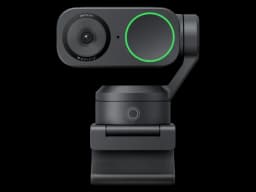
Insta360 Link 2
Presenters, educators, and streamers who need smooth physical tracking and versatile shooting modes
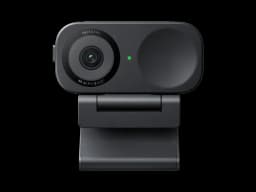
Insta360 Link 2C
Remote workers who want excellent AI features and whiteboard mode without the bulk of a gimbal webcam

Score Comparison
Pricing & Features
Making Your Decision

When to Choose Insta360 Link 2
Presenters, educators, and streamers who need smooth physical tracking and versatile shooting modes
The Insta360 Link 2 remains one of the best gimbal webcams available. The 3-axis physical tracking is noticeably smoother than any digital-only solution, and the whiteboard/desk view modes add genuine utility. If you present, teach, or demo products on camera, the Link 2 is purpose-built for you.
Strengths
- 3-axis gimbal provides smooth physical tracking — best-in-class movement
- Whiteboard mode, overhead desk view, and gesture controls for versatile use
- Insta360 Link Controller app with excellent customization and scene presets
Limitations
- Gimbal adds bulk — significantly larger than compact webcams
- Gimbal motor noise is audible in quiet environments
- Built-in microphone is average — external mic recommended for streaming
When to Choose Insta360 Link 2C
Remote workers who want excellent AI features and whiteboard mode without the bulk of a gimbal webcam
The Insta360 Link 2C packs impressive AI capabilities into a compact body. The whiteboard mode, overhead desk view, and gesture controls make it particularly versatile for presentations and content creation. The companion app is polished and feature-rich. A strong mid-range contender.
Strengths
- 4K output with excellent AI auto-framing and whiteboard mode
- Insta360 Link Controller app offers best-in-class customization
- Compact, clipless design with magnetic mount for clean desk aesthetics
Limitations
- No gimbal — all tracking is digital crop from the 4K sensor
- Magnetic mount can slip on thinner monitor bezels
- Microphone quality is serviceable but not a strength

