Insta360 Link 2C Review
The Insta360 Link 2C packs impressive AI capabilities into a compact body. The whiteboard mode, overhead desk view, and gesture controls make it particularly versatile for presentations and content creation. The companion app is polished and feature-rich. A strong mid-range contender.

Insta360 Link 2C Review
The Insta360 Link 2C packs impressive AI capabilities into a compact body. The whiteboard mode, overhead desk view, and gesture controls make it particularly versatile for presentations and content creation. The companion app is polished and feature-rich. A strong mid-range contender.
Insta360 Link 2C Review
The Insta360 Link 2C packs impressive AI capabilities into a compact body. The whiteboard mode, overhead desk view, and gesture controls make it particularly versatile for presentations and content creation. The companion app is polished and feature-rich. A strong mid-range contender.

Insta360 Link 2C Pros & Cons
Pros
- 4K output with excellent AI auto-framing and whiteboard mode
- Insta360 Link Controller app offers best-in-class customization
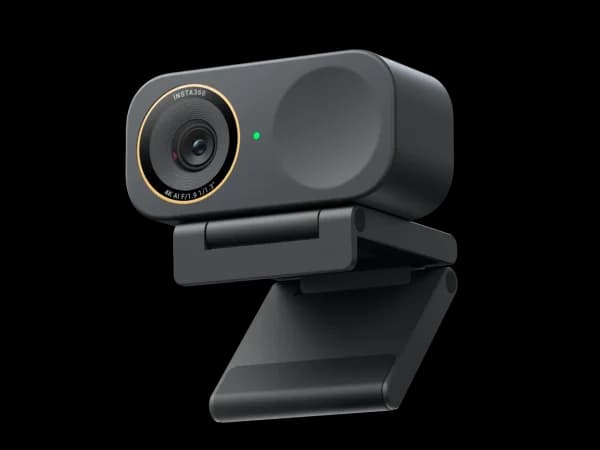
- Compact, clipless design with magnetic mount for clean desk aesthetics
Cons
- No gimbal — all tracking is digital crop from the 4K sensor
- Magnetic mount can slip on thinner monitor bezels
- Microphone quality is serviceable but not a strength
Overview
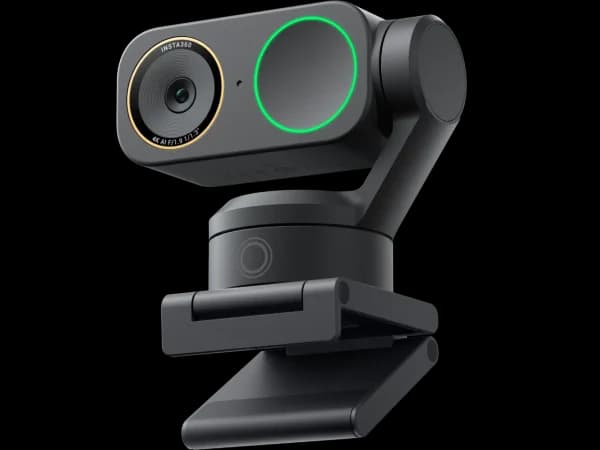
The Insta360 Link 2C is the Swiss Army knife of compact webcams. It captures 4K, auto-frames your face, recognizes gestures, switches to whiteboard mode when you step aside, shows an overhead desk view of documents, and blurs your background — all without a gimbal or any moving parts. Insta360 packed an absurd amount of AI capability into a compact, clipless body with a magnetic mount.
What elevates the Link 2C above spec-sheet competitors is the companion software. The Link Controller app is genuinely excellent — polished, intuitive, and deep. It turns the Link 2C from a capable webcam into a versatile presentation tool.
Features Deep-Dive
AI Auto-Framing and Whiteboard Mode
The Link 2C's auto-framing uses digital cropping from its 4K sensor, and it's one of the best digital-only tracking implementations we've tested. The reframing is smooth, latency is low, and it handles head turns and posture shifts without jittering. Whiteboard mode is the standout: point the camera at a whiteboard and it automatically enhances contrast, straightens perspective, and overlays your video in a corner. For remote teachers and presenters, this single feature can justify the purchase.
Insta360 Link Controller App
The companion software is best-in-class for a compact webcam. Scene presets let you save configurations for different rooms or lighting conditions. The desk view mode turns the camera downward to show documents or sketches on your desk — useful for remote tutoring or signing documents on camera. Background blur and replacement are processed locally with convincing edge detection. Virtual zoom with pan control lets you digitally reframe without touching the camera.
Magnetic Mount Design
The Link 2C ditches the traditional clip mount for a magnetic system. A small metal plate sticks to the back of your monitor, and the camera snaps onto it magnetically. The result is a cleaner look and easier repositioning. The catch: on very thin monitor bezels (under 5mm), the plate doesn't have much surface area to grip, and the camera can slowly slide. For standard monitors, the magnetic mount works well and looks much cleaner than a clip.
Pricing Analysis
At $150, the Link 2C sits at the same price as the Razer Kiyo V2, and the comparison highlights Insta360's value. The Link 2C offers AI auto-framing, whiteboard mode, desk view, gesture controls, and one of the best companion apps in the category. The Kiyo V2 offers marginally better raw image quality and premium build materials. For most users — especially remote workers and presenters — the Link 2C's feature set is more useful day-to-day. The OBSBOT Meet 2 at $129 offers similar AI features in an even smaller body, but the Link 2C's whiteboard mode and desk view add utility that OBSBOT doesn't match.
Who Is This For?
Insta360 Link 2C works best for:
- Remote workers who present frequently — the combination of whiteboard mode, desk view, and auto-framing makes the Link 2C the most versatile presentation webcam at this price without the bulk of a gimbal
- Educators and tutors who need to switch between face-to-face teaching, whiteboard demonstrations, and showing handwritten notes or documents on their desk
- Clean-desk enthusiasts — the magnetic mount and compact body create a minimalist setup that looks professional in both home offices and corporate settings
Who Should NOT Use This
Insta360 Link 2C might not be the right choice if:
- You need physical tracking for active movement — the Link 2C's digital-only tracking can't follow you across a room the way the Insta360 Link 2's gimbal can. If you walk around during presentations, the gimbal version is worth the $50 premium
- Your monitor has a very thin bezel — the magnetic mount requires a flat surface to adhere the metal plate. Ultra-thin bezels (common on modern monitors) can cause the mount to feel insecure. Test the fit before committing
Bottom Line
The Insta360 Link 2C packs impressive AI capabilities into a compact body. The whiteboard mode, overhead desk view, and gesture controls make it particularly versatile for presentations and content creation. The companion app is polished and feature-rich. A strong mid-range contender.
FAQ
What's the difference between the Link 2C and the Link 2?
The Link 2C ($150) is the compact, gimbal-free version with a magnetic mount. The Link 2 ($200) adds a 3-axis physical gimbal for mechanical tracking. Both share the same AI features, software, and image sensor. Choose the 2C if you're mostly stationary and want a sleek form factor; choose the Link 2 if you move around and need smooth physical tracking.
How well does whiteboard mode actually work?
Impressively well. The camera detects the whiteboard edges, corrects for perspective distortion (even at an angle), and enhances marker contrast so text is legible. Your video feed appears in a picture-in-picture corner overlay. It's not perfect — very light marker colors can be hard to read, and the perspective correction struggles with extremely oblique angles — but for standard classroom or meeting-room use, it's a genuinely useful feature.
Does the magnetic mount damage monitors?
The adhesive metal plate is designed to be removable without leaving residue, similar to 3M Command strips. However, it's adhesive-backed, so applying and removing it repeatedly will reduce its grip. Most users apply it once and leave it permanently. The magnet itself is strong enough to hold the camera securely but not so strong that it risks pulling the plate off.
Who Is Insta360 Link 2C Best For?
Remote workers who want excellent AI features and whiteboard mode without the bulk of a gimbal webcam
The Bottom Line
The Insta360 Link 2C packs impressive AI capabilities into a compact body. The whiteboard mode, overhead desk view, and gesture controls make it particularly versatile for presentations and content creation. The companion app is polished and feature-rich. A strong mid-range contender.
Buy on AmazonKey Specs
Scoring Breakdown
Resolution, frame rate, dynamic range, color accuracy, and sharpness of video output
Image quality in dimly lit environments, noise handling, and sensor sensitivity
Speed and accuracy of autofocus, plus AI-powered face/body tracking capabilities
Built-in microphone clarity, noise cancellation, and suitability for calls/streaming
Physical construction quality, mounting system, privacy features, and aesthetic design
Companion app quality, customization options, HDR modes, and background effects
Overall price-to-performance ratio considering features and build quality