Insta360 Link 2 Review
The Insta360 Link 2 remains one of the best gimbal webcams available. The 3-axis physical tracking is noticeably smoother than any digital-only solution, and the whiteboard/desk view modes add genuine utility. If you present, teach, or demo products on camera, the Link 2 is purpose-built for you.

Insta360 Link 2 Review
The Insta360 Link 2 remains one of the best gimbal webcams available. The 3-axis physical tracking is noticeably smoother than any digital-only solution, and the whiteboard/desk view modes add genuine utility. If you present, teach, or demo products on camera, the Link 2 is purpose-built for you.
Insta360 Link 2 Review
The Insta360 Link 2 remains one of the best gimbal webcams available. The 3-axis physical tracking is noticeably smoother than any digital-only solution, and the whiteboard/desk view modes add genuine utility. If you present, teach, or demo products on camera, the Link 2 is purpose-built for you.

Insta360 Link 2 Pros & Cons
Pros
- 3-axis gimbal provides smooth physical tracking — best-in-class movement
- Whiteboard mode, overhead desk view, and gesture controls for versatile use
- Insta360 Link Controller app with excellent customization and scene presets
Cons
- Gimbal adds bulk — significantly larger than compact webcams
- Gimbal motor noise is audible in quiet environments
- Built-in microphone is average — external mic recommended for streaming
Overview
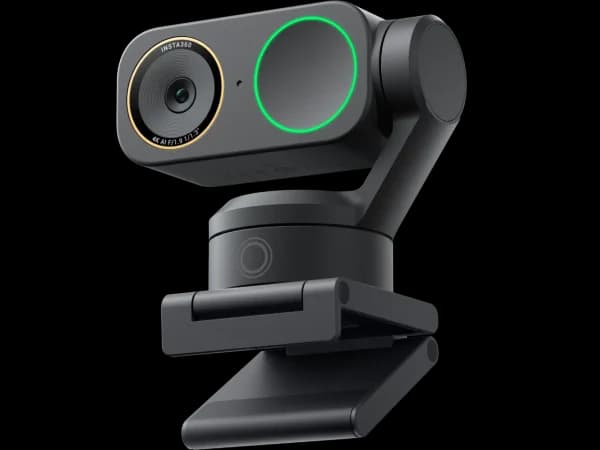
The Insta360 Link 2 is the gimbal webcam to beat. A 3-axis motorized gimbal physically rotates the camera to follow you — pan, tilt, and roll — delivering the smoothest tracking experience you can get without a dedicated PTZ camera system. Add whiteboard mode, overhead desk view, gesture controls, and one of the best companion apps in the industry, and you have the most versatile webcam at any price.
The trade-off is size and noise. The gimbal mechanism makes the Link 2 significantly bulkier than compact webcams, and the motors produce audible sound during movement. But for presenters, educators, and content creators who need active tracking, the gimbal advantage is decisive.
Features Deep-Dive
3-Axis Gimbal Tracking
This is what separates the Link 2 from every compact webcam in this roundup. The 3-axis gimbal physically rotates the camera lens to follow your face, which means the full sensor resolution is always pointed directly at you. Digital tracking (used by the Link 2C, OBSBOT Meet 2, and others) crops from a wider image to simulate movement, losing resolution in the process. The Link 2's physical tracking maintains full 4K quality regardless of your position. The gimbal can follow you walking across a room, standing up from a desk, or moving to a whiteboard — movements that digital tracking simply can't handle.
Whiteboard and Desk View Modes
Whiteboard mode is the Link 2's killer feature for educators. Point the camera at a whiteboard, and the software automatically enhances contrast, corrects perspective, and places your video in a picture-in-picture overlay. Desk view tilts the camera downward to capture documents, sketches, or objects on your desk surface — effectively turning the webcam into a document camera. These modes transform the Link 2 from a video call camera into a complete presentation toolkit.
Insta360 Link Controller App
The companion software is comprehensive and well-designed. Scene presets let you save complete configurations — exposure, white balance, tracking speed, zoom level — for different rooms or use cases. The virtual joystick gives you manual PTZ control when auto-tracking isn't appropriate. Background blur and replacement work with AI edge detection. And gesture controls let you switch between modes, zoom, and adjust framing without touching your computer.
Pricing Analysis
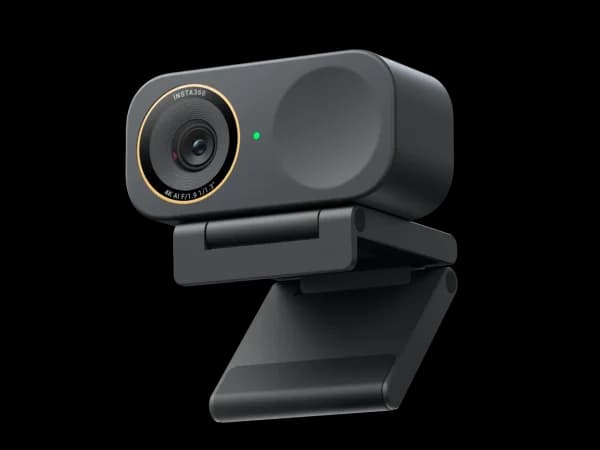
At $200, the Link 2 competes with the Logitech MX Brio and Elgato Facecam 4K. None of those cameras have a gimbal. The MX Brio produces better raw image quality thanks to its larger sensor, and the Facecam 4K offers interchangeable lens filters. But neither can physically track you, show a whiteboard, or capture a desk view. The Link 2C ($150) shares the same AI software without the gimbal — saving $50 but losing the physical tracking that defines this camera. For presenters and educators, the gimbal is worth the $50 upgrade. For purely stationary users, the Link 2C is the smarter buy.
Who Is This For?
Insta360 Link 2 works best for:
- Educators and lecturers who teach from a whiteboard or need to switch between face-to-face instruction and document demonstrations — the gimbal tracking follows you to the whiteboard, and dedicated modes handle the rest
- Content creators who demo physical products — unboxings, cooking videos, craft tutorials, and hardware reviews benefit enormously from a camera that tracks your hands and face as you move between positions
- Presenters and public speakers doing remote keynotes or webinars who need camera movement to keep the visual presentation dynamic rather than a static talking head
Who Should NOT Use This
Insta360 Link 2 might not be the right choice if:
- You primarily sit at a desk for video calls — if you don't move during calls, you're paying $50 extra for a gimbal you won't use. The compact Link 2C ($150) offers the same AI features in a smaller, quieter body
- Noise sensitivity is critical — the gimbal motors produce audible whirring during tracking movements. In quiet recording environments with sensitive microphones, this can be picked up. The compact webcams in this roundup are completely silent
Bottom Line
The Insta360 Link 2 remains one of the best gimbal webcams available. The 3-axis physical tracking is noticeably smoother than any digital-only solution, and the whiteboard/desk view modes add genuine utility. If you present, teach, or demo products on camera, the Link 2 is purpose-built for you.
FAQ
How does the gimbal compare to the OBSBOT Tiny SE's gimbal?
The Insta360 Link 2 has a 3-axis gimbal (pan, tilt, roll) versus the Tiny SE's 2-axis (pan, tilt). The Link 2's tracking is smoother, faster, and covers a wider range of motion. The Link 2 also captures in 4K versus the Tiny SE's 1080p. However, the Link 2 costs $200 vs the Tiny SE's $99 — more than double the price. The Tiny SE is the budget gimbal option; the Link 2 is the no-compromise one.
Is the gimbal motor noise a real problem?
In normal room conditions with typical background noise (air conditioning, keyboard typing, ambient sounds), the gimbal motor is not noticeable. In very quiet, sound-treated spaces, you can hear a soft whirring when the camera is actively tracking movement. Most microphones with noise cancellation (including the Link 2's built-in mic) will filter it out. It's a consideration for ASMR creators or podcasters in dead-silent rooms, not for typical video calls.
Should I get the Link 2 or the Link 2 Pro?
The Link 2 Pro ($250) upgrades to a larger 1/1.3-inch sensor for significantly better low-light performance and improved image quality. If you work in a well-lit room, the Link 2 ($200) produces excellent video and the $50 savings is worthwhile. If your workspace has dim or variable lighting, the Pro's sensor upgrade makes a visible difference in footage quality. Both share the same gimbal, software, and feature set.
Who Is Insta360 Link 2 Best For?
Presenters, educators, and streamers who need smooth physical tracking and versatile shooting modes
The Bottom Line
The Insta360 Link 2 remains one of the best gimbal webcams available. The 3-axis physical tracking is noticeably smoother than any digital-only solution, and the whiteboard/desk view modes add genuine utility. If you present, teach, or demo products on camera, the Link 2 is purpose-built for you.
Buy on AmazonKey Specs
Scoring Breakdown
Resolution, frame rate, dynamic range, color accuracy, and sharpness of video output
Image quality in dimly lit environments, noise handling, and sensor sensitivity
Speed and accuracy of autofocus, plus AI-powered face/body tracking capabilities
Built-in microphone clarity, noise cancellation, and suitability for calls/streaming
Physical construction quality, mounting system, privacy features, and aesthetic design
Companion app quality, customization options, HDR modes, and background effects
Overall price-to-performance ratio considering features and build quality