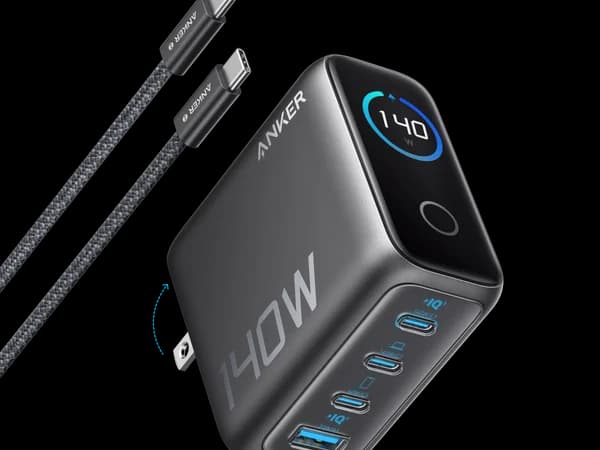
The 100W Smart Display wins for users who charge a laptop and phone with no need for a fourth port. The 140W 4-Port wins for professionals managing four or more devices who need maximum power and port count.
Anker 100W 3-Port Smart Display
Tech enthusiasts who want per-port power monitoring on a high-power multi-port charger
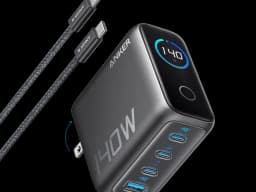
Anker Charger 140W 4-Port PD 3.1
Power users and professionals who need the most powerful and feature-rich desktop charger

Score Comparison
Quick Verdict
Both chargers come from Anker's premium Smart Display lineup and share the same DNA: real-time per-port wattage monitoring, PD 3.1 support, and ActiveShield 2.0 thermal protection. The difference comes down to how many devices you charge and how much power you need. The 100W 3-Port ($69.99) handles a laptop, phone, and one accessory comfortably. The 140W 4-Port ($89.99) adds a fourth port, 40% more total wattage, and enough headroom to charge a 16-inch MacBook Pro at full speed while three other devices share the remaining power. Most people need the 100W. People who know they need 140W already know it.
Head-to-Head Comparison
Charging Power
Winner: Anker 140W 4-Port PD 3.1
The math is straightforward: 140W versus 100W. On a single device, the 140W charges a 16-inch MacBook Pro at its maximum USB-C speed (140W PD 3.1), while the 100W maxes out at 100W -- still fast, but below the MacBook Pro 16-inch's full charging capability. For a 14-inch MacBook Pro, both exceed the included 70W charger, so the difference disappears.
Under multi-device load, the 40W gap compounds. The 140W model distributing power across four ports might allocate 65W + 30W + 22.5W + 22.5W. The 100W model across three ports might distribute 60W + 25W + 15W. The 140W model delivers more power to every connected device simultaneously.
For a household charging a MacBook Air, an iPhone, and AirPods, the 100W model provides more than enough headroom. For a desk with a MacBook Pro 16-inch, an iPad Pro, an iPhone, and wireless earbuds, the 140W model ensures nothing waits in line for power.
Port Count and Versatility
Winner: Anker 140W 4-Port PD 3.1
Four ports versus three. Both offer USB-C and USB-A, but the 140W model adds a third USB-C port. This matters more than it sounds: the fourth port eliminates the moment where you reach for the charger with a new device and realize every port is occupied.
The 100W model has 2 USB-C + 1 USB-A. The 140W model has 3 USB-C + 1 USB-A. If your devices are predominantly USB-C (as most modern devices are), the extra USB-C port on the 140W is more useful than a second USB-A would be.
For a solo user with a laptop and a phone, three ports are sufficient -- the USB-A port handles an occasional accessory. For a couple sharing a desk, or for anyone with four or more daily-charge devices, the fourth port avoids the need for a second charger or a charging rotation schedule.
Smart Display
Winner: Tie
Both chargers feature Anker's smart display technology showing real-time wattage per port. The 140W model's LCD display is slightly higher resolution with more aggressive standby dimming, but functionally they deliver the same information: how many watts each port is currently delivering, which cable might be bad, and whether total power draw is approaching the charger's ceiling.
The diagnostic value is identical on both. A laptop showing 5W instead of 65W points to a cable problem regardless of which charger you are using. The display is Anker's signature differentiator in this market segment, and both models execute it well.
Portability
Winner: Anker 100W 3-Port Smart Display
The 100W model is measurably smaller and lighter. Less wattage means less GaN circuitry, less thermal mass, and a more compact housing. Both have foldable prongs, but the 100W model fits more comfortably in a laptop bag or travel pouch.
The 140W model is a desk fixture by design. It is not impractical to travel with, but its size makes more sense as a permanent installation than as something you pack and unpack weekly. If portability is a meaningful factor in your charger selection, the 100W model offers the same Anker quality in a package that travels better.
Value
Winner: Anker 100W 3-Port Smart Display
At $69.99, the 100W model costs $0.70 per watt. At $89.99, the 140W model costs $0.64 per watt. On a per-watt basis, the 140W model is actually better value -- you get 40% more power for 29% more money. But value is not just about per-watt cost.
The relevant question is whether you use the extra 40W and the fourth port. If your daily charging routine involves three devices or fewer, and none of them need more than 100W, the 100W model delivers everything you need for $20 less. The $20 saved is real money that does not improve your charging experience in any measurable way.
If you do use the fourth port and your laptop benefits from 140W, the 140W model is the more cost-effective choice. Buying a 100W model plus a separate small charger for the fourth device costs more and creates clutter.
When to Choose Anker 100W 3-Port Smart Display
The 100W is the right choice when:
- You charge three devices or fewer: A laptop, a phone, and an occasional accessory is the sweet spot for this charger
- Your laptop draws 100W or less: MacBook Air, 14-inch MacBook Pro, most Windows ultrabooks, and all Chromebooks charge at full speed on 100W
- Portability matters: The smaller form factor makes it a better travel companion while still offering the smart display
- Budget is a factor: $69.99 for a premium Anker charger with a display is excellent value when you do not need the extra power and ports
When to Choose Anker 140W 4-Port PD 3.1
The 140W is the right choice when:
- You charge four or more devices daily: The fourth port eliminates rotation scheduling and the need for a second charger
- You own a 16-inch MacBook Pro: Full 140W PD 3.1 charging means maximum USB-C speed, which the 100W model cannot match
- Your desk is the charging hub: For a permanent setup where one charger replaces an entire power strip of individual chargers, the 140W's extra capacity creates comfortable headroom
- You plan to keep this for years: As devices demand more power over time, the 140W ceiling provides more room before the charger becomes a bottleneck
Final Recommendation
Choose the Anker 100W 3-Port Smart Display if your charging needs center around a laptop and a phone with an occasional third device. It delivers the full Anker premium experience -- smart display, PD 3.1, ActiveShield 2.0 -- at a lower price and in a smaller package. For the majority of users, 100W across three ports is more than sufficient, and the $20 saved over the 140W model buys nothing you would actually use.
Choose the Anker 140W 4-Port PD 3.1 if you manage a desk full of devices or own a power-hungry laptop that benefits from 140W. The additional port and extra wattage headroom make it the more capable charger, and the per-watt value is actually better than the 100W model. The premium is justified when the extra capacity gets used.
Both chargers represent the best of what Anker offers. The 100W is the smart choice. The 140W is the power choice. Neither will disappoint.
Pricing & Features
Making Your Decision

When to Choose Anker 100W 3-Port Smart Display
Tech enthusiasts who want per-port power monitoring on a high-power multi-port charger
The Anker 100W 3-Port Smart Display is the premium choice for power users who want full visibility into their charging. Its PD 3.1 support and smart display make it future-proof and feature-rich.
Strengths
- Smart display shows real-time wattage for each port
- PD 3.1 and UFCS support for next-gen fast charging
- Premium Anker build with ActiveShield 2.0 safety
- 3 ports (2 USB-C + 1 USB-A) with intelligent power allocation
Limitations
- Premium price at $69.99 for 100W
- Larger than competitors without displays
- Display adds to power draw when idle
When to Choose Anker Charger 140W 4-Port PD 3.1
Power users and professionals who need the most powerful and feature-rich desktop charger
The Anker 140W 4-Port PD 3.1 is the flagship desktop charger for power users. Its LCD display, PD 3.1 support, and premium build make it the ultimate charging hub — at a premium price.
Strengths
- 140W with PD 3.1 for fastest possible USB-C charging
- LCD display shows per-port power output in real-time
- 4 ports (3 USB-C + 1 USB-A) with ActiveShield 2.0
- Premium Anker engineering and safety certifications
Limitations
- Most expensive charger in this roundup at $89.99
- Large desktop form factor — not travel-friendly
- Premium price for features most users won't fully utilize