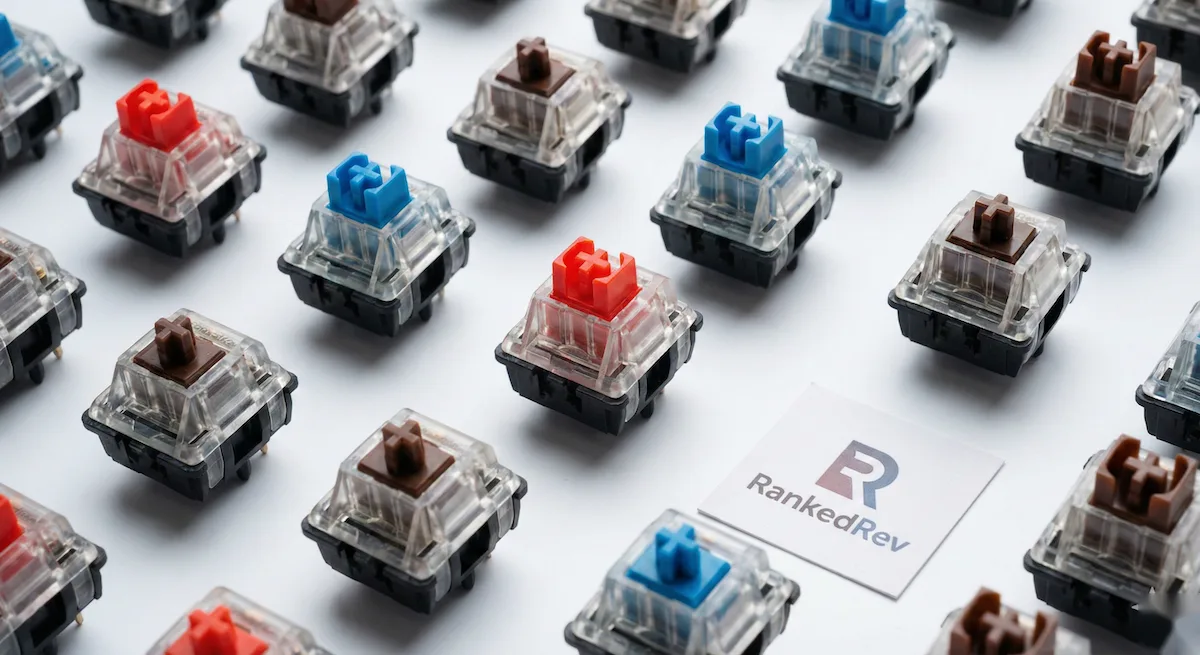
Mechanical Keyboard Switch Guide: Cherry MX, Gateron and Beyond
Linear, tactile, or clicky? We explain every major switch type, their feel, sound, and which ones work best for typing, gaming, and office use.

Switches Are the Soul of a Mechanical Keyboard
You can have the most expensive case, the prettiest keycaps, and the fanciest software, but the switch underneath each key is what determines how your keyboard actually feels. It is the difference between a typing experience that energizes you and one that fatigues you after an hour. And with the explosion of switch options in 2026, traditional mechanical, Hall Effect magnetic, low-profile, optical, choosing the right one has never been more confusing.
This guide breaks down every major switch category, explains what the specifications actually mean in practice, and helps you match a switch type to how you use your keyboard. For specific keyboard recommendations, see our best mechanical keyboards buying guide.
The Three Fundamental Switch Types
Every mechanical switch falls into one of three categories based on how it feels when you press it. This is the most important decision you will make.
Linear Switches
Feel: Smooth from top to bottom with no bump or click. The force increases gradually as you press deeper.
Sound: Quiet. The only sound is the key bottoming out (hitting the base) and the spring returning.
Best for: Gaming, fast typists who bottom out keys, and anyone who needs a quiet keyboard in a shared workspace.
Popular options: Cherry MX Red, Gateron Yellow, Cherry MX Speed Silver, Gateron Oil King, Akko Cream Yellow.
Linear switches are the dominant choice for gaming because the smooth travel allows rapid repeated keypresses without any tactile resistance slowing you down. Many fast typists also prefer linears because the consistent force curve lets them develop a rhythm without being interrupted by tactile bumps.
The downside is that linears provide no physical feedback for when a keystroke registers. If you are a touch typist who relies on feeling the actuation point, you may find yourself bottoming out every key, pressing harder than necessary because there is no bump telling you the key already registered.
Tactile Switches
Feel: A noticeable bump partway through the keypress that tells your finger the keystroke has registered. After the bump, the key continues smoothly to the bottom.
Sound: Moderate. Louder than linears due to the bump mechanism, but no sharp click.
Best for: Typing, programming, and general productivity. The bump provides satisfying feedback without being disruptive.
Popular options: Cherry MX Brown, Gateron Brown, Holy Panda, Boba U4T, Akko Lavender Purple.
Tactile switches are the most popular category for typing because the bump gives your fingers confirmation that the input registered, you can learn to release just after the bump without bottoming out, which reduces fatigue during long typing sessions. Programmers especially tend to prefer tactiles for the feedback during code editing.
The Cherry MX Brown is the classic tactile switch, but I will be honest: the bump on a Brown is so subtle that many enthusiasts call it "scratchy linear" rather than truly tactile. If you want a pronounced, satisfying bump, look at the Holy Panda, Boba U4T, or any "thocky" tactile from aftermarket manufacturers.
Clicky Switches
Feel: A tactile bump paired with a loud, sharp click sound produced by a deliberate mechanism (click jacket or click bar).
Sound: Loud. The click is audible across a room and will absolutely annoy coworkers.
Best for: Solo workspaces where the sound is not a problem, and typists who genuinely enjoy auditory feedback with every keystroke.
Popular options: Cherry MX Blue, Kailh Box White, Kailh Box Jade, Cherry MX Green.
Clicky switches are polarizing. People who love them find the crisp click incredibly satisfying, it provides both tactile and auditory confirmation of every keystroke. People who hate them find the noise intolerable, especially in open offices. There is no middle ground.
If you work from home alone, clicky switches can make typing genuinely fun. If you share any workspace, including video calls, I would strongly recommend against them. The click is picked up by microphones and drives colleagues up the wall.
Hall Effect Magnetic Switches
Hall Effect (HE) switches represent the biggest shift in keyboard technology since mechanical switches went mainstream. Instead of physical metal contacts, HE switches use a magnet in the stem and a magnetic sensor on the PCB to detect the key position.
What makes them different:
- Adjustable actuation point. You can set exactly how far you need to press a key before it registers, from a feather-light 0.1mm to a deep 4.0mm. Traditional switches have a fixed actuation point.
- Rapid Trigger. The key resets the instant you start lifting your finger, with no fixed reset distance. This means faster repeated inputs in gaming, strafe keys respond instantly to direction changes.
- Analog input. The switch reports exactly how far it is pressed, not just on/off. Games that support analog input let you walk slowly with a light press and sprint with a full press, like a controller joystick.
- Near-infinite lifespan. No physical contact points means nothing wears out. Traditional switches are rated for 50-100 million keypresses; HE switches have no practical limit.
The trade-off: Most HE switches feel linear. If you prefer a tactile bump, your options in the HE space are very limited. The typing feel, while smooth, lacks the character of a well-tuned traditional tactile or clicky switch.
For gaming, HE switches are objectively better, the adjustable actuation and Rapid Trigger provide a measurable competitive advantage. For typing enthusiasts who care about feel and sound, traditional mechanical switches still offer more variety and satisfaction. Read our best mechanical keyboards rankings for the top HE boards.
Key Specifications Explained
Actuation force. Measured in grams (g) or centinewtons (cN). Lower = lighter press. Gaming switches tend to be 35-45g (light). Typing switches are 50-65g (medium). Heavy typists may prefer 65g+ to prevent accidental presses. Most people are comfortable in the 45-55g range.
Actuation distance. How far you press before the keystroke registers. Standard is 2.0mm. Speed switches use 1.0-1.2mm for faster registration. Shorter actuation means faster inputs but more accidental keypresses if you rest your fingers on keys.
Total travel. The full distance from top to bottom, typically 3.5-4.0mm. Low-profile switches use 2.5-3.0mm. More travel gives a more deliberate typing feel; less travel enables faster keypresses.
Bottom-out force. The force at the very bottom of the key travel. This determines how hard the key feels when you fully press it. A high bottom-out force (65g+) gives a firm, controlled feeling. A low bottom-out force (50g or less) feels soft and easy but can lead to fatigue from bottoming out.
Which Switch Should You Choose?
| Priority | Recommended Switch Type | Top Pick |
|---|---|---|
| Competitive gaming | Hall Effect linear | Wooting Lekker V2 |
| Casual gaming + typing | HE linear or light tactile | Gateron Magnetic / Cherry MX Brown |
| Programming | Tactile (medium-heavy) | Boba U4T or Holy Panda |
| Writing / long typing sessions | Tactile (light-medium) | Cherry MX Brown or Gateron Brown |
| Maximum silence | Silent linear or silent tactile | Cherry MX Silent Red or Boba U4 |
| Fun / satisfaction | Clicky | Kailh Box Jade |
The Bottom Line
Switches are personal. The "best" switch is the one that feels right to your fingers for the way you use your keyboard. If you can, try before you buy, many keyboard stores stock switch testers with 8-12 different options for a few dollars. If you cannot test in person, start with a hot-swap keyboard that lets you change switches without soldering. That way, your first choice does not have to be your last.
For complete keyboard recommendations using these switch types, head to our best mechanical keyboards in 2026 buying guide.
You Might Also Like
How to Size a Portable Power Station for Your Needs
 James Mitchell
Best Keyboards for Programming vs Gaming in 2026
 Marcus Rivera
Best Mechanical Keyboards in 2026
Marcus Rivera