
Razer Kiyo V2 Review
The Razer Kiyo V2 delivers excellent 4K image quality with a larger sensor than most competitors at this price. The metal construction and Synapse integration are highlights. However, the lack of AI tracking at $150 is a notable gap when competitors like the OBSBOT Meet 2 include it for less.

Razer Kiyo V2 Review
The Razer Kiyo V2 delivers excellent 4K image quality with a larger sensor than most competitors at this price. The metal construction and Synapse integration are highlights. However, the lack of AI tracking at $150 is a notable gap when competitors like the OBSBOT Meet 2 include it for less.
Razer Kiyo V2 Review
The Razer Kiyo V2 delivers excellent 4K image quality with a larger sensor than most competitors at this price. The metal construction and Synapse integration are highlights. However, the lack of AI tracking at $150 is a notable gap when competitors like the OBSBOT Meet 2 include it for less.

Razer Kiyo V2 Pros & Cons
Pros
- 4K30 video with a large sensor delivering excellent dynamic range
- Premium all-metal build quality that feels high-end
- Razer Synapse provides deep customization and Chroma RGB support
Cons
- No AI auto-framing or tracking at this price — surprising omission
- Limited to 4K30 — no 4K60 option for smoother video
- $150 feels steep without AI features that competitors include
Overview
The Razer Kiyo V2 is the camera you buy when you care about how your video looks more than what your camera can do. It produces some of the best raw 4K footage in this roundup, with a large sensor that handles dynamic range and color accuracy exceptionally well. The all-metal body feels like a premium tool. And then you realize it has no AI tracking, no auto-framing, no gesture controls — features that $129 webcams include.
That's the Kiyo V2 in a nutshell: outstanding image quality wrapped in premium materials, positioned at a price where competitors offer more features. It's built for users who want the purest possible video output and plan to handle framing and positioning the old-fashioned way.
Features Deep-Dive
4K30 Sensor and Image Quality
The Kiyo V2's larger-than-average sensor produces 4K footage with excellent dynamic range. Highlights don't blow out as easily, shadows retain detail, and skin tones look natural and well-balanced. Color reproduction is among the best in this roundup — Razer clearly tuned the image processing for accuracy rather than the "vivid but unrealistic" look some webcams default to. The limitation is 4K30 only — there's no 4K60 mode, and at 1080p you can push to 60fps for smoother motion.
Premium Metal Construction
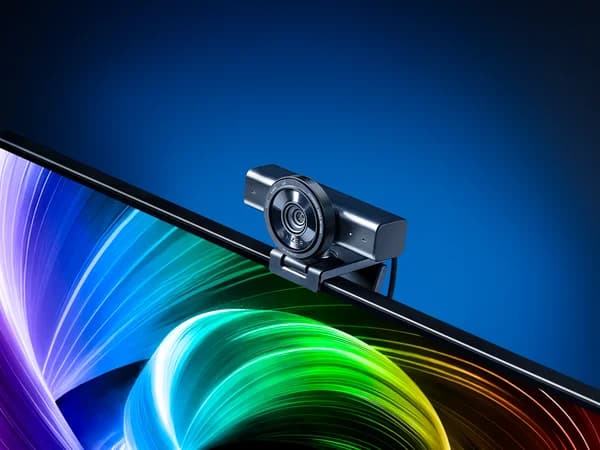
This is one of the few webcams in this roundup that feels genuinely premium in hand. The aluminum body has heft and rigidity that plastic cameras simply can't match. The mounting mechanism is solid, the USB-C cable is well-shielded, and the overall fit and finish suggest a product designed for years of daily use. If you've ever been annoyed by a cheap webcam that flexes, shifts, or creaks, the Kiyo V2 is a revelation.
Razer Synapse and Chroma
Full Synapse integration means image tuning, application-specific profiles, and Chroma RGB synchronization across your entire Razer setup. The software provides granular control over brightness, contrast, saturation, sharpness, and white balance. HDR mode can be toggled on for mixed-lighting scenarios. Like the Kiyo V2 X, the value of Synapse integration scales with how much Razer gear you own.
Pricing Analysis
At $150, the Kiyo V2 competes directly with the Insta360 Link 2C, and the comparison is instructive. The Kiyo V2 produces marginally better raw image quality and has superior build materials. The Link 2C offers AI auto-framing, whiteboard mode, gesture controls, and a more versatile companion app. Same price, fundamentally different philosophies. The OBSBOT Meet 2 at $129 offers AI features and comparable image quality for less. The Kiyo V2's value argument rests on its sensor quality and build — if those are your priorities, $150 is fair. If you want AI features, you're overpaying.
Who Is This For?
Razer Kiyo V2 works best for:
- Streamers and content creators who use external microphones, ring lights, and proper lighting setups — the Kiyo V2 rewards good lighting with outstanding footage, and the lack of AI framing matters less when you're in a fixed streaming position
- Razer ecosystem enthusiasts who want the premium tier of Razer's webcam lineup with 4K, metal construction, and full Synapse/Chroma integration
- Professional users who value build longevity — the all-metal construction means this camera will outlast plastic competitors, and the classic fixed-camera approach has fewer failure points than gimbal mechanisms
Who Should NOT Use This
Razer Kiyo V2 might not be the right choice if:
- You want smart features for the price — at $150, the OBSBOT Meet 2 ($129) and Insta360 Link 2C ($150) both include AI auto-framing, gesture controls, and whiteboard modes. The Kiyo V2's lack of any AI features is its most significant competitive weakness
- You move around during calls — without any form of tracking (digital or physical), the Kiyo V2 frames whatever its lens sees. If you lean out of frame, you're out of frame. Active presenters should look at gimbal options like the Insta360 Link 2
Bottom Line
The Razer Kiyo V2 delivers excellent 4K image quality with a larger sensor than most competitors at this price. The metal construction and Synapse integration are highlights. However, the lack of AI tracking at $150 is a notable gap when competitors like the OBSBOT Meet 2 include it for less.
FAQ
Why doesn't the Kiyo V2 have AI tracking at this price?
Razer's design philosophy with the Kiyo V2 prioritizes image quality and build materials over smart features. The budget that competitors spend on AI processing, OBSBOT-style tracking algorithms, and software development, Razer spent on a larger sensor, metal housing, and Synapse integration. It's a deliberate trade-off, not a cost-cutting measure — but one that leaves it at a feature disadvantage against the competition.
Is the metal build worth the premium over plastic webcams?
If longevity and daily handling matter to you, absolutely. Metal webcams resist flexing, don't develop creaky joints over time, and maintain their mounting position more securely than plastic competitors. If your webcam sits on a monitor and never gets touched, the material difference matters less. But if you travel with it, reposition it frequently, or simply appreciate premium hardware, the build quality justifies part of the price.
Should I get the Kiyo V2 or the Kiyo V2 X?
The Kiyo V2 ($150) is the better camera in every measurable way: 4K vs 1080p, larger sensor, better low-light performance, and all-metal body vs plastic-and-metal. The V2 X ($100) makes sense only if you need a Razer-ecosystem webcam at the lowest possible price. The $50 jump from V2 X to V2 is one of the best upgrades in this entire roundup.
Who Is Razer Kiyo V2 Best For?
Streamers and content creators in the Razer ecosystem who prioritize raw image quality over AI features
The Bottom Line
The Razer Kiyo V2 delivers excellent 4K image quality with a larger sensor than most competitors at this price. The metal construction and Synapse integration are highlights. However, the lack of AI tracking at $150 is a notable gap when competitors like the OBSBOT Meet 2 include it for less.
Buy on AmazonKey Specs
Scoring Breakdown
Resolution, frame rate, dynamic range, color accuracy, and sharpness of video output
Image quality in dimly lit environments, noise handling, and sensor sensitivity
Speed and accuracy of autofocus, plus AI-powered face/body tracking capabilities
Built-in microphone clarity, noise cancellation, and suitability for calls/streaming
Physical construction quality, mounting system, privacy features, and aesthetic design
Companion app quality, customization options, HDR modes, and background effects
Overall price-to-performance ratio considering features and build quality