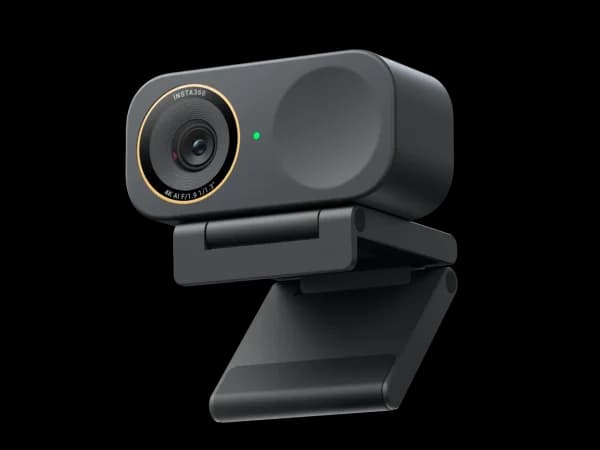
Insta360 Link 2C Pro
Professionals who want the best compact webcam with superior low-light performance and AI features

Logitech MX Brio
Professionals who prioritize raw image quality and low-light performance with a trusted brand

Score Comparison
Quick Verdict
At $200 each, the Insta360 Link 2C Pro and Logitech MX Brio represent two philosophies of premium webcam design. The MX Brio bets everything on sensor size — its 1/1.2-inch sensor produces the best low-light video in our roundup — with minimal AI features. The Link 2C Pro pairs a nearly-as-large 1/1.3-inch sensor with advanced AI auto-framing, whiteboard mode, desk view, and gesture controls. For most users, the Link 2C Pro's combination of strong image quality and smart features is the better daily driver. The MX Brio earns its place for users in the worst lighting conditions who prioritize pure image quality above all else.
Head-to-Head Comparison
Low-Light Performance
Winner: Logitech MX Brio (narrowly)
The MX Brio's 1/1.2-inch sensor is the largest in our entire webcam roundup, and it shows in dim conditions. When light drops to a single desk lamp or dim overhead fluorescent, the MX Brio produces cleaner footage with less noise and better color accuracy. Skin tones remain natural where smaller sensors start to look washed out.
The Link 2C Pro's 1/1.3-inch sensor is close behind — significantly better than standard webcams, and the gap only matters in genuinely poor lighting. In a typical well-lit home office (overhead light plus desk lamp, or decent natural light), the two cameras produce nearly identical results. The MX Brio's sensor advantage is real but narrow, and it only manifests in conditions where both cameras are already being pushed.
AI Features and Software
Winner: Insta360 Link 2C Pro
This is where the comparison becomes lopsided. The Link 2C Pro includes AI auto-framing that smoothly keeps you centered as you shift positions. Whiteboard mode detects your whiteboard, corrects perspective, and enhances writing contrast while overlaying your video. Desk view angles the camera downward to capture documents and objects. Gesture controls let you zoom and switch modes hands-free. Background blur and replacement use AI edge detection.
The MX Brio offers RightSight auto-framing through Logitech Tune, but it's basic — slower to respond, less accurate at the edges of the frame, and noticeably behind Insta360's implementation. There's no whiteboard mode, no desk view, no gesture controls. The Tune app provides image adjustment sliders and Show Mode, but it feels like a generation behind the Link Controller in both design and capability.
For a $200 webcam, the feature gap is significant. The Link 2C Pro is a smarter camera. The MX Brio is a better lens attached to good-but-dated software.
Build Quality and Design
Winner: Logitech MX Brio
The MX Brio's aluminum body with integrated privacy shutter is premium hardware. The graphite finish looks professional, the mount is rock-solid, and the physical privacy shutter provides genuine security peace of mind. It feels like a Logitech MX product — understated, well-built, and designed to last.
The Link 2C Pro uses a compact plastic body with a magnetic mount. The design is sleek and minimal — it looks great on a monitor — but the materials don't match the MX Brio's premium feel. The magnetic mount is clever but can feel insecure on very thin monitor bezels. There's no privacy shutter.
For users who value physical build quality and the security of a built-in lens cover, the MX Brio wins this round definitively.
Compatibility and Reliability
Winner: Logitech MX Brio
Logitech's driver support and cross-platform compatibility are the best in the webcam industry. The MX Brio works perfectly with Windows, macOS, ChromeOS, and every major video conferencing platform out of the box. Firmware updates are reliable, and Logitech Tune runs without issues on all major operating systems.
The Link 2C Pro works well with major platforms, but Insta360's Link Controller app is macOS/Windows only, and occasional firmware update requirements can be inconvenient. For enterprise environments where IT departments need guaranteed compatibility, Logitech's track record is unmatched.
Value
Winner: Insta360 Link 2C Pro
At the same $200 price, the Link 2C Pro delivers comparable image quality (marginally behind in low light, effectively identical in good light) plus AI auto-framing, whiteboard mode, desk view, gesture controls, and a more capable companion app. The MX Brio counters with a slightly larger sensor, premium build, and better compatibility.
For most remote workers and professionals, the Link 2C Pro's feature set adds more daily utility than the MX Brio's sensor advantage. The MX Brio's value proposition is strongest for users in genuinely challenging lighting who don't need AI features.
When to Choose Insta360 Link 2C Pro
The Insta360 Link 2C Pro is the right choice when:
- You present or teach remotely: Whiteboard mode and desk view add genuine utility that the MX Brio simply can't match
- AI framing matters: The Link 2C Pro's auto-framing is significantly more capable than Logitech's RightSight
- Your workspace has decent lighting: In typical office conditions, the sensor difference is negligible, and the AI features tip the balance decisively
- You want a compact, modern design: The magnetic mount and slim form factor look cleaner on most monitors
When to Choose Logitech MX Brio
The Logitech MX Brio is the right choice when:
- Your lighting is genuinely poor: In dim rooms, basements, or spaces with challenging mixed lighting, the MX Brio's larger sensor produces noticeably better footage
- Enterprise reliability is critical: Logitech's driver support, IT management compatibility, and platform reliability are the industry standard
- Privacy shutter is essential: The built-in physical shutter provides security that no software solution can match
- Build quality is paramount: The aluminum body is the most premium construction in this price range
Final Recommendation
Choose the Insta360 Link 2C Pro if you want the most capable compact webcam at $200. The combination of a large sensor, AI features, whiteboard mode, and desk view makes it the best all-rounder in the entire roundup. The slightly smaller sensor compared to the MX Brio is a minor sacrifice for a major gain in daily functionality.
Choose the Logitech MX Brio if you prioritize raw image quality in difficult lighting, need guaranteed enterprise compatibility, or value the premium aluminum build with a physical privacy shutter. It's the better pure camera. It's just not the better webcam for how most people actually use webcams in 2026.
For the majority of remote workers, the Link 2C Pro delivers more practical value at the same price. The MX Brio remains the right choice for a specific, important use case — but it's the narrower recommendation.
Pricing & Features
Making Your Decision

When to Choose Insta360 Link 2C Pro
Professionals who want the best compact webcam with superior low-light performance and AI features
The Insta360 Link 2C Pro takes the already-excellent Link 2C and upgrades it with a much larger sensor. The low-light improvement is immediately noticeable, and the AI features remain best-in-class for a compact webcam. If you work in varied lighting conditions, the Pro upgrade is worth it.
Strengths
- Upgraded 1/1.3-inch sensor delivers noticeably better low-light than Link 2C
- AI auto-framing with advanced background blur and virtual backgrounds
- Compact form factor maintains the Link 2C's clean, minimal design
Limitations
- No gimbal — all tracking remains digital crop from the larger sensor
- Relatively new (Jan 2026) with limited long-term reliability data
- Price premium over Link 2C is significant for the sensor upgrade alone

When to Choose Logitech MX Brio
Professionals who prioritize raw image quality and low-light performance with a trusted brand
The Logitech MX Brio delivers the best raw image quality in this roundup thanks to its large sensor. Low-light performance is excellent, and the build quality is premium. It lacks the AI tracking smarts of OBSBOT and Insta360, but if pure video quality is your priority, it's hard to beat.
Strengths
- Excellent 4K image quality with a large 1/1.2-inch sensor for superior low-light
- Premium build quality with aluminum body and integrated privacy shutter
- Logitech Tune app provides Show Mode, RightLight, and auto-framing
Limitations
- At $200, it's expensive for a webcam without gimbal or PTZ tracking
- Auto-framing is basic compared to OBSBOT and Insta360 AI tracking
- March 2024 release means it's among the older products in this roundup