
UGREEN MagFlow 3-in-1 25W (W711) Review
The UGREEN MagFlow W711 differentiates with its adjustable viewing angle — perfect for StandBy mode at any desk height. Solid 25W charging and good build quality, though the $140 price faces stiff competition from Qi2.2 alternatives.

UGREEN MagFlow 3-in-1 25W (W711) Review
The UGREEN MagFlow W711 differentiates with its adjustable viewing angle — perfect for StandBy mode at any desk height. Solid 25W charging and good build quality, though the $140 price faces stiff competition from Qi2.2 alternatives.
UGREEN MagFlow 3-in-1 25W (W711) Review
The UGREEN MagFlow W711 differentiates with its adjustable viewing angle — perfect for StandBy mode at any desk height. Solid 25W charging and good build quality, though the $140 price faces stiff competition from Qi2.2 alternatives.

UGREEN MagFlow 3-in-1 25W (W711) Pros & Cons
Pros
- 25W Qi2 fast charging with adjustable viewing angle
- Flexible stand lets you tilt the phone for StandBy mode
- Charges iPhone, Apple Watch, and AirPods simultaneously
- Solid build quality with weighted base prevents tipping
Cons
- $140 places it at the higher end without active cooling
- Adjustable arm adds bulk compared to fixed-position docks
- No Qi2.2 certification — 25W Qi2 only
Overview
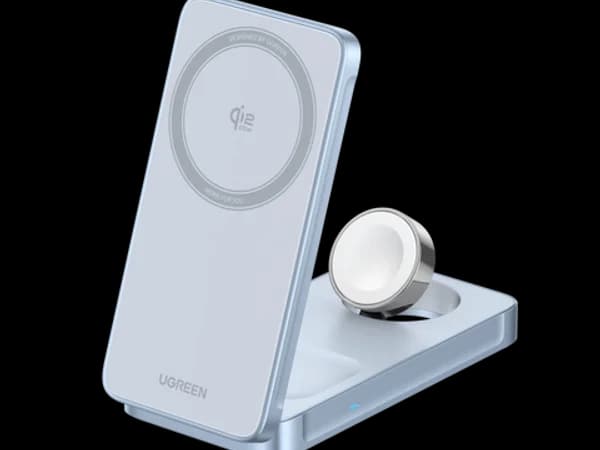
The UGREEN MagFlow W711 does something none of its 3-in-1 competitors bother with: it lets you adjust the viewing angle. A flexible arm tilts the iPhone charging pad to your preferred position, making it the best option for StandBy mode users who want their always-on display visible from any seat at the desk. It also means you can angle the phone up for nightstand use without the fixed-angle compromises of the Belkin or ESR.
The all-metal construction gives it a reassuring heft, and 25W Qi2 charging handles everything from quick top-ups to overnight sessions. The catch is the $139.99 price tag — you're paying a premium for adjustability and build quality without getting Qi2.2 certification or active cooling, and the adapter isn't included.
For users who value ergonomic flexibility and premium materials in a desk charger, the MagFlow delivers something unique.
Features Deep-Dive
Adjustable Viewing Angle
This is the MagFlow's killer feature. The articulating arm lets you tilt the iPhone pad through a wide range of angles, from nearly flat to fully upright. This matters for two scenarios: StandBy mode, where the optimal viewing angle depends on your desk height and chair position, and video calls, where you want the front camera at eye level. Every other charger in our roundup uses a fixed angle, forcing you to adjust your setup around the charger. The MagFlow lets you adjust the charger to your setup.
All-Metal Construction
The MagFlow uses an aluminum housing with a weighted base that feels genuinely premium. It's noticeably heavier than plastic competitors, which is actually an advantage — the weight keeps it stable when you snap your phone on or pull it off. The metal construction also acts as a passive heat sink, drawing warmth away from the charging coil. The downside is bulk: this is a desk charger, not a travel one.
25W Qi2 Charging (Not Qi2.2)
An important distinction: the MagFlow is Qi2 certified, not Qi2.2. In practice, both deliver 25W maximum to compatible iPhones, but Qi2.2 certification includes additional features like improved foreign object detection and thermal management protocols. The speed difference for most users is negligible — your phone charges at the same rate. The distinction matters more for future-proofing and spec-sheet comparisons.
USB-C Power Output Port
A thoughtful addition: a USB-C port on the side of the base lets you charge a fourth device via cable. While it's wired rather than wireless, it's useful for topping up an iPad, Kindle, or second phone without needing another charger or outlet. The port draws from the same power supply, so it works best with a 45W+ adapter.
Pricing Analysis
At $139.99 without an included adapter, the UGREEN MagFlow is the second most expensive option in our roundup. Add a $20-25 adapter and you're approaching $160 total. That's a tough sell when the Belkin UltraCharge Pro ($129.99 with adapter and active cooling) offers more for less. The MagFlow's value proposition rests entirely on its adjustable angle and all-metal build. If those matter to you — and for the right desk setup, they absolutely can — the premium is justified. If not, the Belkin or ESR deliver better overall value.
Who Is This For?
UGREEN MagFlow 3-in-1 25W works best for:
- StandBy mode enthusiasts who want the perfect viewing angle from their specific desk setup
- Design-conscious buyers who appreciate the all-metal construction and want a charger that looks as good as their other desk accessories
- Multi-device users who can take advantage of the bonus USB-C port for a fourth device
- Video callers who want to angle their phone's camera to eye level during meetings
Who Should NOT Use This
UGREEN MagFlow 3-in-1 25W might not be the right choice if:
- Value is your priority — at $140 without an adapter, you're paying more than the Belkin while getting less (no cooling, no included adapter)
- You travel with your charger — the all-metal build is heavy and doesn't fold; this is purely a desk or nightstand charger
- You want the newest certification — the Qi2 (not Qi2.2) spec is technically one generation behind, though real-world charging speed is identical
Bottom Line
The UGREEN MagFlow W711 is the desk charger for people who care about angles. Its adjustable arm solves a real ergonomic problem that fixed-angle chargers ignore, and the all-metal build justifies permanent desk residency. But at $140 without an adapter, it needs to compete against the Belkin UltraCharge Pro that includes more for less. Buy it for the adjustability; skip it if a fixed angle works fine for your setup.
FAQ
Is Qi2 the same speed as Qi2.2?
For charging speed, yes — both deliver 25W to compatible iPhones. Qi2.2 adds improved protocols for foreign object detection, thermal management, and communication between charger and phone, but the wattage is the same. You won't notice a speed difference in daily use.
Does it include a power adapter?
No. UGREEN recommends a 45W or higher USB-C PD adapter for full 25W speed, which adds $20-25 to the total cost. This is a notable omission at the $140 price point, especially when the Belkin ($130) includes one.
How heavy is the base?
Heavy enough to stay put when you snap a phone on and off — that's the point. The all-metal construction and weighted base make it one of the most stable chargers in the roundup, but also one of the least portable. This is designed to live on your desk permanently.
Can I use the USB-C port while wirelessly charging?
Yes. The USB-C port works simultaneously with all three wireless charging surfaces. Just ensure you're using a 45W+ adapter to provide enough power for all devices at full speed.
Who Is UGREEN MagFlow 3-in-1 25W (W711) Best For?
Users who want an adjustable-angle 3-in-1 charging stand for flexible desk or nightstand positioning
The Bottom Line
The UGREEN MagFlow W711 differentiates with its adjustable viewing angle — perfect for StandBy mode at any desk height. Solid 25W charging and good build quality, though the $140 price faces stiff competition from Qi2.2 alternatives.
Buy on AmazonKey Specs
Scoring Breakdown
Maximum wattage, Qi2/Qi2.2 certification level, and real-world charge times
Qi2 standard compliance, cross-platform support (iPhone/Android/AirPods), and case-friendly charging
Materials, construction durability, and thermal management system quality
Number of simultaneous charging devices, Apple Watch support, AirPods support
Form factor versatility (desk/nightstand/travel), footprint, portability, and aesthetic appeal
Active cooling systems, overcharge/overheat protection, temperature monitoring, and certifications
Price-to-feature ratio, included accessories (adapter, cable), and warranty coverage