
OBSBOT Tiny SE Review
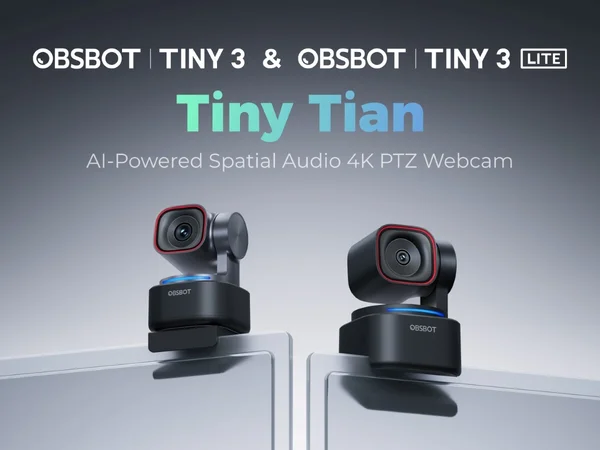
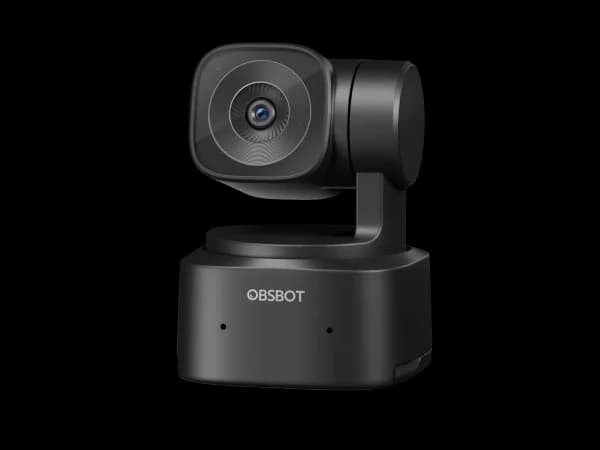
The OBSBOT Tiny SE is the most affordable gimbal webcam available, bringing genuine pan-tilt tracking to the $99 price point. The physical tracking is noticeably smoother than digital-only solutions, and gesture controls add a fun, practical touch. The 1080p resolution is the main compromise.

OBSBOT Tiny SE Review
The OBSBOT Tiny SE is the most affordable gimbal webcam available, bringing genuine pan-tilt tracking to the $99 price point. The physical tracking is noticeably smoother than digital-only solutions, and gesture controls add a fun, practical touch. The 1080p resolution is the main compromise.
OBSBOT Tiny SE Review
The OBSBOT Tiny SE is the most affordable gimbal webcam available, bringing genuine pan-tilt tracking to the $99 price point. The physical tracking is noticeably smoother than digital-only solutions, and gesture controls add a fun, practical touch. The 1080p resolution is the main compromise.

OBSBOT Tiny SE Pros & Cons
Pros
- 2-axis gimbal provides physical pan-tilt-zoom tracking at a budget price
- AI-powered gesture controls for hands-free camera operation
- OBSBOT Center software offers granular image tuning and presets
Cons
- 1080p resolution limits detail — no 4K option at this tier
- Gimbal motor is audible during rapid tracking movements
- Low-light performance is modest compared to larger-sensor competitors
Overview
The OBSBOT Tiny SE is the only webcam under $100 with a physical gimbal. That distinction matters more than any spec sheet comparison can convey. When you move, the camera physically rotates to follow you — not a digital crop from a wide-angle lens, but actual mechanical movement. The result is tracking that feels natural and maintains full sensor resolution regardless of your position in the frame.
The compromise is 1080p resolution in a market moving rapidly toward 4K. But for educators recording lessons, presenters demonstrating products, or anyone who needs to move around during calls, the physical tracking is worth more than extra pixels.
Features Deep-Dive
2-Axis Gimbal Tracking
The Tiny SE's pan-and-tilt gimbal is its defining feature. It physically rotates to follow your face using OBSBOT's AI detection algorithms. The tracking range covers roughly 150 degrees horizontally, which means it can follow you as you walk to a whiteboard, reach for something off-camera, or stand up from your desk. The movement is smooth at moderate speeds, though rapid direction changes can cause the motor to produce audible whirring — noticeable in quiet rooms but unlikely to be picked up by most microphones.
Gesture Controls
Raise your hand with an open palm and the Tiny SE zooms in on you. Make an "L" shape with your thumb and index finger and it zooms out. These gesture controls are surprisingly reliable once you learn the correct hand positions, and they're genuinely useful during presentations. You can switch between zoomed-in talking-head framing and a wider shot that shows your workspace without touching your computer. It's a feature that sounds gimmicky until you use it.
OBSBOT Center Software
The Tiny SE gets full access to OBSBOT's companion software, which is the best webcam software in this roundup alongside Elgato's Camera Hub. You can fine-tune exposure, white balance, and color settings, create custom presets for different lighting conditions, and adjust tracking speed and sensitivity. The software also supports firmware updates, which have historically brought meaningful improvements to OBSBOT cameras.
Pricing Analysis
At $99, the Tiny SE costs $30 more than the OBSBOT Meet SE and delivers a fundamentally different experience. The Meet SE tracks digitally; the Tiny SE tracks physically. That mechanical gimbal adds real cost in components and engineering, making $99 genuinely impressive. The next gimbal webcam up is the Insta360 Link 2 at $200 — more than double the price. If you know you need physical tracking, the Tiny SE is the value leader by a wide margin.
Who Is This For?
OBSBOT Tiny SE works best for:
- Teachers and professors who record lectures from a whiteboard and need the camera to follow them as they move across the frame — digital tracking loses too much resolution at 1080p, but the gimbal keeps the full sensor pointed at you
- Product demo creators who show physical items on camera and need the flexibility to move between a desk setup and standing position without repositioning the camera
- Budget-conscious streamers who want dynamic camera movement for their streams without investing in a $200+ gimbal webcam or a separate PTZ controller
Who Should NOT Use This
OBSBOT Tiny SE might not be the right choice if:
- Video sharpness is your top priority — at 1080p, the Tiny SE simply can't match the detail of 4K competitors. If you're primarily stationary during calls and want the sharpest possible image, the EMEET S600L offers 4K at $80
- You work in a quiet studio environment — the gimbal motor, while not loud, is audible in very quiet rooms. If you're recording in a sound-treated space with sensitive microphones, the mechanical noise may be a concern
Bottom Line
The OBSBOT Tiny SE is the most affordable gimbal webcam available, bringing genuine pan-tilt tracking to the $99 price point. The physical tracking is noticeably smoother than digital-only solutions, and gesture controls add a fun, practical touch. The 1080p resolution is the main compromise.
FAQ
How loud is the gimbal motor?
At a normal conversational distance (2-3 feet), the motor produces a soft whirring sound during movement. It's comparable to a quiet desk fan. Most built-in webcam microphones and external mics with noise cancellation won't pick it up, but in a dead-silent room you'll hear it. It only activates during tracking movements — when you're sitting still, the camera is silent.
Can the Tiny SE track multiple people?
The camera can detect multiple faces and will attempt to frame them all in the shot when in group mode. However, with only 1080p resolution and a 2-axis gimbal (no vertical tilt adjustment to the same degree), group tracking works best with 2-3 people sitting relatively close together. For larger groups, a wide-angle webcam without tracking would frame everyone more reliably.
Is the OBSBOT Tiny SE better than the Meet SE?
They serve different needs. The Meet SE ($69) is smaller, lighter, and cheaper — ideal for stationary video calls where you just want basic AI framing. The Tiny SE ($99) adds a physical gimbal that lets the camera follow you around, which is transformative for presentations and demos. If you mostly sit still at a desk, save the $30. If you move during calls, the gimbal is worth every penny.
Who Is OBSBOT Tiny SE Best For?
Presenters and educators who need physical PTZ tracking on a budget
The Bottom Line
The OBSBOT Tiny SE is the most affordable gimbal webcam available, bringing genuine pan-tilt tracking to the $99 price point. The physical tracking is noticeably smoother than digital-only solutions, and gesture controls add a fun, practical touch. The 1080p resolution is the main compromise.
Buy on AmazonKey Specs
Scoring Breakdown
Resolution, frame rate, dynamic range, color accuracy, and sharpness of video output
Image quality in dimly lit environments, noise handling, and sensor sensitivity
Speed and accuracy of autofocus, plus AI-powered face/body tracking capabilities
Built-in microphone clarity, noise cancellation, and suitability for calls/streaming
Physical construction quality, mounting system, privacy features, and aesthetic design
Companion app quality, customization options, HDR modes, and background effects
Overall price-to-performance ratio considering features and build quality