
OBSBOT Meet SE Review
The OBSBOT Meet SE brings AI-powered auto-framing to the sub-$70 price range. While the 1080p sensor limits absolute image quality, the gesture controls and tracking features are surprisingly capable for the price. A solid entry-level choice for video calls.

OBSBOT Meet SE Review
The OBSBOT Meet SE brings AI-powered auto-framing to the sub-$70 price range. While the 1080p sensor limits absolute image quality, the gesture controls and tracking features are surprisingly capable for the price. A solid entry-level choice for video calls.
OBSBOT Meet SE Review
The OBSBOT Meet SE brings AI-powered auto-framing to the sub-$70 price range. While the 1080p sensor limits absolute image quality, the gesture controls and tracking features are surprisingly capable for the price. A solid entry-level choice for video calls.

OBSBOT Meet SE Pros & Cons
Pros
- AI auto-framing and gesture control at an entry-level price point
- Compact, lightweight design with flexible mounting clip
- OBSBOT Center app provides extensive customization options
Cons
- 1080p resolution lags behind 4K competitors in clarity
- Low-light performance is noticeably weaker than pricier models
- No privacy shutter built into the camera body
Overview
The OBSBOT Meet SE does something genuinely impressive: it brings AI-powered auto-framing and gesture control to the sub-$70 price bracket. That's territory typically reserved for basic fixed-lens webcams with zero smarts. The trade-off is a 1080p sensor that can't compete with the 4K options higher up the price ladder, but for video calls where you need to stay centered in the frame without fiddling with manual positioning, the Meet SE punches above its price.
What sets it apart from other budget webcams isn't resolution — it's the fact that OBSBOT's AI engine, the same one powering their $200+ cameras, has been brought down to this price point. You get face tracking, gesture-based zoom, and auto-framing that actually works, powered by the OBSBOT Center companion app.
Features Deep-Dive
AI Auto-Framing and Gesture Control
The Meet SE uses OBSBOT's AI tracking algorithms to keep you centered in the frame as you move around. Raise your palm and it zooms in; make an "L" shape and it zooms out. These aren't gimmicks — they're genuinely useful during presentations when you need hands-free control. The tracking isn't as fast or as smooth as the gimbal-based Tiny SE, since it relies on digital cropping from the 1080p sensor, but for seated video calls it handles head movements and posture shifts reliably.
OBSBOT Center Software
Where many budget webcams ship with no companion software at all, the Meet SE gets full access to OBSBOT Center. You can adjust exposure, white balance, brightness, contrast, and saturation with granular sliders. There are preset modes for different lighting conditions, and you can configure the auto-framing speed and sensitivity. It's the same app used across the entire OBSBOT lineup, and it's well-designed.
Compact Design and Mounting
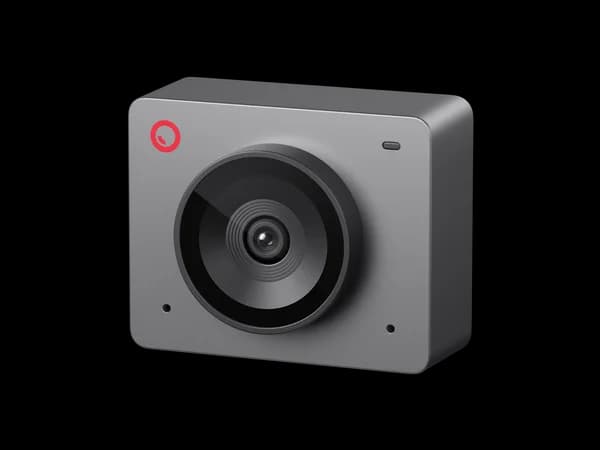
The Meet SE is small and light enough that it doesn't weigh down thin laptop lids. The flexible mounting clip grips monitor bezels securely and includes a standard 1/4-inch thread for tripod mounting. There's no built-in privacy shutter, which is a miss at any price point, but the form factor is clean and unobtrusive.
Pricing Analysis
At $69, the OBSBOT Meet SE occupies an interesting sweet spot. You can find basic 1080p webcams for $30-40, but none of them include AI tracking or gesture controls. The next step up — the EMEET S600L at $80 — gets you 4K resolution but without the AI tracking finesse. The Meet SE's value proposition is clear: if AI features matter more to you than raw resolution, this is the cheapest way to get them.
Who Is This For?
OBSBOT Meet SE works best for:
- Remote workers on a budget who take frequent video calls and want to look centered and professional without spending $130+ on an AI webcam
- Presenters and teachers who need gesture-based zoom control for demos and whiteboard sessions but can't justify the Tiny SE's $99 price tag
- Laptop users who want a lightweight external webcam that's a significant upgrade over built-in laptop cameras without adding bulk
Who Should NOT Use This
OBSBOT Meet SE might not be the right choice if:
- You need sharp, detailed video — the 1080p sensor produces noticeably softer images than the 4K cameras in this roundup, especially on larger monitors where viewers can see the difference
- Your workspace is dimly lit — the small sensor struggles in low light, producing grainy footage that the AI processing can't fully compensate for. Consider the EMEET S600L with its built-in ring light instead
Bottom Line
The OBSBOT Meet SE brings AI-powered auto-framing to the sub-$70 price range. While the 1080p sensor limits absolute image quality, the gesture controls and tracking features are surprisingly capable for the price. A solid entry-level choice for video calls.
FAQ
Does the AI tracking work well enough to replace a gimbal webcam?
For seated video calls, yes. The digital tracking keeps you framed smoothly as you lean, shift, or turn your head. But it can't follow you walking around a room the way a gimbal webcam like the OBSBOT Tiny SE can — the limited 1080p sensor doesn't have enough resolution headroom for aggressive digital cropping while maintaining quality.
How does the OBSBOT Meet SE compare to the EMEET S600L?
These two target different priorities at similar prices. The EMEET S600L ($80) delivers 4K resolution and a built-in ring light, giving you sharper video and better appearance in dim rooms. The Meet SE ($69) trades resolution for smarter AI features — better auto-framing, gesture controls, and superior companion software. Choose the EMEET if you care about image sharpness; choose the OBSBOT if you care about intelligent framing.
Is the lack of a privacy shutter a dealbreaker?
It depends on your security preferences. Many users simply unplug USB webcams or use a $2 slide cover. If built-in privacy is important to you, you'll need to step up to cameras like the Logitech MX Brio ($200) for an integrated shutter. At $69, the omission is understandable but worth noting.
Who Is OBSBOT Meet SE Best For?
Budget-conscious users who want AI tracking features without the premium price tag
The Bottom Line
The OBSBOT Meet SE brings AI-powered auto-framing to the sub-$70 price range. While the 1080p sensor limits absolute image quality, the gesture controls and tracking features are surprisingly capable for the price. A solid entry-level choice for video calls.
Buy on AmazonKey Specs
Scoring Breakdown
Resolution, frame rate, dynamic range, color accuracy, and sharpness of video output
Image quality in dimly lit environments, noise handling, and sensor sensitivity
Speed and accuracy of autofocus, plus AI-powered face/body tracking capabilities
Built-in microphone clarity, noise cancellation, and suitability for calls/streaming
Physical construction quality, mounting system, privacy features, and aesthetic design
Companion app quality, customization options, HDR modes, and background effects
Overall price-to-performance ratio considering features and build quality