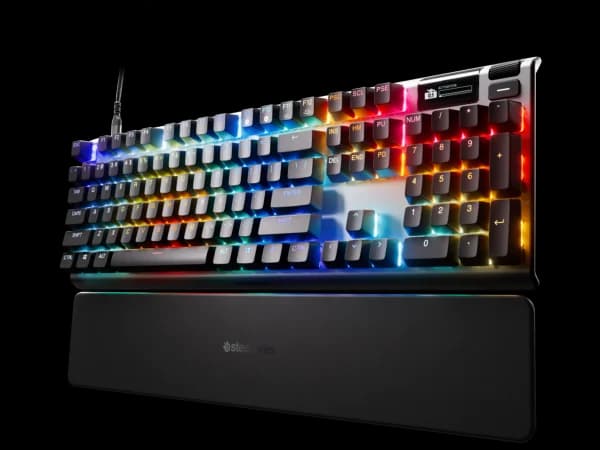

SteelSeries Apex Pro TKL Gen 3 Review
The Apex Pro TKL Gen 3 pushes Hall Effect innovation with 11 actuation presets and dual-action keys. Its OmniPoint 3.0 switches are among the most versatile, though the premium price demands consideration.

SteelSeries Apex Pro TKL Gen 3 Review
The Apex Pro TKL Gen 3 pushes Hall Effect innovation with 11 actuation presets and dual-action keys. Its OmniPoint 3.0 switches are among the most versatile, though the premium price demands consideration.
SteelSeries Apex Pro TKL Gen 3 Review
The Apex Pro TKL Gen 3 pushes Hall Effect innovation with 11 actuation presets and dual-action keys. Its OmniPoint 3.0 switches are among the most versatile, though the premium price demands consideration.

SteelSeries Apex Pro TKL Gen 3 Pros & Cons
Pros
- OmniPoint 3.0 HyperMagnetic switches with 11 actuation presets
- 8KHz polling rate with Rapid Trigger and Rapid Tap
- OLED display for real-time info and GIFs
- Dual-action keys with two functions per keystroke
Cons
- Most expensive TKL in the mid-to-premium range at $240
- Wired only in base model (wireless version costs more)
- SteelSeries GG software can be buggy
Overview
The Apex Pro TKL Gen 3 is SteelSeries' argument that Hall Effect switches should do more than just register keypresses faster. Where most magnetic switch keyboards compete on actuation speed alone, the Gen 3 layers on dual-action keys, 11 actuation presets, and an OLED smart display that turns the keyboard into something closer to a configurable input device than a traditional peripheral.
The OmniPoint 3.0 HyperMagnetic switches sit at the center of everything. Each key can be individually tuned across 11 actuation points, from a feather-light 0.1mm to a deliberate 4.0mm. That per-key granularity matters because competitive gamers want hair-trigger movement keys alongside more resistant modifier keys to avoid misfires. The dual-action system takes this further, assigning two separate functions to a single key based on press depth. A half-press might reload while a full press throws a grenade. No other keyboard in this price range offers that level of per-key intelligence.
At $240, it is the most expensive TKL in the mid-to-premium bracket. The base model is wired only, which feels like a concession at this price point. Buyers wanting wireless need to step up to an even pricier SKU. SteelSeries GG software has a reputation for bugginess that the hardware does not deserve. These are real friction points, but for competitive players who will actually use the granular customization, the Apex Pro Gen 3 delivers capabilities nobody else matches.
Features Deep-Dive
OmniPoint 3.0 HyperMagnetic Switches
The third generation of SteelSeries' Hall Effect switches adds meaningful depth to what was already a strong platform. Eleven actuation presets allow per-key tuning that goes well beyond the binary "light or heavy" choice most keyboards offer. In practice, this means setting WASD to a 0.2mm actuation for instant movement response while keeping surrounding keys at 1.5mm or higher to prevent accidental presses during intense gaming sessions.
Rapid Trigger eliminates the fixed reset point of traditional switches. The key re-engages the moment you reverse direction, regardless of where in the travel you stopped pressing. Combined with Rapid Tap, which instantly prioritizes the most recently pressed directional key, the result is movement input that feels directly connected to intent. Counter-strafing in tactical shooters becomes noticeably more responsive. The 8KHz polling rate means the PC receives input updates every 0.125ms, ensuring the switch improvements are not bottlenecked by slow reporting.
These are not theoretical improvements. Players coming from standard mechanical switches will feel the difference in games where movement precision determines engagements.
Dual-Action Keys
Dual-action is the Gen 3's most distinctive feature and the one that separates it from every other Hall Effect keyboard on the market. Each key can perform two entirely different actions depending on press depth. A shallow press on the spacebar might trigger a jump, while pressing through to the bottom activates a secondary ability. This effectively doubles the number of accessible bindings without adding keys or requiring modifier combos.
The implementation works through SteelSeries GG, where you define the actuation point that divides the two zones per key. Setting up profiles takes experimentation. Finding the right split point so you do not accidentally trigger the wrong action requires iteration and muscle memory. For games with extensive keybind requirements, like MMOs or complex shooters, dual-action can consolidate bindings in a way that reduces hand movement and reaction time. For simpler games, it is a feature you might configure once and forget.
The learning curve is real. Expect a week of adjustment before dual-action feels natural rather than confusing. But once internalized, it becomes difficult to go back.
OLED Smart Display and Build Quality
The integrated OLED display serves both practical and aesthetic purposes. Real-time system stats, game information, Discord notifications, and even animated GIFs can cycle through the small screen embedded above the arrow key cluster. In competitive contexts, glanceable information like GPU temperature or game timers adds genuine utility. In everyday use, it is a nice-to-have that makes the keyboard feel more premium.
Build quality matches the price point. The aluminum alloy top plate provides rigidity without excessive weight, and the TKL form factor frees up mouse space, a non-negotiable requirement for low-sensitivity FPS players. Keycap quality is adequate but not exceptional; the double-shot PBT caps feel solid without reaching the density of aftermarket sets. The detachable USB-C cable is braided and sits flush, avoiding the wobble that plagues some competitors.
SteelSeries GG software is the weak link. Profile management and per-key configuration work well when the software cooperates, but users report occasional sync failures, slow startup, and update issues. SteelSeries has improved stability through patches, but it remains a sore point for a $240 keyboard.
Pricing Analysis
At $240, the Apex Pro TKL Gen 3 is the most expensive TKL keyboard in the mid-to-premium tier, roughly $40-60 more than strong competitors like the Wooting 60HE+ or Razer Huntsman V3 Pro TKL. The price premium buys you dual-action keys, the OLED display, and SteelSeries' specific take on per-key actuation tuning. Whether those features justify the uplift depends on how deeply you engage with customization.
The wired-only base model stings at this price. Competitors like the NuPhy WH80 offer wireless connectivity at $250, making the Apex Pro's wired limitation feel deliberate rather than technical. The wireless Apex Pro variant exists but costs significantly more, pushing total investment past $300.
For competitive gamers who will use dual-action keys and per-key actuation profiles, the Apex Pro Gen 3 delivers unique value. For buyers who want a fast Hall Effect keyboard without the extras, more affordable options exist that match the raw switch performance.
Who Is This For?
The Apex Pro TKL Gen 3 works best for:
- Competitive FPS and tactical shooter players who need per-key actuation tuning, Rapid Trigger, and Rapid Tap to gain measurable input advantages in games like Valorant and Counter-Strike
- MMO and complex-game players who can leverage dual-action keys to consolidate extensive keybinds into fewer physical keys, reducing hand repositioning during gameplay
- Customization enthusiasts who enjoy spending time dialing in per-key settings, building game-specific profiles, and using the OLED display for real-time feedback
- Desk setup aesthetics-minded gamers who want a premium-feeling keyboard with an OLED display that adds visual personality to their station
Who Should NOT Use This
The Apex Pro TKL Gen 3 might not be the right choice if:
- You need wireless connectivity without paying a steep premium. The base model is wired only, and the wireless variant costs significantly more. At $240, wired-only feels like a real limitation when competitors offer tri-mode wireless at similar or lower prices.
- You want plug-and-play simplicity. The Apex Pro's value proposition lives in its customization depth. If you will never touch per-key actuation settings or configure dual-action keys, you are paying for capabilities you will not use. A simpler Hall Effect board at $150-180 would serve you equally well.
- Software reliability is a dealbreaker. SteelSeries GG has improved but still carries a reputation for inconsistency. If finicky software frustrates you, boards with on-device configuration or more stable companion apps will cause less friction.
Bottom Line
The Apex Pro TKL Gen 3 is the most feature-dense Hall Effect keyboard available, offering customization depth that no competitor matches. Dual-action keys, 11 actuation presets, and the OLED display create a package that rewards users willing to invest time in configuration. The premium price and wired-only limitation are real drawbacks, but for competitive players who will exploit every feature, the Gen 3 justifies its position at the top of the TKL market.
FAQ
Is the Apex Pro TKL Gen 3 worth $240 when cheaper Hall Effect keyboards exist?
It depends on whether you will use the exclusive features. Dual-action keys and 11 actuation presets are unique to this keyboard. If those capabilities matter to your gameplay, nothing else offers them. If you just want fast Hall Effect switches with Rapid Trigger, boards like the Wooting 60HE+ deliver comparable raw switch performance for significantly less.
How does the Apex Pro Gen 3 compare to the Wooting 60HE+?
The Wooting matches or exceeds the Apex Pro on raw Hall Effect switch performance and community-driven firmware updates. The Apex Pro counters with dual-action keys, the OLED display, and SteelSeries' established ecosystem. Wooting appeals to the enthusiast community; SteelSeries appeals to gamers who want a polished, all-in-one package.
Does the 8KHz polling rate actually make a difference?
At 8KHz, input reports arrive every 0.125ms compared to 1ms at 1KHz. In competitive shooters where frame timing and input registration matter, the difference is measurable in testing and perceptible to skilled players. For casual gaming or typing, 1KHz is more than sufficient and you would not notice the improvement.
Can dual-action keys be used outside of gaming?
Yes. Productivity applications include mapping a light press to copy and a full press to paste, or assigning different application shortcuts to the same key at different depths. The utility extends beyond gaming, though the learning curve applies equally to any use case.
Who Is SteelSeries Apex Pro TKL Gen 3 Best For?
Competitive gamers who want the most adjustable Hall Effect switches with dual-action keys
The Bottom Line
The Apex Pro TKL Gen 3 pushes Hall Effect innovation with 11 actuation presets and dual-action keys. Its OmniPoint 3.0 switches are among the most versatile, though the premium price demands consideration.
Buy on AmazonKey Specs
Scoring Breakdown
Switch quality, actuation feel, key travel, and overall typing/gaming experience. Includes switch type characteristics (linear, tactile, clicky, magnetic).
Frame materials (aluminum, plastic, steel), keycap quality (PBT vs ABS), stabilizer quality, weight, and overall construction durability.
Hot-swap support, RGB lighting, media controls, display/OLED, programmable keys, onboard memory, and extra functionality.
Wired/wireless options, Bluetooth, 2.4GHz wireless, USB-C, polling rate, latency, and multi-device pairing.
Software quality, macro programming, per-key RGB control, key remapping, profile management, and modding potential.
Price-to-performance ratio considering build quality, features, and overall package relative to competing options.