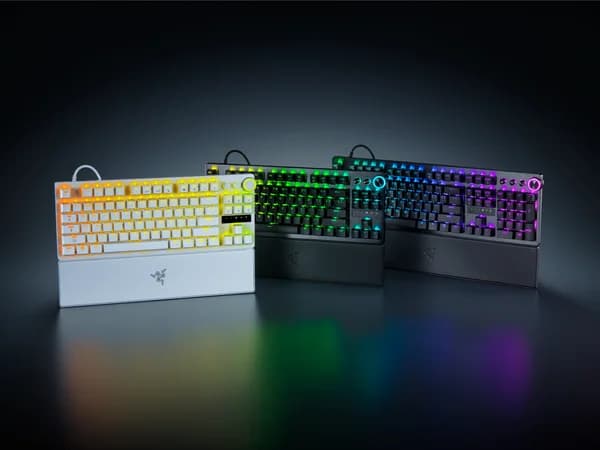

Razer Huntsman V3 Pro TKL 8KHz Review
The Huntsman V3 Pro TKL 8KHz brings Razer's refined optical switches to the Rapid Trigger era. Excellent for competitive gaming with strong software support, though the wired-only design limits versatility.

Razer Huntsman V3 Pro TKL 8KHz Review
The Huntsman V3 Pro TKL 8KHz brings Razer's refined optical switches to the Rapid Trigger era. Excellent for competitive gaming with strong software support, though the wired-only design limits versatility.
Razer Huntsman V3 Pro TKL 8KHz Review
The Huntsman V3 Pro TKL 8KHz brings Razer's refined optical switches to the Rapid Trigger era. Excellent for competitive gaming with strong software support, though the wired-only design limits versatility.

Razer Huntsman V3 Pro TKL 8KHz Pros & Cons
Pros
- Gen 2 Analog Optical switches with dual-step actuation profiles
- 8KHz polling rate for ultra-responsive esports performance
- Adjustable magnetic wrist rest included
- Razer Synapse 4 with Snap Tap and Rapid Trigger modes
Cons
- Wired only at a $220 price point
- Optical switches not hot-swappable with mechanical switches
- Razer Synapse software required for full functionality
Overview
Razer built the Huntsman V3 Pro TKL 8KHz for one purpose: winning competitive games. Everything about this keyboard -- the Gen 2 Analog Optical switches, the 8KHz polling, the Snap Tap feature, the adjustable magnetic wrist rest -- serves that goal. It does not try to be the most customizable board. It does not try to be the most versatile. It tries to be the fastest, and it gets remarkably close.
The distinction between Razer's optical magnetic switches and the Hall Effect switches used by Wooting and others is worth understanding. Both technologies detect key position magnetically. Both support adjustable actuation and Rapid Trigger. But Razer's implementation uses optical actuation as the primary mechanism with magnetic position sensing layered on top, resulting in a switch feel that is noticeably different from pure HE designs. Whether you prefer one over the other comes down to personal tolerance for the slightly snappier optical reset versus the pure linear travel of Hall Effect.
At $220, the Huntsman V3 Pro TKL competes directly with the Wooting 80HE and undercuts the Corsair Vanguard Pro 96. Razer's advantages are brand ecosystem integration, the included wrist rest, Snap Tap for strafing, and software that most gamers already have installed. Its disadvantage is a wired-only design at a price where some buyers expect more, and a switch technology that cannot be swapped for alternatives.
Features Deep-Dive
Gen 2 Analog Optical Switches
Razer's Gen 2 switches represent a meaningful evolution from the original Huntsman optical design. The magnetic sensor enables continuous position tracking across the full 4mm travel, which unlocks adjustable actuation from 0.1mm to 4.0mm and Rapid Trigger with per-key sensitivity. The dual-step actuation profiles let you set two different actions at different depths on the same key -- for example, a walk input at 1.5mm and a sprint at 3.5mm.
The switch feel sits between a traditional optical linear and a Hall Effect linear. There is a very slight tactile bump at the optical actuation point that pure HE switches lack. Some users find this provides better feedback; others find it distracting compared to the buttery smooth travel of Lekker V2 or Gateron magnetic switches. Neither is objectively better, but the difference is real and worth testing before committing.
Critically, these switches are not hot-swappable. The optical design is soldered to the PCB, and there is no ecosystem of compatible replacement switches. What Razer ships is what you get. For gamers who treat their keyboard as a tool rather than a hobby, this is irrelevant. For tinkerers, it is a hard stop.
8KHz Polling and Snap Tap
The 8KHz polling rate on the Huntsman V3 Pro matches Wooting's implementation at the hardware level, sending input reports every 0.125ms. In practical testing, the two boards trade blows on raw latency depending on the specific test scenario, with the Wooting occasionally edging ahead in Rapid Trigger response and the Razer performing comparably in standard keypress registration.
Snap Tap is Razer's implementation of SOCD (Simultaneous Opposing Cardinal Directions) handling. When you press both A and D simultaneously, Snap Tap ensures only the most recently pressed key registers. In competitive FPS games, this eliminates the deadzone when counter-strafing, allowing faster directional changes. Razer was one of the first major manufacturers to ship this feature, and their implementation is clean and reliable.
The combination of 8KHz polling, Rapid Trigger, and Snap Tap makes the Huntsman V3 Pro TKL a genuinely competitive tool. Professional esports players have adopted it, and the performance ceiling is as high as any board on the market. Whether you can feel the difference versus a well-tuned Wooting 80HE depends on your sensitivity level, but both boards are operating at the bleeding edge.
Razer Synapse 4 and Ecosystem
Synapse 4 is divisive. On one hand, it provides a polished interface for configuring Rapid Trigger, actuation points, Snap Tap, macro recording, lighting, and per-game profiles. On the other hand, it is a full software suite that runs persistently and requires a Razer account for cloud sync. If you already use Razer peripherals, Synapse is an asset -- unified control of your mouse, keyboard, headset, and lighting from one interface. If the Huntsman is your only Razer device, the software footprint feels heavy.
Profile storage is hybrid. Basic settings save to onboard memory, but advanced configurations and cloud sync require Synapse. The software is Windows-only for full functionality, with limited Mac support. Linux users are effectively locked out of configuration, relying on whatever settings are stored on-device.
The Chroma RGB integration is extensive, with per-key lighting and ecosystem-wide synchronization. For streamers and content creators who coordinate their setup lighting, this is a genuine feature. For everyone else, it is visual flair that you will configure once and forget.
Pricing Analysis
At $220, the Huntsman V3 Pro TKL sits $21 above the Wooting 80HE and $10 below the Corsair Vanguard Pro 96. The included magnetic wrist rest adds meaningful value -- comparable aftermarket wrist rests cost $25-40 separately. Factoring that in, the effective keyboard cost is competitive with the Wooting. Razer's build quality, while not full aluminum, uses a sturdy construction that feels more premium than the Wooting's plastic shell. The value proposition is strongest for buyers already invested in the Razer ecosystem, where Synapse integration amplifies what you get from the keyboard alone. For buyers outside that ecosystem, the Wooting 80HE delivers comparable core performance for less money.
Who Is This For?
The Razer Huntsman V3 Pro TKL 8KHz works best for:
- Competitive FPS players who want a proven esports keyboard with 8KHz polling, Rapid Trigger, and Snap Tap in a package backed by a major manufacturer with professional player endorsements
- Razer ecosystem users who already run Synapse for their mouse and headset and want unified configuration, synchronized Chroma lighting, and a single software interface for all peripherals
- Comfort-focused gamers who value the included adjustable magnetic wrist rest for marathon sessions and prefer a polished, ready-to-use experience over DIY customization
Who Should NOT Use This
The Razer Huntsman V3 Pro TKL 8KHz might not be the right choice if:
- You want switch customization: The optical switches are permanent. No hot-swap, no aftermarket options, no community switch ecosystem. If you might want different switches in six months, this board cannot accommodate that.
- You dislike persistent software suites: Synapse runs as a background service, requires an account, and is Windows-centric. If you prefer on-device configuration or use Mac/Linux as your primary platform, Wooting's cross-platform Wootility is a better fit.
Bottom Line
The Razer Huntsman V3 Pro TKL 8KHz is a focused competitive gaming tool. Excellent 8KHz performance, a well-implemented Rapid Trigger and Snap Tap combination, and the comfort of an included wrist rest make it a legitimate top-tier esports keyboard. Accept the ecosystem lock-in and fixed switch design for a board that is ready to compete out of the box.
FAQ
How does this compare to the Wooting 80HE for competitive gaming?
Neck and neck. Both deliver 8KHz polling with excellent Rapid Trigger implementations. The Wooting has a slight edge in firmware speed and analog input versatility. The Razer counters with Snap Tap, the included wrist rest, and easier availability. At the professional level, both boards are used. Your choice should come down to switch feel preference and software ecosystem, not raw performance.
Are the optical switches really different from Hall Effect?
Yes, but subtly. Both detect position magnetically and support the same adjustable actuation features. The optical switches have a slightly more defined reset point compared to the seamless linear travel of pure HE switches. In blind tests, most users can tell the difference. Whether one feels "better" is entirely personal.
Do I need Synapse installed to use the keyboard?
For basic typing and default settings, no. For Rapid Trigger configuration, custom actuation points, Snap Tap, per-key lighting, and profiles, yes. Practically, you need Synapse to access the features you bought this keyboard for. The on-device profile storage means settings persist when you unplug Synapse, but initial setup requires it.
Is the wrist rest worth mentioning?
Absolutely. It is magnetic, adjustable in height, padded with memory foam, and actually comfortable for extended sessions. Comparable standalone wrist rests cost $30 or more. Its inclusion partially offsets the price premium over the Wooting 80HE and it is one of the best bundled wrist rests available on any keyboard.
Who Is Razer Huntsman V3 Pro TKL 8KHz Best For?
Esports players who want Razer's proven optical technology with 8KHz Rapid Trigger
The Bottom Line
The Huntsman V3 Pro TKL 8KHz brings Razer's refined optical switches to the Rapid Trigger era. Excellent for competitive gaming with strong software support, though the wired-only design limits versatility.
Buy on AmazonKey Specs
Scoring Breakdown
Switch quality, actuation feel, key travel, and overall typing/gaming experience. Includes switch type characteristics (linear, tactile, clicky, magnetic).
Frame materials (aluminum, plastic, steel), keycap quality (PBT vs ABS), stabilizer quality, weight, and overall construction durability.
Hot-swap support, RGB lighting, media controls, display/OLED, programmable keys, onboard memory, and extra functionality.
Wired/wireless options, Bluetooth, 2.4GHz wireless, USB-C, polling rate, latency, and multi-device pairing.
Software quality, macro programming, per-key RGB control, key remapping, profile management, and modding potential.
Price-to-performance ratio considering build quality, features, and overall package relative to competing options.