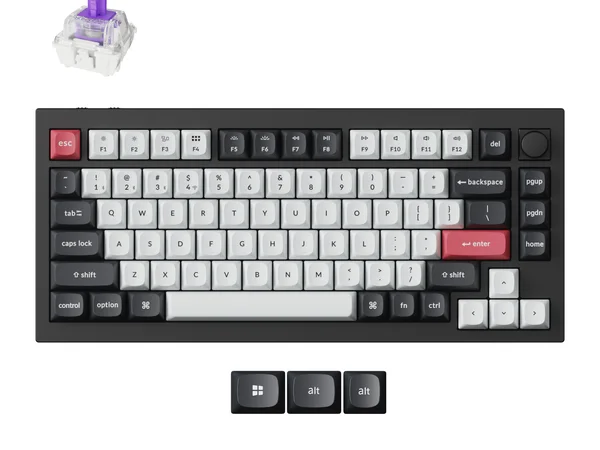

Keychron Q1 HE Review
The Q1 HE is the only wireless Hall Effect keyboard with full QMK/VIA support. Its aluminum build and deep customization make it the top choice for enthusiasts who prioritize versatility over raw gaming speed.

Keychron Q1 HE Review
The Q1 HE is the only wireless Hall Effect keyboard with full QMK/VIA support. Its aluminum build and deep customization make it the top choice for enthusiasts who prioritize versatility over raw gaming speed.
Keychron Q1 HE Review
The Q1 HE is the only wireless Hall Effect keyboard with full QMK/VIA support. Its aluminum build and deep customization make it the top choice for enthusiasts who prioritize versatility over raw gaming speed.

Keychron Q1 HE Pros & Cons
Pros
- Full QMK/VIA support — the most customizable HE keyboard available
- Tri-mode wireless with Bluetooth 5.1 and 2.4GHz
- CNC aluminum case with double-gasket mount
- Gateron double-rail magnetic switches with smooth linear feel
Cons
- 1KHz polling rate limits competitive gaming potential
- Heavier than plastic alternatives at 1.7kg
- Premium price for a 75% layout
Overview
The Keychron Q1 HE occupies a unique position that no other keyboard currently matches: it is the only wireless Hall Effect keyboard with full QMK/VIA support. That combination matters enormously for a specific audience. Programmers, power users, and keyboard enthusiasts who have spent years building muscle memory around custom key mappings can finally have adjustable actuation and wireless freedom without giving up the remapping ecosystem they depend on.
The Q1 HE is not trying to be the fastest gaming keyboard. Its 1KHz polling rate is an honest limitation for competitive esports, and Keychron does not pretend otherwise. Instead, this board optimizes for versatility. Tri-mode wireless covers Bluetooth for the couch, 2.4GHz for low-latency desk use, and wired for guaranteed stability. The CNC aluminum case with double-gasket mount delivers build quality that most competitors reserve for their non-HE flagship boards. And Gateron's double-rail magnetic switches feel refined enough to type on for eight hours without fatigue.
At $219, you are paying for the intersection of customization, wireless, and Hall Effect in a single package. If even one of those three features is not important to you, there are better options for less money. But if you need all three, the Q1 HE is the only game in town.
Features Deep-Dive
QMK/VIA Support on a Hall Effect Board
This is the Q1 HE's defining feature and the reason it exists. QMK is the most powerful open-source keyboard firmware available, and VIA provides a real-time GUI for remapping keys, building layers, and programming macros without reflashing. Every other HE keyboard uses proprietary software with varying degrees of capability. The Q1 HE gives you the full QMK stack.
For developers and power users, this means tap-hold keys, one-shot modifiers, leader keys, Unicode input, per-application layers, and hundreds of other behaviors that proprietary firmware simply cannot match. If you use Vim keybindings, code in multiple languages, or have workflows that depend on complex key combinations, QMK compatibility is not a nice-to-have. It is the entire point.
The HE-specific features -- adjustable actuation points, Rapid Trigger -- are accessible through Keychron's launcher software alongside the QMK layers. You do not lose Hall Effect functionality to gain QMK. You get both, which is an engineering achievement that took Keychron considerable effort to implement.
Tri-Mode Wireless with Premium Build
The Q1 HE connects via Bluetooth 5.1, 2.4GHz wireless dongle, or USB-C wired. Bluetooth supports up to three device pairings, so switching between a work laptop, personal machine, and tablet is a button press away. The 2.4GHz connection offers lower latency for gaming, though still not competitive with wired 8KHz boards.
Keychron's 2.4GHz implementation is reliable enough for casual gaming. Input latency lands around 4-5ms, perceptible to competitive players but invisible for RPGs, strategy games, or anything that is not a twitch shooter. Battery life runs approximately 80-100 hours with RGB off over Bluetooth, or around 40 hours with moderate lighting.
The CNC aluminum case is genuinely premium. At 1.7kg, this board is not going anywhere when you type aggressively. The double-gasket mount provides flex where it matters (the typing surface) while the rigid aluminum frame prevents any structural flex. The combination produces a typing feel that is dampened and pleasant without feeling mushy. Sound is deep and muted rather than hollow and pingy.
Gateron Double-Rail Magnetic Switches
Gateron's double-rail Hall Effect switches are a meaningful step up from the single-rail designs found in budget HE boards. The dual rails reduce stem wobble, which translates to a more stable keypress and more consistent actuation across the switch's travel. Side-by-side with Wooting's Lekker V2 switches, Gateron's offering feels slightly smoother but with marginally less precise analog behavior.
Actuation points are adjustable from 0.2mm to 3.8mm, with Rapid Trigger support down to 0.1mm sensitivity. The switches are hot-swappable within the Gateron magnetic ecosystem, so future switch upgrades are possible without desoldering. For most users, the stock switches are excellent for typing and more than adequate for non-competitive gaming. Factory lubrication is applied consistently, and the linear travel is free of scratchiness.
Pricing Analysis
At $219, the Q1 HE costs $20 more than the Wooting 80HE while offering wireless connectivity and an aluminum case that the Wooting lacks. That premium is easy to justify for anyone who needs wireless. Compared to the Razer Huntsman V3 Pro TKL at $220, you trade competitive-grade polling for QMK support and wireless -- a clear win for non-esports users. The only caveat is the 75% layout. If you need a numpad or prefer a TKL arrangement, the Q1 HE's layout is a hard constraint. Within its niche, though, the pricing is fair for the feature set and build quality delivered.
Who Is This For?
The Keychron Q1 HE works best for:
- Developers and power users who rely on QMK/VIA for custom layers, tap-hold behaviors, and workflow-specific macros and refuse to give those up for Hall Effect features
- Multi-device users who switch between two or three computers throughout the day and need reliable Bluetooth pairing alongside a clean wireless desk setup
- Build quality enthusiasts who want the sound, weight, and rigidity of a CNC aluminum case with double-gasket mount and are willing to pay for materials that feel premium under their hands every day
Who Should NOT Use This
The Keychron Q1 HE might not be the right choice if:
- Competitive gaming is your priority: The 1KHz polling rate is a genuine bottleneck for fast-paced FPS games. The Wooting 80HE and Razer Huntsman V3 Pro both offer 8KHz polling that makes a measurable difference in input latency at the highest levels.
- You want the lightest, most portable keyboard: At 1.7kg, the Q1 HE is a dense, heavy board. It travels poorly. If you commute with your keyboard or frequently move between setups, lighter alternatives like the Wooting 60HE or a standard wireless mechanical board will save your shoulders.
Bottom Line
The Keychron Q1 HE is the keyboard for people who know exactly what QMK is and why they need it. Wireless Hall Effect with the most powerful open-source firmware available, wrapped in an aluminum case that sounds and feels like a board costing $300 or more. Accept the 1KHz polling rate for a combination of features nobody else offers.
FAQ
Can I really use QMK layers alongside Hall Effect features?
Yes. QMK handles your key mappings, layers, and macros while Keychron's launcher software manages HE-specific features like actuation depth and Rapid Trigger. Both coexist. Your QMK layers work identically whether you are connected via Bluetooth, 2.4GHz, or USB.
Is the 1KHz polling rate a dealbreaker for gaming?
For competitive esports, honestly, yes. If you play Valorant, Counter-Strike, or similar titles at a high rank, the 8KHz boards from Wooting and Razer provide meaningfully faster input registration. For every other type of gaming -- RPGs, strategy, casual shooters, single-player titles -- 1KHz is perfectly fine and the wireless convenience is a net positive.
How does the Bluetooth latency compare to 2.4GHz?
Bluetooth adds roughly 8-15ms of latency compared to 2.4GHz mode. For typing and general use, it is undetectable. For gaming, use the 2.4GHz dongle. The practical difference between 2.4GHz wireless and wired USB on this board is minimal at 1KHz polling.
Is the weight a problem for desk use?
The opposite. At 1.7kg, the Q1 HE is rock-solid on a desk. It does not slide, does not shift during intense typing sessions, and the mass contributes to the dampened sound signature. The weight is only a negative if you need to carry it somewhere.
Who Is Keychron Q1 HE Best For?
Enthusiasts and programmers who want QMK customization with wireless Hall Effect convenience
The Bottom Line
The Q1 HE is the only wireless Hall Effect keyboard with full QMK/VIA support. Its aluminum build and deep customization make it the top choice for enthusiasts who prioritize versatility over raw gaming speed.
Buy on AmazonKey Specs
Scoring Breakdown
Switch quality, actuation feel, key travel, and overall typing/gaming experience. Includes switch type characteristics (linear, tactile, clicky, magnetic).
Frame materials (aluminum, plastic, steel), keycap quality (PBT vs ABS), stabilizer quality, weight, and overall construction durability.
Hot-swap support, RGB lighting, media controls, display/OLED, programmable keys, onboard memory, and extra functionality.
Wired/wireless options, Bluetooth, 2.4GHz wireless, USB-C, polling rate, latency, and multi-device pairing.
Software quality, macro programming, per-key RGB control, key remapping, profile management, and modding potential.
Price-to-performance ratio considering build quality, features, and overall package relative to competing options.