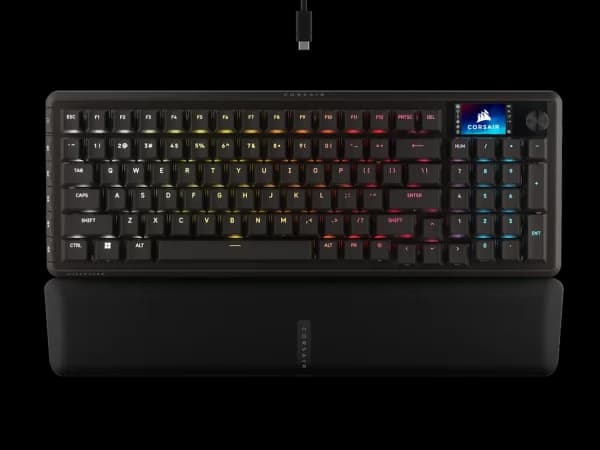

Corsair Vanguard Pro 96 Review
The Vanguard Pro 96 is Corsair's flagship keyboard with a standout LCD touchscreen. The 96% layout with numpad and premium build make it ideal for users who want gaming performance without sacrificing productivity keys.

Corsair Vanguard Pro 96 Review
The Vanguard Pro 96 is Corsair's flagship keyboard with a standout LCD touchscreen. The 96% layout with numpad and premium build make it ideal for users who want gaming performance without sacrificing productivity keys.
Corsair Vanguard Pro 96 Review
The Vanguard Pro 96 is Corsair's flagship keyboard with a standout LCD touchscreen. The 96% layout with numpad and premium build make it ideal for users who want gaming performance without sacrificing productivity keys.

Corsair Vanguard Pro 96 Pros & Cons
Pros
- LCD touchscreen for system monitoring, media, and iCUE integration
- MGX Hall Effect switches with 8KHz polling and Rapid Trigger
- 96% layout offers numpad in a compact form factor
- Premium aluminum frame with magnetic wrist rest
Cons
- Wired only despite $230 price tag
- LCD screen is a battery drain (moot for wired)
- Heaviest keyboard in the category at ~1.2kg
Overview
The Corsair Vanguard Pro 96 asks a question nobody else in the Hall Effect keyboard space is asking: what if you could have a numpad, an LCD touchscreen, and competitive-grade 8KHz HE switches in a single board? The answer, it turns out, is a keyboard that does a lot of things well but has to make compromises to fit everything in.
The 96% layout is the most immediately distinctive choice. While every other premium HE keyboard ships in TKL or 75% form factors, Corsair keeps the numpad and compresses the navigation cluster to save space. For anyone who regularly enters numbers -- accountants, data analysts, programmers who use the numpad for macros, or gamers who bind abilities to it -- this layout eliminates the need for a separate number pad. The trade-off is a wider keyboard that pushes your mouse further to the right, which competitive FPS players may find suboptimal.
Then there is the LCD touchscreen. It displays system monitoring stats, media controls, iCUE integration widgets, and custom graphics. It is genuinely useful as a glanceable dashboard but also unquestionably a luxury feature that contributes to the $230 price tag and the 1.2kg weight. Whether that screen justifies its cost depends entirely on whether you will actually use it daily or forget about it after the novelty fades.
At $230, the Vanguard Pro 96 is the most expensive keyboard in its competitive set. But it also offers the most physical features: the numpad, the screen, the aluminum frame, the magnetic wrist rest, and MGX Hall Effect switches with full 8KHz Rapid Trigger support. Corsair is betting that you want the Swiss Army knife, not the scalpel.
Features Deep-Dive
LCD Touchscreen Display
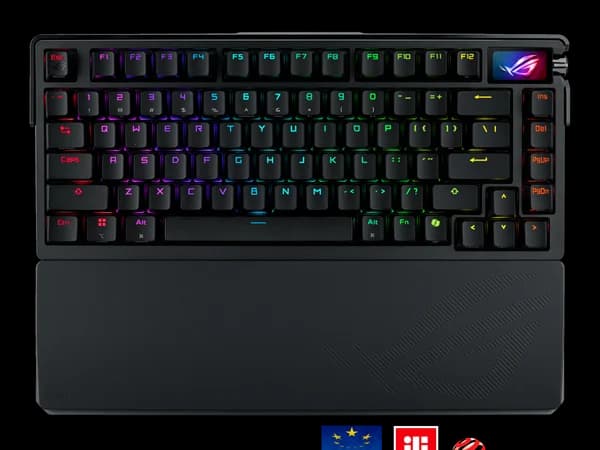
The onboard LCD touchscreen is a 2.1-inch panel positioned above the navigation cluster. Through iCUE, it displays real-time CPU and GPU temperatures, clock speeds, memory usage, and fan RPMs without Alt-tabbing out of a game. Swipe between widgets to access media playback controls, audio mixer levels, or custom-uploaded images and GIFs.
In practice, the screen is most useful as a passive system monitor. Glancing down to check GPU temperature during a rendering job or confirming that your CPU is not thermal throttling mid-game has genuine utility. The media controls are convenient but not faster than keyboard shortcuts. The custom image feature is fun for about two days.
The touchscreen adds complexity to the board's design and contributes to both weight and cost. It requires iCUE to configure, and the widget selection is limited to what Corsair provides. Third-party developers cannot easily create custom widgets, which constrains the screen's long-term potential. It is a differentiator, not a necessity -- and whether it justifies the premium over a screenless competitor depends on how much you value glanceable information without reaching for your phone or second monitor.
MGX Hall Effect Switches with 8KHz Polling
Corsair's MGX switches enter the Hall Effect space with solid fundamentals. Adjustable actuation from 0.1mm to 4.0mm, Rapid Trigger support, and 8KHz polling rate put the MGX platform on paper parity with Wooting's Lekker V2 switches. In practice, the MGX switches feel slightly heavier at the bottom-out compared to Lekker V2, with a touch more resistance during the return stroke.
The 8KHz polling implementation is competent. Input latency measurements place the Vanguard Pro 96 within 1-2ms of the Wooting 80HE in most scenarios, which is functionally indistinguishable in gameplay. Rapid Trigger sensitivity goes down to 0.1mm, matching the best in class. Corsair's firmware has improved steadily since launch, closing an initial gap in Rapid Trigger responsiveness that early reviewers noted.
Where the MGX switches fall behind is in analog input. Corsair supports adjustable actuation and Rapid Trigger but does not currently offer the true proportional analog input that Wooting provides. If you want throttle control in racing games via your keyboard, the Wooting 80HE remains the only real option. For standard gaming and typing, the MGX switches perform well.
96% Layout and Build Quality
The 96% layout packs a full numpad into a footprint only marginally wider than a TKL keyboard. Corsair achieves this by compressing the gaps between key clusters and stacking the navigation keys vertically. Arrow keys, Page Up/Down, Home, End, and Delete are all present, just reorganized. The learning curve for finding these repositioned keys takes about a week for most users.
The aluminum top frame gives the Vanguard Pro 96 a premium feel that neither the Wooting's plastic case nor the Razer's mixed construction can match. At roughly 1.2kg, it is the heaviest keyboard in the category, planted firmly on any desk surface. The included magnetic wrist rest attaches cleanly and provides comfortable support during extended sessions, though it extends the total desk footprint further.
Sound profile out of the box leans towards deep and muted, with the aluminum frame and internal dampening absorbing the higher-pitched resonance. It is not as thocky as a well-modded Wooting 80HE, but it sounds pleasant without any modifications. Key stabilizers are lubed from the factory and exhibit minimal rattle on the spacebar and larger keys.
Pricing Analysis
At $230, the Vanguard Pro 96 is the most expensive keyboard in its direct competitive set. That premium buys you three things no competitor offers together: a numpad, an LCD touchscreen, and a full aluminum frame. If you price out those features individually -- a standalone numpad runs $40-60, a system monitoring widget runs $30-50, and aluminum construction typically commands a $30-50 premium -- the Vanguard's pricing starts to look reasonable. The question is whether you need all of those features. If you would never use the numpad and find the screen gimmicky, the Wooting 80HE delivers better core HE performance for $31 less. But for productivity-minded gamers who want one keyboard that handles everything, the $230 ask is defensible.
Who Is This For?
The Corsair Vanguard Pro 96 works best for:
- Gamers who also do productivity work and need a numpad for spreadsheets, data entry, or number-heavy workflows without the desk clutter of a separate pad
- System monitoring enthusiasts who want glanceable hardware stats without third-party software overlays, and who are already running iCUE for other Corsair peripherals like coolers, fans, or RGB
- Premium build quality buyers who want the heaviest, most solid-feeling keyboard available with CNC aluminum construction, a magnetic wrist rest, and a visual presence that looks impressive on a desk
Who Should NOT Use This
The Corsair Vanguard Pro 96 might not be the right choice if:
- Competitive FPS is your primary use case: The wider 96% layout pushes your mouse further right, which creates a less ergonomic position for low-sensitivity aiming. TKL boards from Wooting and Razer give you more mouse room and equivalent or better core HE performance.
- You want minimal software dependencies: iCUE is required to configure the screen, set up Rapid Trigger, and customize actuation points. It is a full system tray application with meaningful resource usage. If you prefer lightweight, focused software like Wootility, the Corsair ecosystem will feel heavy.
Bottom Line
The Corsair Vanguard Pro 96 is the maximalist choice in the Hall Effect keyboard space. More keys, more features, more metal, more screen. The 8KHz MGX switches perform well, the build quality is the best in class, and the 96% layout solves a real problem for users who refuse to give up their numpad. Pay the premium for the most fully featured HE keyboard available, or save money on a focused competitor that does the core job equally well.
FAQ
Is the LCD screen a gimmick or genuinely useful?
It depends on your workflow. If you regularly monitor system temperatures during gaming or content creation, having a persistent hardware readout on your keyboard is quicker than opening software or checking a second monitor. If you do not actively monitor system stats, the novelty wears off within a week. Media controls on the screen are convenient but not essential. Be honest with yourself about whether you will use it.
How does the 96% layout affect gaming?
The extra width adds roughly 3-4cm compared to a TKL board, pushing your mouse hand further to the right. For high-sensitivity players or those who use small mouse movements, this is negligible. For low-sensitivity FPS players who make wide sweeping motions, the reduced mouse space can be noticeable. Many competitive gamers prefer TKL or smaller specifically for this reason.
Can I use this without iCUE installed?
For basic typing with default settings, yes. For configuring the screen, adjusting actuation points, enabling Rapid Trigger, or customizing lighting, iCUE is required. Unlike some competitors that store full profiles on-device, the Vanguard Pro 96 leans heavily on its software. Once configured, settings persist if you temporarily close iCUE, but the screen will display only a default Corsair logo.
How does it compare to just buying a TKL keyboard and a separate numpad?
A separate mechanical numpad typically costs $40-60. Combined with the Wooting 80HE at $199, you are looking at $239-259 for comparable coverage, more than the Vanguard Pro 96's $230. But the separate setup gives you the option to move the numpad to your left side or remove it entirely for gaming. The Vanguard trades that flexibility for a cleaner, integrated solution. Desk space and workflow preferences should drive this decision.
Who Is Corsair Vanguard Pro 96 Best For?
Gamers and content creators who want a full-featured 96% keyboard with an LCD screen
The Bottom Line
The Vanguard Pro 96 is Corsair's flagship keyboard with a standout LCD touchscreen. The 96% layout with numpad and premium build make it ideal for users who want gaming performance without sacrificing productivity keys.
Buy on AmazonKey Specs
Scoring Breakdown
Switch quality, actuation feel, key travel, and overall typing/gaming experience. Includes switch type characteristics (linear, tactile, clicky, magnetic).
Frame materials (aluminum, plastic, steel), keycap quality (PBT vs ABS), stabilizer quality, weight, and overall construction durability.
Hot-swap support, RGB lighting, media controls, display/OLED, programmable keys, onboard memory, and extra functionality.
Wired/wireless options, Bluetooth, 2.4GHz wireless, USB-C, polling rate, latency, and multi-device pairing.
Software quality, macro programming, per-key RGB control, key remapping, profile management, and modding potential.
Price-to-performance ratio considering build quality, features, and overall package relative to competing options.