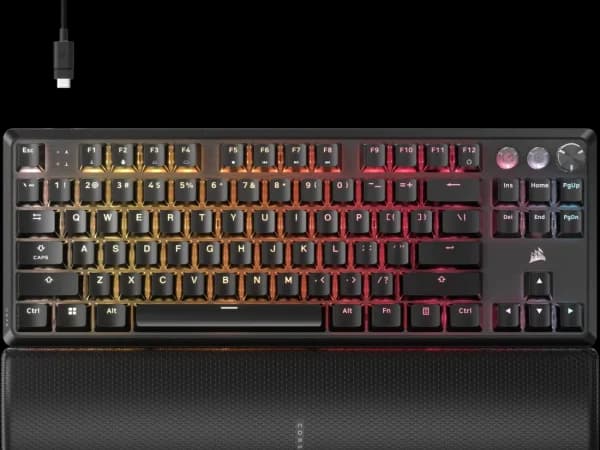

Corsair K70 PRO TKL Review
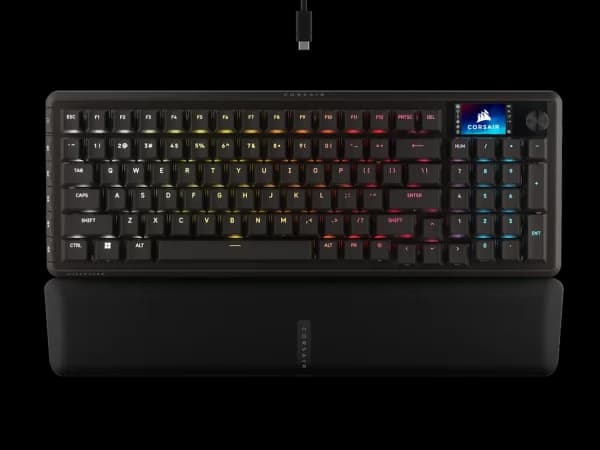
The K70 PRO TKL combines Corsair's proven build quality with cutting-edge MGX magnetic switches. The aluminum frame and 8KHz polling make it a strong mid-range gaming contender.

Corsair K70 PRO TKL Review
The K70 PRO TKL combines Corsair's proven build quality with cutting-edge MGX magnetic switches. The aluminum frame and 8KHz polling make it a strong mid-range gaming contender.
Corsair K70 PRO TKL Review
The K70 PRO TKL combines Corsair's proven build quality with cutting-edge MGX magnetic switches. The aluminum frame and 8KHz polling make it a strong mid-range gaming contender.

Corsair K70 PRO TKL Pros & Cons
Pros
- MGX Hall Effect switches with 0.1mm actuation and Rapid Trigger
- 8KHz polling rate for ultra-responsive gaming
- Brushed aluminum frame with premium build quality
- iCUE software with deep customization and macro support
Cons
- Wired only — no wireless connectivity
- ABS keycaps feel budget on a $180 keyboard
- iCUE software can be resource-heavy
Overview
The Corsair K70 PRO TKL is the keyboard for people who want the spec-sheet win and the premium build in the same package. Where Logitech compromises on polling rate and budget brands compromise on materials, Corsair threads the needle: 8KHz polling, 0.1mm Rapid Trigger actuation, MGX Hall Effect switches, and a brushed aluminum frame, all at $180.
That combination makes the K70 PRO TKL one of the most complete mid-range offerings in the Hall Effect space. The aluminum top plate gives the board a weight and rigidity that plastic-cased competitors simply cannot match. When you bottom out a key, the keystroke feels anchored rather than hollow. The MGX switches are smooth and responsive, and iCUE software -- love it or tolerate it -- offers some of the deepest customization available on any gaming keyboard.
The asterisks are minor but worth noting. ABS keycaps on a $180 aluminum-framed board feel like a cost-cutting decision that clashes with the premium positioning. iCUE is powerful but resource-hungry, and it practically demands to run at startup to maintain your settings. And like most magnetic switch keyboards at this price, it is wired-only. None of these are dealbreakers, but they keep the K70 PRO TKL from being the unqualified recommendation it could have been with PBT keycaps and a lighter software footprint.
Features Deep-Dive
MGX Hall Effect Switches with 0.1mm Actuation
Corsair's MGX switches represent their first in-house Hall Effect design, and the execution is strong. The 0.1mm actuation point means the switch can register a press after barely any downward movement, which is absurdly sensitive and primarily useful for competitive gaming bindings on movement keys. The more practical everyday setting is somewhere between 0.5mm and 1.5mm, which iCUE lets you configure per key. Rapid Trigger support means the switch resets as soon as you begin lifting, without waiting for a fixed reset point. The combination of adjustable actuation and Rapid Trigger at 8KHz polling gives the K70 PRO TKL the fastest possible input chain from keystroke to PC registration. The switches themselves have a satisfyingly smooth linear travel with no scratchiness and minimal stem wobble. They feel more refined than what you get on budget Hall Effect boards, though the margin is narrower than the price difference might suggest.
Brushed Aluminum Frame
This is where the K70 PRO TKL separates itself from the pack most tangibly. The brushed aluminum top plate adds significant weight and eliminates the flex and resonance that plague plastic-cased keyboards. Every keystroke sounds tighter and feels more planted. The aluminum also resists scratches and fingerprints better than painted plastic, aging gracefully rather than developing the scuffed, worn look that budget boards acquire after a year of heavy use. The underside is plastic to keep the overall weight reasonable for a TKL, but since you never see or touch the bottom plate, this is a sensible engineering compromise. The overall desk presence is commanding without being garish: clean lines, minimal branding, and a profile low enough that most users will not need a wrist rest.
iCUE Software and Ecosystem
Corsair's iCUE platform is arguably the most feature-rich peripheral software available, which is both its greatest strength and its most common complaint. On the positive side, iCUE lets you configure per-key actuation points, create multi-layered lighting profiles, set up complex macros with conditional branching, and synchronize RGB effects across every Corsair device you own -- keyboard, mouse, headset, fans, RAM, AIO cooler, the works. If you have a Corsair-heavy setup, the visual synchronization is genuinely impressive. The cost is system resources: iCUE runs multiple background processes and can consume 200-400MB of RAM at idle. It also insists on running at startup to maintain custom profiles, and closing it reverts the keyboard to a basic onboard mode. For users who build lean gaming rigs and dislike background bloat, this is a real friction point. But for those who embrace the ecosystem, iCUE delivers customization depth that competitors simply do not match.
Pricing Analysis
At $180, the K70 PRO TKL asks $10 more than the Logitech G PRO X TKL RAPID while delivering 8KHz polling versus Logitech's 1KHz. That comparison alone makes the Corsair look like the better technical value between the two established brands. Against budget competitors, the story is more nuanced. You can get identical polling rates and Rapid Trigger from the Gamakay NS68 at $45 or the Epomaker HE80 at $59. What the extra $120-135 buys you is the aluminum frame, more refined switches, Corsair's software ecosystem, and the peace of mind that comes with an established brand's warranty and support infrastructure. Whether that is worth it depends entirely on how much you value materials and polish over raw price-to-performance. If you plan to use this keyboard daily for years, the build quality premium pays dividends in durability and desk presence that budget boards cannot match.
Who Is This For?
Corsair K70 PRO TKL works best for:
- Competitive gamers who also care about build quality and want 8KHz polling and Rapid Trigger in a chassis that feels as good as it performs, not a plastic box with great switches inside
- Corsair ecosystem users who own Corsair mice, headsets, or RGB components and want everything synchronized through iCUE's unified lighting and macro platform
- Long-term buyers who plan to use one keyboard for years and value the durability of brushed aluminum over the planned obsolescence feel of budget plastic cases
Who Should NOT Use This
Corsair K70 PRO TKL might not be the right choice if:
- You prioritize value above all -- the core gaming technology inside the K70 PRO TKL is available for a quarter of the price in budget Hall Effect boards, and the aluminum frame and Corsair badge do not make your aim any better
- Lightweight software matters to you -- iCUE is powerful but resource-intensive, and if you run a tightly optimized gaming rig where every background process is scrutinized, the software overhead may frustrate you more than the features justify
Bottom Line
The Corsair K70 PRO TKL is the best-built mid-range Hall Effect keyboard you can buy. It matches or beats the competition on every gaming-relevant spec while wrapping it all in an aluminum frame that budget boards cannot touch. The ABS keycaps are a letdown at this price, and iCUE demands more system resources than it should, but neither flaw undermines what is fundamentally an excellent competitive gaming keyboard with the build quality to last.
FAQ
Why does Corsair ship ABS keycaps on a $180 keyboard?
It is a common frustration. ABS keycaps are cheaper to manufacture with RGB-compatible shine-through legends, which is likely the primary reason. The good news is that the K70 PRO TKL uses a standard MX-compatible layout, so aftermarket PBT keycap sets are easy to find and install. A $30-40 PBT set transforms the typing feel and eliminates the greasy shine that ABS develops over time.
How does 8KHz polling on the K70 compare to the Logitech at 1KHz?
In controlled input latency tests, the K70 PRO TKL registers keystrokes measurably faster and produces smoother input curves than 1KHz keyboards. In practical gaming, the difference is most noticeable during rapid key releases in counter-strafing scenarios. Whether the average player can feel the difference is debatable, but if you are choosing between the Corsair and Logitech at similar prices, the K70 PRO TKL objectively wins on input responsiveness.
Is iCUE required, or can I use the keyboard without it?
The keyboard works without iCUE installed, but it runs in a basic onboard mode with default actuation points, a single lighting effect, and no Rapid Trigger customization. To access per-key actuation settings, custom Rapid Trigger configurations, advanced macros, and RGB profiles, iCUE must be installed and running. For most buyers of this keyboard, installing iCUE is effectively mandatory to access the features you paid for.
Who Is Corsair K70 PRO TKL Best For?
Competitive gamers who want premium build quality with 8KHz Hall Effect performance
The Bottom Line
The K70 PRO TKL combines Corsair's proven build quality with cutting-edge MGX magnetic switches. The aluminum frame and 8KHz polling make it a strong mid-range gaming contender.
Buy on AmazonKey Specs
Scoring Breakdown
Switch quality, actuation feel, key travel, and overall typing/gaming experience. Includes switch type characteristics (linear, tactile, clicky, magnetic).
Frame materials (aluminum, plastic, steel), keycap quality (PBT vs ABS), stabilizer quality, weight, and overall construction durability.
Hot-swap support, RGB lighting, media controls, display/OLED, programmable keys, onboard memory, and extra functionality.
Wired/wireless options, Bluetooth, 2.4GHz wireless, USB-C, polling rate, latency, and multi-device pairing.
Software quality, macro programming, per-key RGB control, key remapping, profile management, and modding potential.
Price-to-performance ratio considering build quality, features, and overall package relative to competing options.