
Yealink MeetingBar A40 Review
The Yealink MeetingBar A40 delivers impressive specs for the price — dual cameras, integrated Teams compute, and AI framing for under $2,700. It's a compelling alternative to pricier Poly and Logitech options for Teams-first organizations. The main trade-off is a smaller ecosystem and less brand recognition.

Yealink MeetingBar A40 Review
The Yealink MeetingBar A40 delivers impressive specs for the price — dual cameras, integrated Teams compute, and AI framing for under $2,700. It's a compelling alternative to pricier Poly and Logitech options for Teams-first organizations. The main trade-off is a smaller ecosystem and less brand recognition.
Yealink MeetingBar A40 Review
The Yealink MeetingBar A40 delivers impressive specs for the price — dual cameras, integrated Teams compute, and AI framing for under $2,700. It's a compelling alternative to pricier Poly and Logitech options for Teams-first organizations. The main trade-off is a smaller ecosystem and less brand recognition.

Yealink MeetingBar A40 Pros & Cons
Pros
- Integrated compute for Microsoft Teams Rooms — no external PC needed
- Dual-camera system with AI framing at a competitive price point
- Yealink Device Management Platform for cloud-based IT administration
- Strong value proposition compared to Poly and Logitech at similar specs
Cons
- Primarily optimized for Teams — Zoom support requires separate licensing
- Brand awareness lower than Poly or Logitech in North American markets
- Ecosystem of accessories and add-ons smaller than established competitors
Overview
The Yealink MeetingBar A40 is the value play in this category, and it's a surprisingly strong one. Dual 48MP cameras, integrated Microsoft Teams Rooms compute, AI-powered IntelliFocus framing, and expandable microphone support — all for $2,699. That's $1,500 less than the Logitech Rally Bar and $4,300 less than the Poly Studio X72, while offering integrated compute that the Logitech doesn't include.
The A40 is unambiguously a Teams-first device. It ships certified for Microsoft Teams Rooms on Android 13 with deep platform integration, including support for the Microsoft Device Ecosystem Platform (MDEP) for security compliance. A General Mode enables Zoom and USB BYOD usage, but the native experience is optimized for Teams. For organizations that have standardized on Microsoft Teams and want to equip small-to-medium conference rooms with capable video bars without breaking the budget, the A40 delivers specifications that punch well above its price point.
The trade-off is ecosystem maturity. Yealink's brand recognition and AV channel presence in North America lag behind Logitech, Poly, and Jabra. The accessory ecosystem is smaller, and finding local support partners requires more effort. But the hardware-to-dollar ratio is the best in this roundup, and for Teams-focused organizations, the A40 deserves serious consideration.
Features Deep-Dive
Dual 48MP Camera System with IntelliFocus
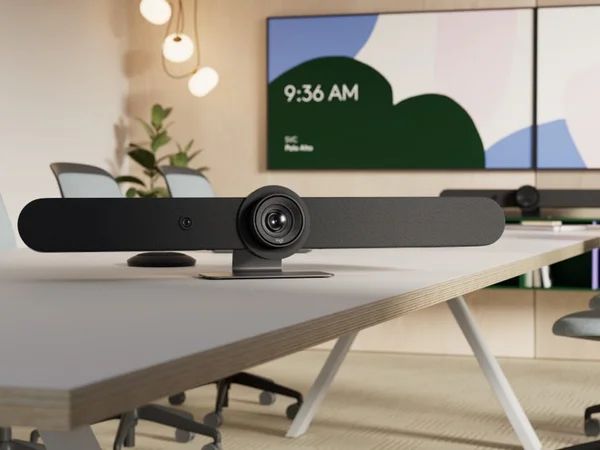
The A40's dual 48MP lenses each cover 78° of field of view, combining for a 120° ultra-wide frame. IntelliFocus is Yealink's take on intelligent framing: rather than just cropping to the group, it identifies the most recent speaker and provides a real-time close-up alongside the wider room view. This promotes meeting equity by ensuring remote participants can read facial expressions even when speakers are seated at the back of the room. Video Fence complements IntelliFocus by creating virtual boundaries — in glass-walled rooms, only participants within the defined frame appear on camera, preventing hallway traffic from distracting remote attendees. The dual-camera architecture at this price point is notable; most sub-$3,000 competitors use single cameras.
Integrated Teams Rooms on Android
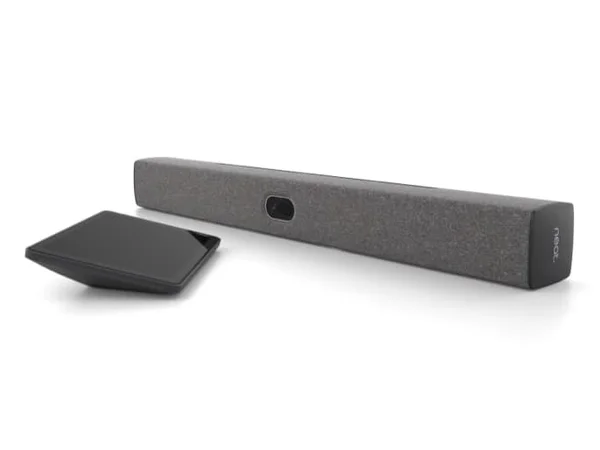
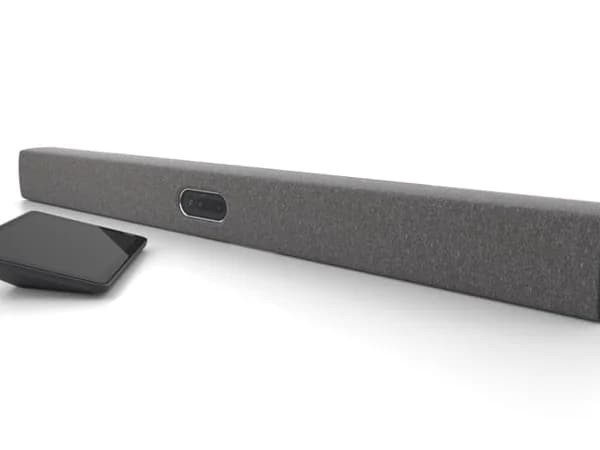
Like the Poly X-series, the A40 runs Microsoft Teams Rooms natively on its integrated compute — no external PC required. This runs on Android 13, which Microsoft has been actively developing as a lighter-weight alternative to Windows for meeting room devices. The practical benefit is the same: mount, connect, provision. For Teams administrators, the A40 appears in the Microsoft Teams Admin Center alongside other certified devices, and it supports Microsoft's MDEP security framework. A single USB-C cable connects the CTP25 touch console for power and data, keeping the table clean. The A40 also offers a General Mode for basic Zoom support and USB BYOD connectivity, though Teams is clearly the intended platform.
Expandable Audio with Ceiling and Table Options
The built-in microphone picks up voices at up to 6 meters (roughly 20 feet), which covers most small conference rooms. But the A40's real audio flexibility emerges through its expansion options: it supports Yealink's VCM35 and VCM36 table extension microphones, CS10 ceiling speakers, and CM20 ceiling microphones. Line-in and line-out ports also enable integration with third-party audio equipment, making the A40 adaptable to rooms with existing AV infrastructure. This expansion flexibility is unusual at this price point — the Logitech Rally Bar Huddle ($1,899) has no expansion option, and even the Rally Bar Mini requires proprietary Mic Pods.
Pricing Analysis
At $2,699, the Yealink MeetingBar A40 undercuts every premium competitor by a significant margin. The closest comparison is the Poly Studio X32 ($2,099), which targets smaller rooms with a single camera and less sophisticated AI framing. Versus the Logitech Rally Bar Mini ($3,299), the A40 saves $600 while adding integrated compute that the Logitech lacks. Versus the Poly Studio X52 ($3,853), the savings are $1,154 — significant when multiplied across 20+ room deployments. The CTP25 touch console adds roughly $500-700 to the deployment, but even fully configured, the A40 system remains substantially cheaper than alternatives. The primary risk is less mature support infrastructure compared to Logitech and Poly.
Who Is This For?
Yealink MeetingBar A40 works best for:
- Microsoft Teams-first organizations that want integrated Teams Rooms compute with AI framing and expandable audio at the lowest per-room cost in this category
- Budget-conscious IT teams deploying 10+ rooms where the $600-1,500 savings per room versus Logitech or Poly alternatives compounds into a meaningful budget difference — at 20 rooms, you're saving $12,000-30,000
- Rooms with existing AV infrastructure where the line-in/line-out ports and ceiling microphone support enable integration with installed audio systems rather than replacing everything
Who Should NOT Use This
Yealink MeetingBar A40 might not be the right choice if:
- You run Zoom or Google Meet as your primary platform — the A40's native experience is optimized for Teams. Zoom works in General Mode but lacks the deep integration of the Rally Bar or Poly X-series on Zoom Rooms. Google Meet support is limited.
- You need strong local AV support — Yealink's North American channel partner network is thinner than Logitech's or Poly's. If your organization relies on local AV integrators for installation and support, verify Yealink support availability in your area before committing.
- Meeting rooms are client-facing and appearance matters — the A40's design is functional rather than striking. In executive boardrooms or design-conscious workplaces, the Neat Bar Gen 2 or Neat Bar Pro offer substantially more polished aesthetics.
Bottom Line
The Yealink MeetingBar A40 offers the best hardware-per-dollar ratio in the conference room camera category. Dual 48MP cameras, integrated Teams compute, AI framing, and expandable audio at $2,699 is a combination no competitor matches at this price. The Teams-centric design is both its strength and limitation — for Teams organizations, it's an obvious value pick; for multi-platform environments, the ecosystem constraint is real. Yealink's growing market presence suggests the support infrastructure will continue improving, making the A40 a smart bet for cost-conscious Teams deployments.
FAQ
How does Yealink compare to Logitech and Poly in terms of reliability?
Yealink is the world's largest SIP phone manufacturer and has been expanding aggressively into video conferencing. The A40 is Microsoft Teams certified with MDEP security compliance, indicating it meets Microsoft's reliability and security standards. That said, Logitech and Poly have longer track records in the video conferencing space and more established North American support networks. Real-world reliability reports for the A40 are positive but less extensive than for the Rally Bar or Poly X-series.
Can I use the A40 with Zoom?
Yes, the A40 offers a General Mode that supports Zoom and USB BYOD connectivity. However, the native experience is optimized for Microsoft Teams Rooms on Android. For dedicated Zoom rooms, a device with native Zoom Rooms certification like the Logitech Rally Bar or Poly X-series provides a more streamlined experience.
What touch controller options are available?
The A40 pairs with the Yealink CTP25 touch console, which connects via a single USB-C cable for both power and data. It's sold separately. The A40 can also be controlled through the Teams Rooms interface on a connected display without a dedicated controller.
Is TUV SUD carbon footprint verification meaningful?
It indicates Yealink has measured and third-party verified the product's environmental impact per ISO 14064-3. While it doesn't directly affect performance, it's relevant for organizations with sustainability procurement requirements — an increasingly common consideration in enterprise purchasing.
Who Is Yealink MeetingBar A40 Best For?
Microsoft Teams organizations looking for integrated compute with AI framing at a competitive price
The Bottom Line
The Yealink MeetingBar A40 delivers impressive specs for the price — dual cameras, integrated Teams compute, and AI framing for under $2,700. It's a compelling alternative to pricier Poly and Logitech options for Teams-first organizations. The main trade-off is a smaller ecosystem and less brand recognition.
Buy on AmazonKey Specs
Scoring Breakdown
Camera resolution, AI-powered auto-framing, speaker tracking accuracy, and field of view coverage
Microphone array quality, pickup range, noise cancellation, echo suppression, and built-in speaker clarity
Maximum room size support, participant capacity, zoom capabilities, and ability to capture all meeting participants
Native support for Zoom Rooms, Microsoft Teams Rooms, Google Meet, Webex, and BYOD/USB connectivity
Installation simplicity, IT remote management tools, firmware update process, and enterprise deployment features
Physical construction quality, aesthetics, mounting flexibility, form factor, and thermal management
Price-to-feature ratio, included accessories, warranty coverage, and total cost of ownership