
Poly Studio X72 Review
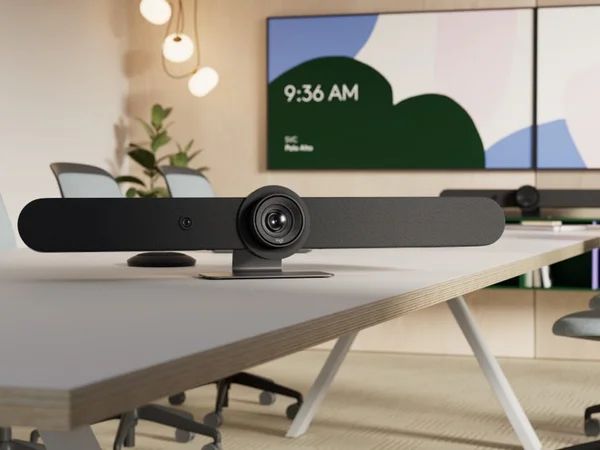
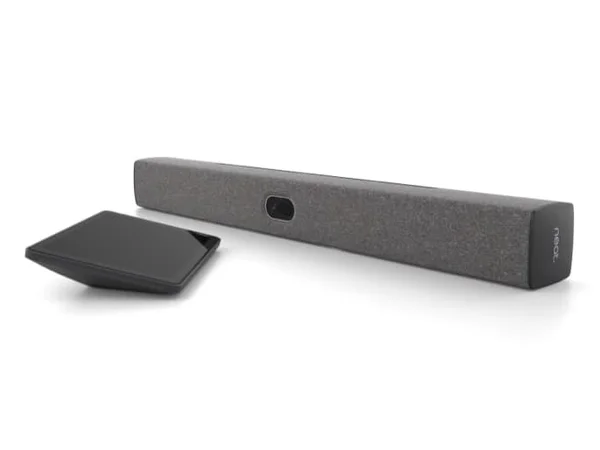
The Poly Studio X72 is the flagship all-in-one video bar for large conference rooms. Its dual-camera AI Director system handles big rooms with ease, and the integrated compute means no separate PC is needed for Zoom or Teams Rooms. The price is steep, but for large-room deployments, the X72 delivers enterprise-grade quality.

Poly Studio X72 Review
The Poly Studio X72 is the flagship all-in-one video bar for large conference rooms. Its dual-camera AI Director system handles big rooms with ease, and the integrated compute means no separate PC is needed for Zoom or Teams Rooms. The price is steep, but for large-room deployments, the X72 delivers enterprise-grade quality.
Poly Studio X72 Review
The Poly Studio X72 is the flagship all-in-one video bar for large conference rooms. Its dual-camera AI Director system handles big rooms with ease, and the integrated compute means no separate PC is needed for Zoom or Teams Rooms. The price is steep, but for large-room deployments, the X72 delivers enterprise-grade quality.

Poly Studio X72 Pros & Cons
Pros
- Dual-camera system with AI Director for intelligent framing of up to 20+ participants
- Exceptional audio with NoiseBlockAI and Acoustic Fence technology
- Native Zoom, Teams, and open SIP support — no external compute needed
- Premium build quality with versatile wall-mount and table-stand options
Cons
- Premium price at $6,999 is a significant investment
- Large form factor may not suit smaller rooms
- Requires Poly Lens for full remote management capabilities
Overview
The Poly Studio X72 is the product you reach for when boardroom video quality is non-negotiable and budget is secondary. Its dual 4K 20MP camera system with independent wide-angle (120°) and telephoto (70°) lenses gives HP's AI Director technology an enormous amount of visual data to work with, producing intelligent framing that handles 20+ participants without breaking a sweat.
What makes the X72 genuinely different from everything else in this roundup is the integrated compute. There's no separate PC or NUC tucked behind the display — Zoom Rooms and Microsoft Teams Rooms run natively on the device itself. For IT teams managing dozens of conference rooms, eliminating that extra point of failure is worth more than any spec sheet advantage.
The audio story is equally compelling. Second-order gradient microphones with NoiseBlockAI and Acoustic Fence technology create a pickup zone that reaches 25 feet while aggressively rejecting noise from hallways and adjacent rooms. At $6,999, this is an investment — but for organizations where a failed video call means a failed deal, the X72 delivers the reliability that justifies its price.
Features Deep-Dive
Dual-Camera AI Director System
The X72's defining feature is its dual-camera architecture. Rather than relying on a single wide-angle lens with digital zoom (the approach most competitors take), Poly uses two independent 4K sensors — one wide, one telephoto — and lets AI Director switch between them in real time. The result is dramatically better image quality when framing distant participants. Where single-camera systems produce grainy crops at the back of a 30-foot boardroom, the X72's telephoto lens captures those participants with native resolution. The AI Director also offers multiple framing modes: group view for seeing everyone, speaker tracking for focusing on whoever's talking, and a gallery-style view that frames individuals separately.
NoiseBlockAI and Acoustic Fence
Poly's audio intelligence goes beyond standard noise cancellation. NoiseBlockAI uses machine learning to identify and suppress specific distracting sounds — keyboard clatter, pen tapping, paper rustling, HVAC rumble — without affecting speech. Acoustic Fence takes this further by creating a virtual boundary around the meeting space: voices outside the defined zone are attenuated even if they're clearly audible in the room. This is transformative for glass-walled conference rooms where adjacent conversations bleed in. The second-order gradient microphone array captures audio from up to 25 feet away, and the stereo speaker system with aluminum cone tweeters and bass reflex ports ensures remote participants sound natural rather than tinny.
Integrated Compute and Zero-PC Deployment
Every X72 ships with enough processing power to run Zoom Rooms or Microsoft Teams Rooms natively. No external PC, no NUC, no compute module — just mount the bar, connect power and Ethernet, and the room is live. This dramatically simplifies IT provisioning: one firmware to manage via Poly Lens, one device to troubleshoot, one power draw to account for. The integrated approach also means the camera AI features run locally rather than being dependent on an attached computer's processing power, ensuring consistent performance regardless of software updates on external machines. Dual HDMI outputs support two displays natively, and HDMI input handles content sharing from laptops.
Pricing Analysis
At $6,999, the Poly Studio X72 is the most expensive device in this category — and it doesn't include a touch controller (the TC10 is sold separately). However, the total cost of ownership calculation shifts meaningfully when you factor in the integrated compute. A comparable Logitech Rally Bar ($4,199) plus a dedicated room PC ($500-1,000) plus ongoing Windows licensing and maintenance narrows the gap considerably. For organizations deploying 20+ rooms, the reduced IT overhead of a single-device solution can offset the premium within the first year. The X72 makes the most financial sense in large boardrooms and executive conference rooms where the dual-camera system's superior telephoto framing provides capabilities that cheaper single-camera bars simply cannot match.
Who Is This For?
Poly Studio X72 works best for:
- Enterprise IT teams deploying large boardrooms (14-20+ seats) that need a single all-in-one device with no external compute, reducing failure points and simplifying fleet management through Poly Lens
- Organizations standardized on Zoom or Teams that want native room OS integration without maintaining a separate Windows or Android compute device per room
- Executive meeting spaces where video quality directly impacts business outcomes — investor calls, client presentations, board meetings — and the dual-camera telephoto system ensures participants at the far end of a 30-foot table appear sharp rather than pixelated
Who Should NOT Use This
Poly Studio X72 might not be the right choice if:
- Your rooms seat fewer than 10 people — the X72's dual-camera system is engineered for large spaces, and you'll be paying a significant premium for capabilities a smaller room won't utilize. The Poly X52 or X32 serve medium and small rooms at substantially lower price points.
- You need Google Meet native support — the X72 runs Zoom and Teams natively but requires a separate compute module for Google Meet, adding cost and complexity. The Logitech Rally Bar offers native Meet support out of the box.
- Budget is the primary constraint — at $6,999 plus controller, this is a $8,000+ investment per room. The Yealink MeetingBar A40 delivers dual cameras and integrated Teams compute for under $2,700.
Bottom Line
The Poly Studio X72 is the uncompromising choice for large conference rooms. Its dual-camera AI Director delivers framing quality that single-camera competitors cannot match at distance, and the integrated compute eliminates the most common point of failure in conference room deployments. The price is steep, but for organizations where reliable, high-quality video in large rooms is a business requirement, the X72 justifies every dollar.
FAQ
Does the Poly Studio X72 require a separate computer?
No. The X72 has integrated compute that runs Zoom Rooms and Microsoft Teams Rooms natively. You connect power, Ethernet, and displays — no external PC needed. This is one of its key advantages over devices like the Logitech Rally Bar, which requires either its own Android appliance mode or an external computer.
How does the dual-camera system actually work?
The X72 has two independent 4K 20MP cameras with different focal lengths (120° wide and 70° telephoto). The AI Director analyzes the room in real time and switches between cameras or blends their feeds to optimize framing. For distant participants, the telephoto lens captures them with native resolution rather than digitally cropping from the wide-angle feed, resulting in noticeably sharper video.
Can I expand the microphone coverage for very large rooms?
Yes. The X72 includes an expansion microphone port that supports additional Poly table microphones. The built-in array covers approximately 25 feet, but for rooms beyond that — L-shaped conference rooms or extra-large boardrooms — adding expansion microphones extends coverage to the entire space.
What management tools are available for IT teams?
Poly Lens provides cloud-based device management including remote monitoring, firmware updates, configuration deployment, and analytics across your entire Poly fleet. It integrates with both Zoom and Microsoft admin consoles, allowing IT teams to manage X72 devices alongside their broader collaboration infrastructure.
Who Is Poly Studio X72 Best For?
Large conference rooms (14-20+ people) that need a premium all-in-one solution with native platform support
The Bottom Line
The Poly Studio X72 is the flagship all-in-one video bar for large conference rooms. Its dual-camera AI Director system handles big rooms with ease, and the integrated compute means no separate PC is needed for Zoom or Teams Rooms. The price is steep, but for large-room deployments, the X72 delivers enterprise-grade quality.
Buy on AmazonKey Specs
Scoring Breakdown
Camera resolution, AI-powered auto-framing, speaker tracking accuracy, and field of view coverage
Microphone array quality, pickup range, noise cancellation, echo suppression, and built-in speaker clarity
Maximum room size support, participant capacity, zoom capabilities, and ability to capture all meeting participants
Native support for Zoom Rooms, Microsoft Teams Rooms, Google Meet, Webex, and BYOD/USB connectivity
Installation simplicity, IT remote management tools, firmware update process, and enterprise deployment features
Physical construction quality, aesthetics, mounting flexibility, form factor, and thermal management
Price-to-feature ratio, included accessories, warranty coverage, and total cost of ownership