
Poly Studio X32 Review
The Poly Studio X32 brings Poly's all-in-one approach to smaller rooms at a much more accessible price point. NoiseBlockAI and integrated Zoom/Teams compute are included, and Poly Lens management works identically to the larger models. The best entry point into Poly's ecosystem for smaller spaces.

Poly Studio X32 Review
The Poly Studio X32 brings Poly's all-in-one approach to smaller rooms at a much more accessible price point. NoiseBlockAI and integrated Zoom/Teams compute are included, and Poly Lens management works identically to the larger models. The best entry point into Poly's ecosystem for smaller spaces.
Poly Studio X32 Review
The Poly Studio X32 brings Poly's all-in-one approach to smaller rooms at a much more accessible price point. NoiseBlockAI and integrated Zoom/Teams compute are included, and Poly Lens management works identically to the larger models. The best entry point into Poly's ecosystem for smaller spaces.

Poly Studio X32 Pros & Cons
Pros
- Compact all-in-one with integrated Zoom and Teams compute at an accessible price
- Same NoiseBlockAI and Acoustic Fence as higher-end Poly models
- Poly Lens cloud management included for enterprise deployment
- Ideal for huddle rooms and small meeting spaces
Cons
- Limited to ~8 participants — not suitable for medium or large rooms
- Single camera limits AI framing capabilities compared to X52/X72
- Audio pickup range designed for small spaces only
Overview
The Poly Studio X32 brings the full Poly X-series experience — integrated compute, NoiseBlockAI, Acoustic Fence, Poly Lens management — to huddle rooms and small meeting spaces at a price that finally makes the zero-PC approach accessible. At $2,099, it costs less than the Logitech Rally Bar Huddle ($1,899) once you factor in the external computer that non-integrated solutions require.
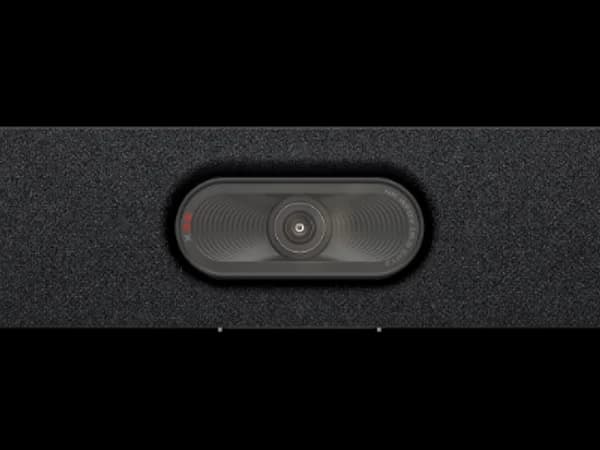
The X32 uses a single camera rather than the dual-camera systems in its X52 and X72 siblings, which limits its AI Director to digital zoom and crop within a single frame. For rooms seating 2-8 people, this is perfectly adequate — participants sit close enough to the camera that the single-sensor approach captures everyone with good detail. The real value proposition is the same as the rest of the X-series: Zoom Rooms and Teams Rooms run natively, Poly Lens manages the device remotely, and there's no room PC to troubleshoot, update, or replace.
For organizations already deploying X52s in medium rooms and X72s in large rooms, the X32 completes the lineup at the small end. For new deployments, it represents the most affordable path to a genuinely PC-free conference room.
Features Deep-Dive
NoiseBlockAI in Small Spaces
NoiseBlockAI is arguably even more valuable in small rooms than in large ones. Huddle rooms are often located in open-plan offices, adjacent to high-traffic corridors, or sharing thin walls with other meeting spaces. The constant background noise — footsteps, nearby conversations, door sounds, HVAC — is exactly what NoiseBlockAI's machine learning models are trained to identify and suppress. Acoustic Fence adds a virtual boundary that attenuates sound from outside the room perimeter, which is transformative for glass-walled huddle rooms where adjacent noise bleeds through. In testing environments, Poly's audio intelligence consistently outperforms standard noise suppression in these challenging small-room scenarios.
Integrated Compute at the Entry Level
The X32 runs the same integrated platform as the X72 and X52 — Zoom Rooms and Microsoft Teams Rooms natively, managed through Poly Lens. This means an IT team can deploy X32s in 50 huddle rooms with the same provisioning workflow they use for X72s in boardrooms: push the configuration from Poly Lens, connect the device to power and Ethernet, and the room is live. No imaging PCs, no managing Windows updates across 50 machines, no troubleshooting driver conflicts. The operational simplicity at scale is the X32's most compelling argument against cheaper USB-only devices that seem affordable per-unit but create significant IT overhead when deployed across an organization.
Compact Form Factor
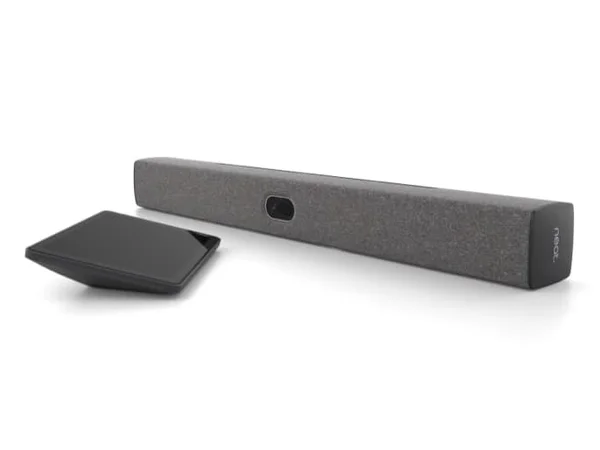
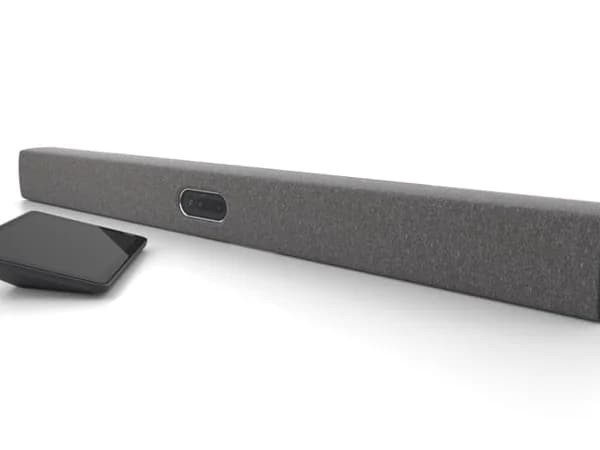
The X32 is physically the smallest device in Poly's X-series, designed to sit below a small display or mount on a wall in tight spaces. The compact footprint makes it suitable for phone booths, focus rooms, and huddle spaces where larger bars would dominate the room. Despite its size, the X32 still delivers Poly Lens cloud management, dual HDMI output for connecting up to two displays, and HDMI input for content sharing — the full feature set in a smaller package.
Pricing Analysis
At $2,099, the Poly Studio X32 is the most affordable integrated-compute video bar in this roundup. The most direct comparison is the Logitech Rally Bar Huddle at $1,899 — $200 less, but without integrated compute. The Huddle requires either its Android appliance mode (which is compute-integrated) or a connected PC for native room OS. For a fair comparison: the Rally Bar Huddle in appliance mode provides Zoom, Teams, and Meet support at $1,899, while the X32 provides Zoom and Teams support at $2,099. The $200 premium buys you Poly's NoiseBlockAI (demonstrably superior to Logitech's RightSound in noisy environments) and seamless integration with the broader Poly X-series fleet. The TC10 touch controller is sold separately at approximately $800-1,000, but many huddle room deployments forgo a dedicated controller and use the platform interface on the room display.
Who Is This For?
Poly Studio X32 works best for:
- Organizations deploying many huddle rooms (10+) that want zero-PC provisioning at scale — Poly Lens manages X32s alongside X52s and X72s in a unified fleet, with the same provisioning and monitoring workflows for every room size
- Noisy office environments where huddle rooms sit in open-plan spaces, along corridors, or behind glass walls — NoiseBlockAI and Acoustic Fence handle these challenging audio environments better than standard noise suppression
- Small Zoom or Teams rooms (2-8 people) where simplicity and reliability matter more than cutting-edge AI framing — the X32 works every time because there are fewer things that can fail
Who Should NOT Use This
Poly Studio X32 might not be the right choice if:
- You need Google Meet or multi-platform support — the X32 runs Zoom and Teams natively but doesn't support Google Meet without a separate compute module. The Logitech Rally Bar Huddle supports all three platforms in appliance mode, making it the better choice for multi-platform organizations.
- The room seats more than 8 people — the X32's single camera and audio reach are designed for small spaces. Medium rooms should step up to the X52 ($3,853) or a competitor like the Logitech Rally Bar Mini ($3,299).
Bottom Line
The Poly Studio X32 does one thing exceptionally well: it eliminates the room PC from small meeting spaces while delivering Poly's best-in-class noise cancellation. At $2,099 with integrated compute, it's actually cheaper than many solutions that require a separate computer when you factor in total deployment cost. The single-camera system doesn't win any innovation awards, but in huddle rooms, reliability and audio clarity matter more than AI framing sophistication. For Poly fleet deployments, it's the obvious small-room choice.
FAQ
How does the X32 compare to the Logitech Rally Bar Huddle?
Both target small rooms at similar price points. The X32 ($2,099) includes integrated Zoom/Teams compute and Poly's NoiseBlockAI. The Rally Bar Huddle ($1,899) costs $200 less, supports Google Meet natively, and runs on Logitech Sync. The X32 wins on audio quality in noisy environments; the Huddle wins on platform breadth and price. Choose based on your platform and fleet ecosystem.
Is the single camera a significant limitation?
Not for the rooms the X32 targets. In huddle rooms seating 2-8 people within roughly 12 feet of the camera, a single wide-angle sensor with digital zoom captures everyone effectively. The dual-camera advantage of the X52 and X72 becomes important in larger rooms where participants sit at greater distances.
Do I need the TC10 touch controller?
Not necessarily. Many huddle room deployments use the Zoom or Teams interface on the room display for meeting control, managed centrally through Poly Lens. The TC10 adds a convenient in-room touch interface for one-touch meeting join, but at $800-1,000, it nearly doubles the deployment cost. For cost-sensitive deployments, the display interface is perfectly functional.
Can the X32 handle rooms with a lot of background noise?
This is actually where the X32 shines. NoiseBlockAI specifically targets the non-speech sounds common in office environments — HVAC, keyboard noise, hallway conversations, door sounds — and Acoustic Fence creates a virtual boundary that attenuates sounds from outside the meeting space. In testing, Poly's audio intelligence handles open-plan and glass-walled huddle rooms better than competitors' standard noise cancellation.
Who Is Poly Studio X32 Best For?
Huddle rooms and small meeting spaces (2-8 people) that want Poly's integrated compute and AI features at a lower price
The Bottom Line
The Poly Studio X32 brings Poly's all-in-one approach to smaller rooms at a much more accessible price point. NoiseBlockAI and integrated Zoom/Teams compute are included, and Poly Lens management works identically to the larger models. The best entry point into Poly's ecosystem for smaller spaces.
Buy on AmazonKey Specs
Scoring Breakdown
Camera resolution, AI-powered auto-framing, speaker tracking accuracy, and field of view coverage
Microphone array quality, pickup range, noise cancellation, echo suppression, and built-in speaker clarity
Maximum room size support, participant capacity, zoom capabilities, and ability to capture all meeting participants
Native support for Zoom Rooms, Microsoft Teams Rooms, Google Meet, Webex, and BYOD/USB connectivity
Installation simplicity, IT remote management tools, firmware update process, and enterprise deployment features
Physical construction quality, aesthetics, mounting flexibility, form factor, and thermal management
Price-to-feature ratio, included accessories, warranty coverage, and total cost of ownership