
Neat Bar Pro Review
The Neat Bar Pro combines striking industrial design with powerful AI video capabilities. Neat Symmetry's multi-camera framing is among the best available, and Neat Pulse makes IT management straightforward. The limited platform support (Zoom/Teams only) is the main drawback for organizations using Google Meet or open SIP.

Neat Bar Pro Review
The Neat Bar Pro combines striking industrial design with powerful AI video capabilities. Neat Symmetry's multi-camera framing is among the best available, and Neat Pulse makes IT management straightforward. The limited platform support (Zoom/Teams only) is the main drawback for organizations using Google Meet or open SIP.
Neat Bar Pro Review
The Neat Bar Pro combines striking industrial design with powerful AI video capabilities. Neat Symmetry's multi-camera framing is among the best available, and Neat Pulse makes IT management straightforward. The limited platform support (Zoom/Teams only) is the main drawback for organizations using Google Meet or open SIP.

Neat Bar Pro Pros & Cons
Pros
- Three wide-angle cameras with Neat Symmetry for intelligent participant framing
- Stunning industrial design with premium materials and minimal footprint
- Neat Pulse cloud management for remote monitoring and updates
- Purpose-built for Zoom and Microsoft Teams with deep native integration
Cons
- Limited to Zoom and Teams — no open SIP or Google Meet support
- Premium pricing at $5,850 for the bar alone (Neat Pad controller sold separately)
- Older product (2022) though still actively supported with regular firmware updates
Overview
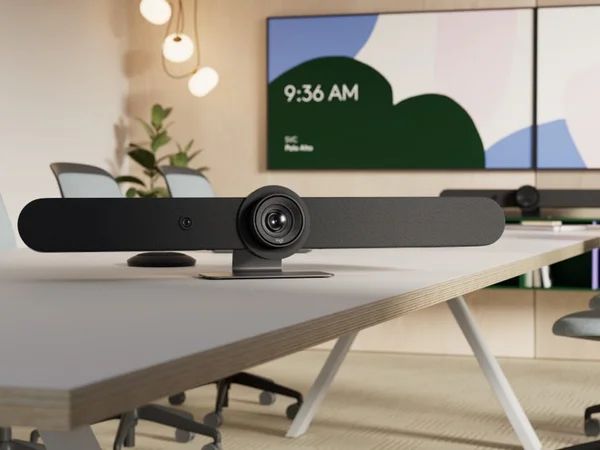
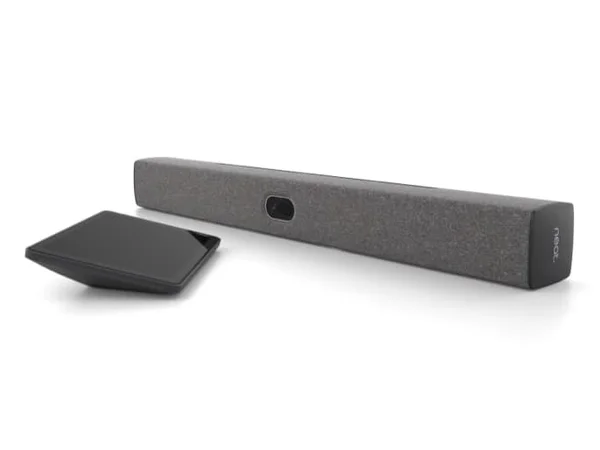
The Neat Bar Pro is what happens when a company designs a video bar for the people who actually sit in conference rooms, not just the IT team that installs them. Its industrial design — a Red Dot Award winner — is genuinely striking, a slim charcoal bar that disappears against a display rather than dominating the room. But beneath that aesthetic restraint is some of the most aggressive camera and audio engineering in this category.
The headline spec is the dual 50MP camera system with 16x hybrid zoom, backed by a depth sensor that gives Neat Symmetry's AI framing an almost three-dimensional understanding of the room. Where most auto-framing systems struggle with depth perception — zooming in on the front row while cropping out the back — Neat Symmetry individually frames each participant at equal visual size regardless of their distance from the camera. It's the closest any conference camera has come to making remote participants feel like they're in the room.
The 16-microphone pyramid array with 33-foot reach means the Bar Pro covers rooms that would require expansion microphones with any competitor. At $5,850, it's not cheap — but the combination of design, AI framing quality, and audio reach puts it in a class of its own for large Zoom and Teams rooms.
Features Deep-Dive
Neat Symmetry and Depth-Sensing AI
Neat Symmetry is the Bar Pro's killer feature. Using the dual 50MP cameras plus a dedicated depth sensor, the system builds a spatial map of the room and identifies each participant's position in three dimensions. Rather than applying a single crop to the group, Symmetry individually frames each person at equal close-up size — someone sitting 25 feet from the camera appears the same size as someone 8 feet away. This solves the single biggest complaint about conference room cameras: the person at the far end of the table becomes a tiny, unreadable face. The 16x hybrid zoom gives the system enormous flexibility to pull in distant participants without visible quality loss, and the 113° wide-angle lens ensures wall-to-wall coverage at close range.
16-Microphone Pyramid Array
Most conference room bars ship with 6-8 microphones. The Neat Bar Pro has 16, arranged in a pyramid configuration with 4 dedicated tracking microphones and 12 sensor microphones. This array enables true 3D beamforming — the system doesn't just determine which direction a voice is coming from, but its exact position in three-dimensional space. The practical result is a 33-foot (10-meter) pickup range that maintains voice clarity even at the extremes. Hardware-accelerated audio processing handles echo cancellation, noise suppression, automatic gain control, and dereverberation simultaneously without introducing latency. The Neat Audio engine specifically addresses double-talk scenarios where multiple people speak simultaneously — a common occurrence in conference rooms that trips up lesser systems.
Triple-Screen Support and Premium Audio
The Bar Pro is the only device in this roundup that supports three external displays via its three HDMI outputs. In practice, this means you can dedicate one screen to the video gallery, one to shared content, and one to the room controller interface — a configuration that's increasingly standard in executive meeting rooms. The speaker system is equally overbuilt: three full-range directional speakers, a subwoofer with dual opposing drivers for vibration cancellation, and two bass-reflex woofers. The opposing driver design is clever — it eliminates the physical buzzing that can occur when a subwoofer is mounted in a thin bar enclosure. Voice clarity on the output side matches the input quality, which matters when remote participants are presenting complex information.
Pricing Analysis
The Neat Bar Pro's $5,850 price tag is for the bar unit with an included Neat Pad controller — a meaningful distinction since competitors like Poly sell their touch controllers separately. Still, this positions the Bar Pro squarely in the premium tier, above the Logitech Rally Bar ($4,199 without controller) and below the Poly Studio X72 ($6,999 without controller). The value proposition hinges on two factors: the 33-foot microphone reach eliminates the need for expansion microphones that competitors require in large rooms ($200-400 each), and the Neat Symmetry framing quality is measurably superior to alternatives. For Zoom or Teams environments with large conference rooms, the Bar Pro can actually be more cost-effective than a cheaper bar plus expansion mics plus a room controller.
Who Is This For?
Neat Bar Pro works best for:
- Design-conscious organizations with modern conference rooms where a generic black video bar would clash with the aesthetic — the Red Dot Award-winning design genuinely blends into premium meeting spaces
- Large conference rooms (14-20 people) running Zoom or Teams where the 33-foot microphone reach and Neat Symmetry's depth-aware framing solve the "back of the room" problem without expansion microphones
- IT teams managing Zoom or Teams fleets that want Neat Pulse's straightforward cloud management and appreciate the included Neat Pad controller reducing per-room accessory costs
Who Should NOT Use This
Neat Bar Pro might not be the right choice if:
- You use Google Meet, Webex, or open SIP — the Bar Pro supports Zoom and Teams natively, with limited Google Meet support (triple-screen not available). Organizations needing broad platform flexibility should look at the Logitech Rally Bar, which natively supports Zoom, Teams, and Meet.
- You need the latest hardware — the Bar Pro launched in 2022 and hasn't received a hardware refresh. While firmware updates keep it current, organizations wanting the newest silicon and camera sensors may prefer the Neat Bar Gen 2 (2024) for smaller rooms or the Poly Studio X72 (2024) for large rooms.
Bottom Line
The Neat Bar Pro combines the best auto-framing technology in its class with a 16-microphone array that reaches further than any competitor. Its depth-sensing Neat Symmetry creates a genuinely more equitable meeting experience for remote participants. The platform limitation to Zoom and Teams is the only significant constraint — if your organization is committed to either platform, the Bar Pro delivers a combination of design, audio reach, and framing intelligence that nothing else matches.
FAQ
How does Neat Symmetry differ from other auto-framing systems?
Most auto-framing systems apply a single crop to the group — zooming into the area where people are sitting. Neat Symmetry uses a depth sensor to understand each participant's position in 3D space, then individually frames each person at equal visual size. Someone 25 feet from the camera appears the same size as someone 8 feet away, which is a meaningful improvement for meeting equity.
Does the Neat Bar Pro work with Google Meet?
It has limited Google Meet support — basic video and audio work, but the triple-screen configuration isn't available, and you don't get the same deep integration as with Zoom or Teams. If Google Meet is your primary platform, the Logitech Rally Bar is a better choice.
What's included in the box?
The $5,850 price includes the Bar Pro unit, a Neat Pad touch controller (8" display), HDMI and Ethernet cables, power supply, and multiple mounting options (wall mount, screen mount, table stand, VESA mount hardware). This is a more complete package than competitors that sell controllers separately.
Can I use the Neat Bar Pro without the Neat Pad controller?
Yes, the Bar Pro can be controlled through the Zoom or Teams room interface on a connected display, or managed remotely through Neat Pulse. The Neat Pad provides a convenient in-room touch interface for starting meetings and adjusting settings, but it isn't strictly required.
Who Is Neat Bar Pro Best For?
Large conference rooms (14-20 people) in Zoom or Teams environments that prioritize design and AI framing
The Bottom Line
The Neat Bar Pro combines striking industrial design with powerful AI video capabilities. Neat Symmetry's multi-camera framing is among the best available, and Neat Pulse makes IT management straightforward. The limited platform support (Zoom/Teams only) is the main drawback for organizations using Google Meet or open SIP.
Buy on AmazonKey Specs
Scoring Breakdown
Camera resolution, AI-powered auto-framing, speaker tracking accuracy, and field of view coverage
Microphone array quality, pickup range, noise cancellation, echo suppression, and built-in speaker clarity
Maximum room size support, participant capacity, zoom capabilities, and ability to capture all meeting participants
Native support for Zoom Rooms, Microsoft Teams Rooms, Google Meet, Webex, and BYOD/USB connectivity
Installation simplicity, IT remote management tools, firmware update process, and enterprise deployment features
Physical construction quality, aesthetics, mounting flexibility, form factor, and thermal management
Price-to-feature ratio, included accessories, warranty coverage, and total cost of ownership