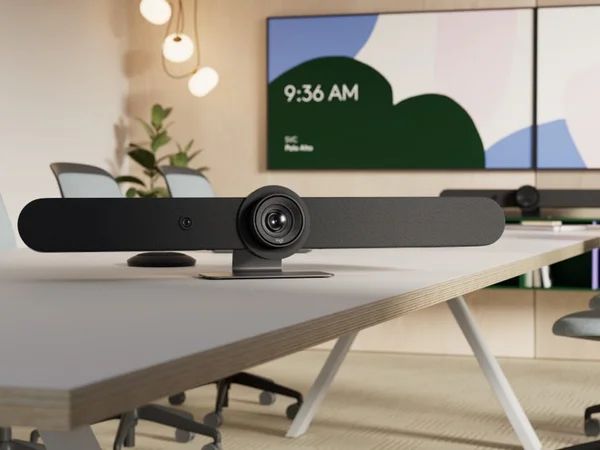

Logitech Rally Bar Review
The Logitech Rally Bar is the Swiss Army knife of conference room cameras. No other video bar matches its platform breadth — native Zoom, Teams, and Meet plus USB BYOD. Logitech Sync makes fleet management effortless. While the 2021 hardware is aging, continuous firmware updates keep it competitive. The go-to choice for multi-platform enterprises.

Logitech Rally Bar Review
The Logitech Rally Bar is the Swiss Army knife of conference room cameras. No other video bar matches its platform breadth — native Zoom, Teams, and Meet plus USB BYOD. Logitech Sync makes fleet management effortless. While the 2021 hardware is aging, continuous firmware updates keep it competitive. The go-to choice for multi-platform enterprises.
Logitech Rally Bar Review
The Logitech Rally Bar is the Swiss Army knife of conference room cameras. No other video bar matches its platform breadth — native Zoom, Teams, and Meet plus USB BYOD. Logitech Sync makes fleet management effortless. While the 2021 hardware is aging, continuous firmware updates keep it competitive. The go-to choice for multi-platform enterprises.

Logitech Rally Bar Pros & Cons
Pros
- Broadest platform support — native Zoom, Teams, Google Meet, and BYOD USB mode
- Logitech Sync cloud management is the industry gold standard for IT administration
- RightSight 2 AI auto-framing with group view and speaker tracking modes
- Proven reliability with massive enterprise install base since 2021
Cons
- Design is functional but not as striking as Neat or Poly competitors
- Released in 2021 — hardware is aging though firmware keeps it competitive
- AI framing occasionally struggles with participants at extreme angles
Overview
The Logitech Rally Bar is the safe choice — and that's not a backhanded compliment. No other conference room camera matches its breadth of platform support, management tooling, and enterprise install base. It runs Zoom Rooms, Microsoft Teams Rooms, and Google Meet natively, plus USB BYOD mode. Logitech Sync is the gold standard for fleet management. And with millions of units deployed globally since 2021, the Rally Bar has the kind of battle-tested reliability that IT procurement teams value above flashier specs.
The hardware itself remains surprisingly competitive despite its age. The 4K camera with 15X HD zoom (5X optical, 3X digital) and motorized pan/tilt covers a total area of 132° horizontal by 82° vertical. Six beamforming microphones pick up voices at 23 feet, expandable with Rally Mic Pods for larger spaces. RightSight 2's AI auto-framing handles group and speaker tracking well, though it lacks the depth-sensing sophistication of newer Neat Symmetry or Poly AI Director systems.
At $4,199, the Rally Bar occupies the premium tier without reaching into ultra-premium territory. For multi-platform enterprises that need a single video bar standard across rooms of different sizes (pair it with the Rally Bar Mini and Rally Bar Huddle), nothing else offers this level of ecosystem consistency.
Features Deep-Dive
RightSense AI Suite
The Rally Bar's intelligence comes from three complementary systems. RightSight 2 handles camera framing with two modes: Speaker View tracks the active speaker with smooth motorized pan/tilt, while Group View frames all detected participants. The newer Grid View goes further, detecting individual participants and framing each one separately for a gallery-style layout — Logitech's answer to Neat Symmetry, though without the depth sensor. RightLight analyzes the scene and adjusts exposure per-participant, compensating for backlighting from windows and rendering natural skin tones. RightSound uses AI to distinguish speech from ambient noise, auto-leveling voices so that the person furthest from the mic sounds as clear as the person sitting directly below it. Together, these systems deliver a polished, consistent meeting experience that handles most room conditions well.
Logitech Sync Fleet Management
For IT teams managing dozens or hundreds of rooms, Sync is the Rally Bar's strongest argument. The cloud-based platform provides real-time health monitoring, remote firmware updates, centralized settings configuration, and proactive diagnostics across every Logitech device in the organization. Unlike Neat Pulse (limited to Neat devices) or Poly Lens (limited to Poly devices), Sync manages the full Logitech ecosystem including Rally Bars, Rally Bar Minis, Rally Bar Huddles, Tap controllers, and peripheral cameras. The ability to standardize on a single management platform across all room sizes — from phone booths to boardrooms — is a significant operational advantage. Sync also integrates with Zoom, Teams, and Meet admin consoles, providing a unified view regardless of which platform each room runs.
Expandable Audio Architecture
The Rally Bar's 6-microphone array covers 23 feet natively, which handles most medium-to-large rooms. But its real audio flexibility comes from the expansion ecosystem: up to 4 Rally Mic Pods plus 2 Mic Pod Hubs can be daisy-chained to cover rooms of virtually any size. Each Mic Pod adds its own beamforming microphone array, extending coverage to L-shaped rooms, extra-large boardrooms, or training spaces that would overwhelm any single-bar solution. The Mic Pods connect via a proprietary cable, keeping the installation clean. The speaker output — two 70mm drivers at 8W with 99dB peak SPL — is adequate for medium rooms but may need supplemental audio in very large spaces.
Pricing Analysis
At $4,199, the Rally Bar sits in the middle of the premium tier — less than the Poly Studio X72 ($6,999) and Neat Bar Pro ($5,850), but more than the Jabra PanaCast 50 VBS ($3,499) and Yealink MeetingBar A40 ($2,699). Unlike the Poly X-series, the Rally Bar does not include integrated compute for native room OS — you'll either use its built-in Android appliance mode or connect an external PC for Windows-based Teams Rooms. A Logitech Tap controller adds $1,200-1,500 to the deployment. Where the Rally Bar excels in value is at fleet scale: the ability to standardize on Logitech Sync across Rally Bar, Rally Bar Mini, and Rally Bar Huddle creates operational savings that compound across large deployments. For organizations buying 20+ rooms, the ecosystem consistency often matters more than per-unit price.
Who Is This For?
Logitech Rally Bar works best for:
- Multi-platform IT environments that need native support for Zoom, Teams, and Google Meet across the same hardware — no other bar covers all three with equal depth of certification
- Large enterprise deployments standardizing on Logitech Sync for fleet management across rooms of varying sizes, pairing Rally Bar (large), Rally Bar Mini (medium), and Rally Bar Huddle (small) under one management umbrella
- Organizations with very large or irregularly shaped rooms that need the Rally Mic Pod expansion system to extend audio coverage beyond what any single bar can provide
Who Should NOT Use This
Logitech Rally Bar might not be the right choice if:
- You prioritize cutting-edge AI framing — the Rally Bar's RightSight 2 is capable but lacks the depth sensor of Neat's Symmetry or the dual-camera architecture of Poly's AI Director. For rooms where framing quality is the top priority, newer competitors deliver more sophisticated results.
- Industrial design matters to your organization — the Rally Bar is functional and well-built, but its 2021 design language is utilitarian compared to the Neat Bar Pro's Red Dot Award-winning aesthetics. In client-facing meeting rooms where appearance matters, the Rally Bar looks like equipment rather than furniture.
- You want integrated compute — unlike the Poly X-series, the Rally Bar requires either its Android appliance mode or an external computer. For organizations that want zero-PC deployment, the Poly Studio X72 or X52 are better options.
Bottom Line
The Logitech Rally Bar remains the most versatile conference room camera available. Its unmatched platform breadth, industry-leading fleet management, and expandable audio architecture make it the default choice for enterprise IT teams that need standardization across diverse room types. The 2021 hardware is aging, but continuous firmware updates and the RightSense AI suite keep it competitive. If your organization runs multiple video platforms or values operational consistency above bleeding-edge features, the Rally Bar is the answer.
FAQ
Is the Logitech Rally Bar still worth buying in 2026?
Yes. Despite 2021 hardware, Logitech's continuous firmware updates have added features like Grid View and improved RightSight framing. The platform breadth (Zoom, Teams, Meet) and Sync fleet management remain unmatched. That said, if you're deploying exclusively on Zoom or Teams and prioritize AI framing quality, newer options like the Neat Bar Gen 2 or Poly X-series offer more advanced camera technology.
Can the Rally Bar work without a separate computer?
Yes, the Rally Bar has a built-in Android appliance mode that runs Zoom Rooms, Teams Rooms, or Google Meet natively. You can also connect it via USB to a laptop for BYOD mode, or pair it with a Windows PC for Windows-based Teams Rooms. The appliance mode is the simplest deployment path for most organizations.
How far do the microphones reach, and can I extend coverage?
The built-in 6-microphone array covers up to 23 feet (7 meters). For larger rooms, you can add up to 4 Rally Mic Pods (plus 2 Mic Pod Hubs) that extend coverage virtually as far as you need. This makes the Rally Bar suitable for rooms of any size with the right expansion accessories.
What's the difference between Rally Bar, Rally Bar Mini, and Rally Bar Huddle?
All three share the same RightSense AI suite, Sync management, and platform support. The difference is room size: Rally Bar handles medium-to-large rooms (up to 23 ft native), Rally Bar Mini covers small-to-medium rooms in a more compact form factor, and Rally Bar Huddle is optimized for huddle spaces and phone booths. Using all three gives IT teams a single-vendor ecosystem for every room type.
Who Is Logitech Rally Bar Best For?
IT teams deploying across multiple platforms (Zoom, Teams, Meet) that need the best management tools and broadest compatibility
The Bottom Line
The Logitech Rally Bar is the Swiss Army knife of conference room cameras. No other video bar matches its platform breadth — native Zoom, Teams, and Meet plus USB BYOD. Logitech Sync makes fleet management effortless. While the 2021 hardware is aging, continuous firmware updates keep it competitive. The go-to choice for multi-platform enterprises.
Buy on AmazonKey Specs
Scoring Breakdown
Camera resolution, AI-powered auto-framing, speaker tracking accuracy, and field of view coverage
Microphone array quality, pickup range, noise cancellation, echo suppression, and built-in speaker clarity
Maximum room size support, participant capacity, zoom capabilities, and ability to capture all meeting participants
Native support for Zoom Rooms, Microsoft Teams Rooms, Google Meet, Webex, and BYOD/USB connectivity
Installation simplicity, IT remote management tools, firmware update process, and enterprise deployment features
Physical construction quality, aesthetics, mounting flexibility, form factor, and thermal management
Price-to-feature ratio, included accessories, warranty coverage, and total cost of ownership