
Logitech Rally Bar Huddle Review
The Logitech Rally Bar Huddle is the most accessible entry point into Logitech's enterprise ecosystem. Full Sync management, multi-platform support, and RightSight AI — all optimized for the smallest meeting spaces. For organizations deploying dozens of huddle rooms, the combination of price and manageability is compelling.

Logitech Rally Bar Huddle Review
The Logitech Rally Bar Huddle is the most accessible entry point into Logitech's enterprise ecosystem. Full Sync management, multi-platform support, and RightSight AI — all optimized for the smallest meeting spaces. For organizations deploying dozens of huddle rooms, the combination of price and manageability is compelling.
Logitech Rally Bar Huddle Review
The Logitech Rally Bar Huddle is the most accessible entry point into Logitech's enterprise ecosystem. Full Sync management, multi-platform support, and RightSight AI — all optimized for the smallest meeting spaces. For organizations deploying dozens of huddle rooms, the combination of price and manageability is compelling.

Logitech Rally Bar Huddle Pros & Cons
Pros
- Most affordable Rally Bar with full Logitech Sync fleet management
- Same multi-platform support — native Zoom, Teams, Meet, and USB BYOD
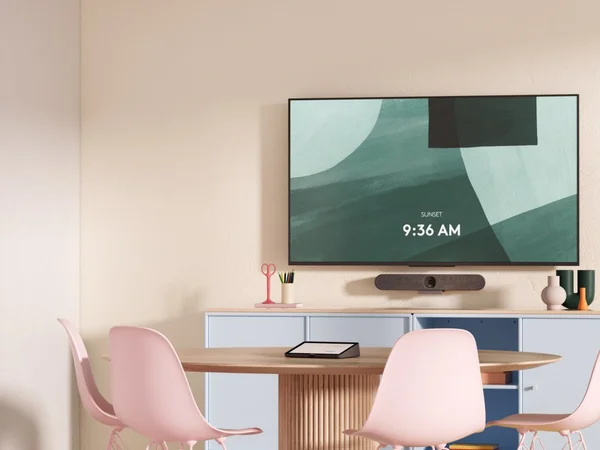
- Ultra-compact design fits below monitors or mounts on walls
- RightSight AI auto-framing optimized for small room dynamics
Cons
- Designed for 2-6 people only — very limited room coverage
- Audio pickup range is short — not suitable beyond huddle rooms
- Lower resolution camera than Rally Bar and Rally Bar Mini
Overview
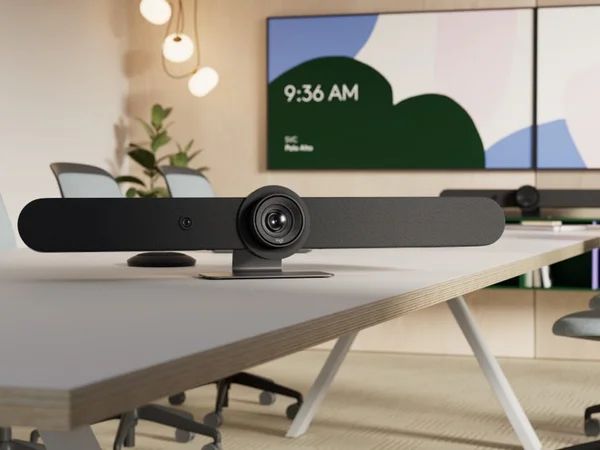
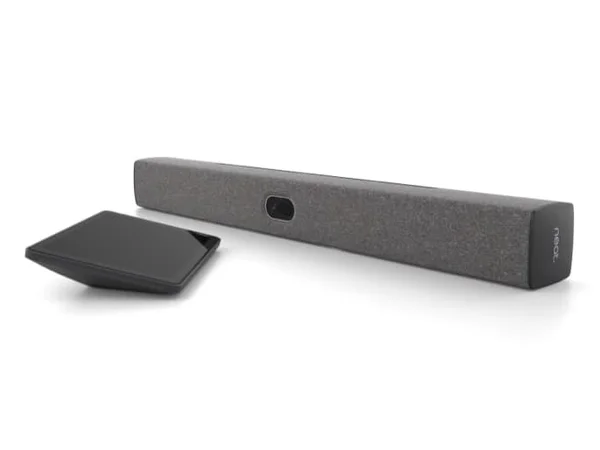
The Logitech Rally Bar Huddle is the most affordable entry into Logitech's enterprise conference room ecosystem, and for organizations deploying dozens of small meeting spaces, that matters enormously. At $1,899, it delivers the same Logitech Sync fleet management, the same multi-platform support (Zoom, Teams, Meet), and the same RightSight AI auto-framing as its Rally Bar and Rally Bar Mini siblings — all in a package compact enough to fit below a small monitor or mount on a narrow wall.
The Huddle isn't just a scaled-down Rally Bar Mini. The 4K camera with 120° diagonal field of view and 6 beamforming microphones with 23-foot pickup range are genuine enterprise specs, not budget compromises. Where the Huddle saves cost is in the speaker system (a single 2.2" driver versus the Mini's multi-driver setup) and some physical construction choices. For rooms designed for 2-6 people — phone booths, focus rooms, and huddle spaces — the audio output is perfectly adequate, and the microphone range actually exceeds what the room requires.
For IT teams that have deployed Rally Bars in boardrooms and Rally Bar Minis in medium rooms, the Huddle completes the lineup. Every room, from phone booth to boardroom, managed through a single Logitech Sync dashboard with consistent firmware updates and configuration deployment.
Features Deep-Dive
RightSight for Small Spaces
The Huddle's 120° diagonal field of view — the widest in the Rally family alongside the Mini — captures the full width of a small room from close range. This is by design: in huddle spaces, participants sit very close to the camera and spread wide relative to its position. RightSight AI uses this wide canvas to frame participants dynamically, zooming and panning digitally with up to 4x magnification. The virtual pan/tilt extends coverage to ±48° horizontally and ±32° vertically when zoomed, effectively covering a much wider area than the raw field of view suggests. For rooms with 2-6 people, this is more than sufficient. The motorized privacy shutter is a thoughtful addition for rooms where the camera should be visibly off when not in use.
Fleet-Scale Economics
The Huddle's real value proposition isn't per-unit — it's per-fleet. Consider an organization with 100 small meeting spaces across multiple offices. At $1,899 each, that's a $189,900 deployment managed through a single Logitech Sync dashboard. Firmware updates push to all 100 devices simultaneously. Room health monitoring catches issues before users report them. Settings changes propagate across the fleet in minutes. The alternative — 100 individual USB webcams, each requiring manual firmware updates and individual troubleshooting — quickly consumes more IT staff time than the Huddle premium costs. The Huddle even uses 42% post-consumer recycled plastic and includes a field-replaceable front cover for easy maintenance without swapping the entire unit.
Multi-Platform Consistency
Like all Rally Bar devices, the Huddle supports Zoom Rooms, Microsoft Teams Rooms, and Google Meet natively in appliance mode, plus USB BYOD mode for any platform. This is a differentiator against the Poly Studio X32 ($2,099), which only runs Zoom and Teams natively. For organizations where different floors, offices, or teams use different video platforms, the Huddle provides a single hardware standard that works everywhere. The 6 beamforming microphones with 23-foot pickup range and audio processing (AEC, VAD, AI noise suppression) are identical to the Rally Bar's specifications, ensuring consistent audio quality across the full Rally family regardless of room size.
Pricing Analysis
At $1,899, the Rally Bar Huddle is the least expensive device in this roundup. Its most direct competitor is the Poly Studio X32 at $2,099 — $200 more but with Poly's integrated compute and NoiseBlockAI. The Huddle counters with native Google Meet support and Logitech Sync fleet management. For single-room purchases, the decision is close — Poly's audio intelligence has a slight edge in noisy environments, while Logitech's platform breadth is broader. At fleet scale (20+ rooms), the Logitech ecosystem advantage compounds: Sync manages Huddles, Minis, and Rally Bars together, creating operational savings that justify the platform choice regardless of the per-unit comparison. The Meeting Owl 4+ ($1,999) is an alternative at a similar price, but it's a fundamentally different form factor — tabletop 360-degree versus wall-mounted bar.
Who Is This For?
Logitech Rally Bar Huddle works best for:
- Organizations deploying many huddle rooms and phone booths (10+) that want enterprise-grade fleet management without enterprise-grade per-room cost — Sync manages Huddles alongside Rally Bars and Minis from a single dashboard
- Multi-platform environments where different teams or offices use Zoom, Teams, or Google Meet — the Huddle supports all three natively in appliance mode, ensuring every small room works with every platform
- IT teams standardizing on the Logitech ecosystem that need a cost-effective option for their smallest meeting spaces while maintaining the same management tools and firmware update processes used for larger Rally Bar deployments
Who Should NOT Use This
Logitech Rally Bar Huddle might not be the right choice if:
- Audio quality in noisy environments is critical — the Huddle's single 2.2" speaker driver is adequate for small rooms but noticeably thinner than the Rally Bar Mini's multi-driver setup. In open-plan offices with significant background noise, the Poly Studio X32's NoiseBlockAI provides more aggressive noise cancellation.
- The room seats more than 6 people — the Huddle is explicitly designed for the smallest meeting spaces. Even with its 23-foot microphone range, the camera and speaker system are optimized for close-range interaction. For rooms seating 6-10, step up to the Rally Bar Mini.
Bottom Line
The Logitech Rally Bar Huddle is the smart choice for organizations that view conference rooms as a fleet management challenge rather than individual technology decisions. Its per-unit specs are solid, but its real advantage is completing the Logitech ecosystem: from phone booths (Huddle) through medium rooms (Mini) to boardrooms (Rally Bar), every space runs the same platform support, the same AI suite, and the same management tools. At $1,899, it's the most accessible path to enterprise-grade huddle room video conferencing.
FAQ
How does the Huddle compare to a good USB webcam?
The Huddle is in a different category. A USB webcam provides a camera and microphone for a single participant. The Huddle provides wide-angle 4K video with AI auto-framing for up to 6 participants, 23-foot microphone pickup, native room OS support (Zoom, Teams, Meet), and fleet management through Sync. For individual desks, a webcam suffices. For shared meeting spaces — even small ones — the Huddle provides a dramatically better experience.
Can I use the Huddle in USB BYOD mode?
Yes. The Huddle connects via USB-C to any laptop and functions as a standard camera/microphone/speaker, working with any video conferencing application. It also runs natively in appliance mode for Zoom, Teams, and Meet. This dual-mode capability makes it versatile for both dedicated rooms and shared spaces.
Is the single speaker adequate for small rooms?
For rooms designed for 2-6 people, the single 2.2" driver with bass reflex enclosure produces clear, intelligible audio at 83 dB SPL. It won't fill a medium conference room, but in the huddle spaces and phone booths the Huddle targets, it's sufficient. If you need more audio output, the Rally Bar Mini's multi-driver system is the next step up.
What's the field-replaceable front cover?
The Huddle's front panel can be removed and replaced without tools, allowing IT teams to swap damaged covers in the field rather than replacing the entire unit. It's a practical design choice for high-traffic spaces where physical wear is inevitable, and supports customization options for organizations that want branded or color-matched room equipment.
Who Is Logitech Rally Bar Huddle Best For?
Organizations standardizing on Logitech Sync that need an affordable video bar for huddle rooms and phone booths
The Bottom Line
The Logitech Rally Bar Huddle is the most accessible entry point into Logitech's enterprise ecosystem. Full Sync management, multi-platform support, and RightSight AI — all optimized for the smallest meeting spaces. For organizations deploying dozens of huddle rooms, the combination of price and manageability is compelling.
Buy on AmazonKey Specs
Scoring Breakdown
Camera resolution, AI-powered auto-framing, speaker tracking accuracy, and field of view coverage
Microphone array quality, pickup range, noise cancellation, echo suppression, and built-in speaker clarity
Maximum room size support, participant capacity, zoom capabilities, and ability to capture all meeting participants
Native support for Zoom Rooms, Microsoft Teams Rooms, Google Meet, Webex, and BYOD/USB connectivity
Installation simplicity, IT remote management tools, firmware update process, and enterprise deployment features
Physical construction quality, aesthetics, mounting flexibility, form factor, and thermal management
Price-to-feature ratio, included accessories, warranty coverage, and total cost of ownership