
Jabra PanaCast 50 VBS Review
The Jabra PanaCast 50 VBS stands out with its unique 180-degree panoramic view — no other video bar covers as wide a field. The Virtual Director AI creates polished, broadcast-style views that make remote participants feel more included. The triple-camera stitching is impressive but not seamless. Best for rooms where wall-to-wall coverage is essential.

Jabra PanaCast 50 VBS Review
The Jabra PanaCast 50 VBS stands out with its unique 180-degree panoramic view — no other video bar covers as wide a field. The Virtual Director AI creates polished, broadcast-style views that make remote participants feel more included. The triple-camera stitching is impressive but not seamless. Best for rooms where wall-to-wall coverage is essential.
Jabra PanaCast 50 VBS Review
The Jabra PanaCast 50 VBS stands out with its unique 180-degree panoramic view — no other video bar covers as wide a field. The Virtual Director AI creates polished, broadcast-style views that make remote participants feel more included. The triple-camera stitching is impressive but not seamless. Best for rooms where wall-to-wall coverage is essential.

Jabra PanaCast 50 VBS Pros & Cons
Pros
- 180-degree panoramic field of view using triple-camera stitching — widest coverage in class
- Virtual Director AI creates broadcast-style speaker-focused views automatically
- Intelligent Zoom dynamically adjusts framing based on participant positions
- Eight-microphone array with Jabra's proven noise cancellation technology
Cons
- Triple-camera stitching can produce visible seams in challenging lighting
- VBS compute module adds complexity and cost to installation
- Fan noise from VBS compute unit reported in some installations
Overview
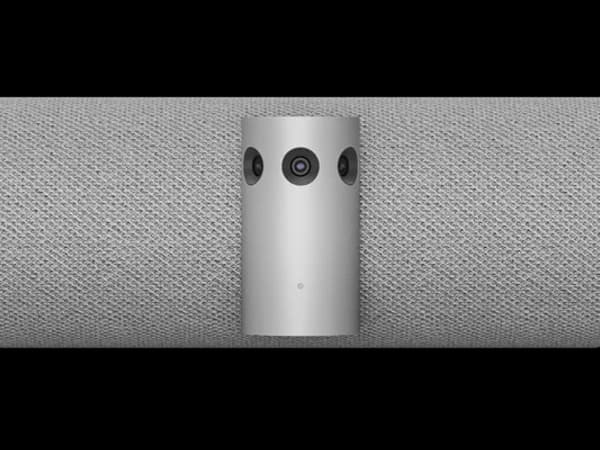
The Jabra PanaCast 50 VBS does something no other video bar in this roundup attempts: it shows the entire room wall-to-wall with a 180-degree panoramic field of view. Where every competitor captures a maximum of 120° (and most top out at 90°), the PanaCast 50 uses three 13-megapixel cameras with patented real-time AI stitching to create a seamless panoramic view that covers the full width of any conference room.
This isn't a gimmick — it solves a real problem. In many medium-sized rooms, the table is pushed against the wall directly below the display, putting participants at the extreme edges of a standard camera's field of view. The PanaCast 50's 180° coverage means you can literally push the table flush against the wall and still capture everyone. For L-shaped rooms, wide rooms, or rooms where the seating layout isn't a predictable rectangle, the panoramic advantage is genuine.
The VBS (Video Bar System) variant adds a dedicated compute module for native Zoom and Teams Rooms support, plus the Virtual Director AI that creates broadcast-style speaker tracking. At $3,499 for the bar alone (compute module extra), it's competitively priced — though the total deployment cost depends on your room configuration. The triple-camera stitching is occasionally visible in challenging lighting, but for rooms where coverage area matters more than pixel-perfect framing, the PanaCast 50 offers something nothing else can.
Features Deep-Dive
180-Degree Triple-Camera Panoramic System
The PanaCast 50's headline feature is its patented Panoramic-4K video created by stitching together feeds from three 13MP cameras in real time. The AI stitching algorithms work to create a seamless ultra-wide image, though in practice, the seams between cameras can become visible when lighting varies significantly across the room — a window on one side casting harsh light while the other side is in shadow, for example. In consistent lighting, the stitching is remarkably clean. The practical benefit is transformative for space-constrained rooms: instead of pushing the table back to fit within a 90° camera view, you can use the full room. For remote participants, seeing everyone simultaneously — including people sitting at the far edges of the table — creates a more inclusive meeting experience than any single-camera system can deliver.
Virtual Director and Intelligent Zoom
The Virtual Director AI analyzes the 180° field and creates focused, broadcast-style views of the active speaker. Rather than just cropping into the panoramic feed, Virtual Director combines speaker detection with Intelligent Zoom to produce a composed shot that feels deliberate rather than algorithmic. The system simultaneously shows a speaker close-up alongside the full room panoramic view, giving remote participants both context and focus. Intelligent Zoom also dynamically adjusts framing based on where participants are seated — if the room is half-empty, the camera tightens the frame rather than showing empty chairs. The Intelligent Meeting Space feature defines virtual boundaries for glass-walled rooms, preventing the camera from tracking people walking past in hallways.
Audio Architecture
The PanaCast 50's eight-microphone beamforming array provides voice pickup to 20 feet, with precision voice detection algorithms that maximize the signal-to-noise ratio. The four-speaker system (two 50mm woofers and two 20mm tweeters) is arranged in a zero-vibration stereo configuration that produces clear, room-filling sound without physical resonance. Full-duplex communication, echo cancellation, and noise suppression handle the audio processing. The 20-foot pickup range is adequate for medium rooms (certified for spaces up to 4.5m x 6m) but falls short of the Logitech Rally Bar's 23 feet or the Neat Bar Pro's 33 feet. There's no expansion microphone ecosystem, so the built-in array is what you get.
Pricing Analysis
The PanaCast 50 VBS bar is priced at $3,499, making it one of the more affordable premium options. However, the "VBS" designation means it's designed to work with Jabra's compute module for native Zoom/Teams Rooms — adding that module pushes the total system cost higher. In USB BYOD mode, the bar works standalone with any platform. The value proposition centers entirely on the 180° field of view: if your rooms need wall-to-wall coverage, no other device delivers it, making the PanaCast 50 effectively priceless for those use cases. If your rooms are standard rectangular layouts where a 90-120° camera would suffice, the premium for panoramic coverage is harder to justify, and the Logitech Rally Bar or Poly X52 may deliver better per-dollar value with superior framing quality within their narrower field of view.
Who Is This For?
Jabra PanaCast 50 VBS works best for:
- Wide, L-shaped, or non-rectangular meeting rooms where a standard 90-120° camera cannot capture all participants — the 180° panoramic view is the only solution that covers wall-to-wall without extreme fisheye distortion
- Space-constrained rooms where the table is pushed against the wall beneath the display, putting edge participants outside the view of conventional cameras
- Organizations that prioritize meeting inclusivity for remote participants — seeing every in-room participant simultaneously, rather than relying on speaker tracking to show one person at a time, creates a more equitable hybrid experience
Who Should NOT Use This
Jabra PanaCast 50 VBS might not be the right choice if:
- Individual framing quality is your priority — the triple-camera stitching produces a panoramic view, but individual participant close-ups from a stitched 13MP feed don't match the resolution of Poly's 20MP telephoto or Neat's 50MP zoom crops. For speaker-focused video quality, single-point-of-view cameras produce sharper results.
- Your rooms are deeper than 20 feet — the 8-microphone array picks up voices to 20 feet without an expansion option. Larger rooms will experience audio dropoff at the far end, where the Logitech Rally Bar's Mic Pod expansion system handles the distance better.
- You need Google Meet native support — the VBS compute module supports Zoom and Teams Rooms. Google Meet works in USB BYOD mode but doesn't get native room integration.
Bottom Line
The Jabra PanaCast 50 VBS occupies a unique niche: it's the only conference room camera that genuinely covers an entire room wall-to-wall. For wide rooms, L-shaped rooms, or any space where participants sit outside a conventional camera's field of view, the 180° panoramic system solves a problem that no amount of pan/tilt/zoom can fix. The triple-camera stitching isn't seamless in all conditions, and the individual framing quality trails dedicated telephoto systems, but for room coverage, nothing else comes close.
FAQ
Are the camera stitching seams visible during meetings?
In consistent, even lighting, the stitching is remarkably seamless. The seams become most noticeable when lighting varies dramatically across the room — for example, a bright window on one side with artificial light on the other. Overhead fluorescent lighting (the most common conference room setup) produces the cleanest results.
What's the difference between PanaCast 50 and PanaCast 50 VBS?
The standard PanaCast 50 is a USB-only device that connects to a room computer. The VBS (Video Bar System) variant is designed to pair with Jabra's dedicated compute module for native Zoom Rooms and Teams Rooms operation. The VBS bar can still operate in USB mode, but the compute integration is the key differentiator.
How does the 180° view appear to remote participants?
Remote participants see either a wide panoramic view of the entire room or a composed Virtual Director view that shows a close-up of the active speaker alongside the full room context. The panoramic view is genuinely useful for reading body language and visual cues from participants at the edges of the table who would be invisible on a standard camera.
Can I add expansion microphones?
No. Unlike the Logitech Rally Bar's Mic Pod system, the PanaCast 50 relies solely on its built-in 8-microphone array with a 20-foot pickup range. This is sufficient for rooms up to approximately 4.5m x 6m (15 x 20 feet), but larger spaces would benefit from a device with expandable audio coverage.
Who Is Jabra PanaCast 50 VBS Best For?
Wide or L-shaped meeting rooms that need 180-degree coverage with AI-powered speaker tracking
The Bottom Line
The Jabra PanaCast 50 VBS stands out with its unique 180-degree panoramic view — no other video bar covers as wide a field. The Virtual Director AI creates polished, broadcast-style views that make remote participants feel more included. The triple-camera stitching is impressive but not seamless. Best for rooms where wall-to-wall coverage is essential.
Buy on AmazonKey Specs
Scoring Breakdown
Camera resolution, AI-powered auto-framing, speaker tracking accuracy, and field of view coverage
Microphone array quality, pickup range, noise cancellation, echo suppression, and built-in speaker clarity
Maximum room size support, participant capacity, zoom capabilities, and ability to capture all meeting participants
Native support for Zoom Rooms, Microsoft Teams Rooms, Google Meet, Webex, and BYOD/USB connectivity
Installation simplicity, IT remote management tools, firmware update process, and enterprise deployment features
Physical construction quality, aesthetics, mounting flexibility, form factor, and thermal management
Price-to-feature ratio, included accessories, warranty coverage, and total cost of ownership